Liam Proven wrote:
> Hey, John, welcome! Have you just joined or been here lurking all along?
Just joined.
> In CP/M, isn't the BIOS just a file on disk anyway?
It is, but adding functionality to it without the loadable driver
facility would be nowhere near as straightforward. You'd need to work
out how to allocate memory to your additional feature, how to hook it
into the various BIOS data structures, and then how to get the .EMS
self-unpacker to relocate it to the right place. And since it would be
infringement of copyright to distribute the patched file, you'd have to
distribute a program that did that patching.
Chuck Guzis wrote:
> Suppose I wanted to use 1.44M 3.5" floppies. The hardware (with a
> bit of tweaking) is capable of it. No way to get to the boot
> software, however. Suppose I wanted to boot from a home-built CF
> card...
In theory you could replace the boot ROM (desolder the 8041, read its
contents, and burn an 8741 with the new boot image. Or even an 8742, if
you wanted more than 256 bytes of boot program). In the 9512 it would be
even easier, because the corresponding microcontroller used an external ROM.
It was also possible for peripherals plugged into the expansion port to
provide their own boot ROMs; Cirtech's external hard drives did so, for
example, and they advertised a similar device that booted from flash.
--
John Elliott
Spammer!
Does anyone trim the list?
On 08/23/2012 04:39 AM, dennis.yurichev at gmail.com wrote:
> Hi!
>
> Your email was taken from classiccmp/cctalk mailing list.
> (So it's kind of SPAM).
> I'm writing you because I'm looking for job and you'll see now why I do it in that way.
> I'm good on reverse engineering of ancient software like those for MS-DOS, ancient Unices and/or for exotic platforms.
> I'm
[snip]
> >> I'd love to find one of those add-on boards that would allow IDE or
> >> CF to be used - the HD in my 10 isn't going to last forever. :(
> >
> > GIDE works in the Kaypros I think.
> >
> Is anyone selling them?
>
[snip]
Hi
The GIDE is a neat circuit but finding one is difficult. They are long out
of production and are hard to replicate since it uses GALs. At least the
equations for the GALs are known. It also uses obscure obsolete RTC chip
that is hard to find.
How about instead of just replicating the GIDE convert the XT-IDE V2
circuitry to use a Z80 socket rather than an 8 bit ISA slot.
The XT-IDE V2 provides a 16 bit IDE interface, an optional boot ROM, and an
optional UART for remote booting capability. All of those would be useful
things on Kaypro or any other Z80 computer. It would use the same "shim
socket" approach as the GIDE and would be easy for anyone to use and/or
replicate.
Thanks and have a nice day!
Andrew Lynch
I'm a bit surprised that there hasn't been more discussion about S-100
machines. In particular I would point out the Morrow Decision 1. It's
DJ-DMA floppy controller could handle 8" SSSD thru DSDD, and both
soft-sectored and hard-sectored (NorthStar) 5.25" formats and a separate
hard drive controller was also available of course. Later variations even
had a switching power supply.
Not strictly a CP/M machine (though probably 90+% used CP/M or variation
thereof) and CP/M came standard with the machine. Morrow even provided a
UNIX-like OS, the name of which escapes me at the moment (Micronix maybe?).
With the addition of an 8086 S-100 board it would certainly run a plain
vanilla CP/M-86 system.
Other S-100 systems like CompuPro and Cromemco and even NorthStar were all
versatile and well-built CP/M machines which could aspire to be called 'the
best CP/M machine ever.' In general I would even proclaim the category of
S-100 micros as the holder of that title.
Bob Stek
Saver of Lost Sols
> Personally, I'm partial to the Amstrad PCW line.While it was marketed
> as a dedicated word processor in much of the world, it had gobs of RAM
> (at least 256KB), high-resolution monochrome graphics (720x256) and
> shipped with a very nice CP/M Plus implementation which included a
> better-than-average BASIC as well as DRI LOGO and the GSX graphics
> libraries. The non-standard 3 inch floppies are a bit of a drag, but
> it was fairly easy to add 3.5 inch drives and even hard drives were
> available.
Second-generation PCWs corrected that; they had 3.5" drives. And later
iterations of the BIOS supported loadable device drivers, with all sorts of
possibilities for mischief.
--
John Elliott
I haven't yet tried it but at tapeheads.net you can learn about the use of
a 50-50 mixture of Nu-Finish car polish and naptha as a treatment for
flaking/shedding reel-to-reel tape. (Honest)
>
>
>[Snip]
>Sorry if it was offensive!
>And thanks in advance for your attention.
>
And as some of you have stated, the market these days is MUCH
more difficult than it was a few years ago.
I have been waiting to observe if anyone else mentioned the
following two points:
When you consider that probably every other response has used
more bytes than the original request (including this one - and there
have been at least 20), it certainly seems reasonable to have sent
the request.
In addition, no links were activated when the body of the e-mail
was displayed. On the rare occasions I receive spam these
days, most of the time a link attempts to activate itself - which
is almost always impossible since I try to remember to disconnect
the cable to the router before I start to read any e-mail. If such
a link had been included, that would have been unacceptable!!!!!
Jerome Fine
Has anyone had any success at all recently in recovering data from
Wabash-branded floppies?
I haven't. The binder on these things has gone to Hades and the
oxide will flake off if you so much as touch it with a drive.
Yesterday, I thought I'd try again after swearing off of the things,
as the disks in question were 10-sector rather than soft-sector. I
wondered if 10-sector being rarer than the soft-sector variety might
not be different.
No soap. That grinding sound, accompanied by dirty heads tells me
that *no* Wabash disk is worth touching.
Anyone got any secrets for these?
Cheers,
--Chuck
Hi Rich! Thanks! I really appreciate the support! Here is a little
background information in case anyone was wondering about building your own
home brew CP/M computer.
At the N8VEM home brew computer project there are several boards to assemble
your own home brew CP/M computer.
The original is the SBC V2 which is a Z80 based Eurocard system. It can be
stand alone or act as an ECB bus controller for IO expansion.
Next is the Zeta which is an SBC without bus expansion but several built in
peripherals such as a floppy drive controller, IDE, serial, RTC, etc.
Finally there is the N8 which is a Z8S180 based all-in-one computer with
complete IO suite (FDC, IDE, serial, parallel, video, audio, etc). It is a
bit like the P112 with built in video, sound, and some other peripherals
along with hobbyist friendly components.
All of the N8VEM CP/M computers share a common ROM BIOS (RomWBW) or you can
use your own or someone else's custom BIOS (MSX CBIOS).
What is really neat is a sizable robust community has grown up around the
N8VEM computers and builders are even making their own systems (like the
Zeta) for the group. We don't always agree on things but manage to get
along pretty well. There are many points of view and not everyone sees
things the same way. That's OK -- its healthy.
There is also a fairly complete suite (25+ types) of S-100 boards with
backplanes, serial IO, drive controllers, video controllers, RAM boards, CPU
boards, etc. Really too many to mention here.
All the hardware and software design information is free (as in speech and
beer) and publicly posted.
There is a mailing list and wiki available for information and support if
you want it. You are free to use what's there even if you never participate
in the N8VEM home brew computer project. Several other projects have
branched off N8VEM and are now making their own CP/M computers, S-100
boards, etc.
http://groups.google.com/group/n8vemhttp://n8vem-sbc.pbworks.com
Most boards have parts lists in addition to full schematic and PCB layout.
Complete KiCAD EDA files with custom libraries are included as well as full
source code listings, tools, etc.
I try to emphasize the use of free/open source tool sets so literally
*anyone* can build their own systems including making their own home made
PCBs. The PCBs are available through group buys which is a sort of informal
process. I try to keep the cost as low as possible and it more or less
works.
Active community participation is encouraged and expected but not required
since everyone is a *builder*. There are no bosses, management, users,
stockholders, clients, or customers!
So if you have the inclination or ever desired to build your own home brew
computer this is your chance. It is pretty easy to do and a lot of fun!
Please consider this your personal invitation to come to the N8VEM home brew
computer project. You are all most certainly welcome!
Thanks and have a nice day!
Andrew Lynch
PS, if you have questions feel free to contact me at LYNCHAJ at YAHOO.COM
> -----Original Message-----
> From: cctalk-bounces at classiccmp.org [mailto:cctalk-
> bounces at classiccmp.org] On Behalf Of Rich Cini
> Sent: Thursday, August 23, 2012 9:19 AM
> To: General Discussion: On-Topic and Off-Topic Posts
> Subject: Re: The best CP/M machine ever? was Re: Kaypro II
>
> Do you mean hobbyist or COTS? There are several hobby SBCs that can do it,
> including the P112 and N8VEM. There are 68k and 8086 boards as well.
>
>
>
> Rich Cini
> Sent from my iPhone
>
>
> On Aug 23, 2012, at 8:56 AM, microcode at zoho.com wrote:
>
> > Are there any modern ready-to-go SBCs capable of running CP/M?
> >
> >
I could not help but become part of the conversation even if people have
already written more 'diligent and competent than me.
My site is http://elazzerini.interfree.it
Originally my disposal clone a Ferguson Bigboard I that I was able to start
charging even CP / M 2.2 to 3.5" diskettes.
Obviously I could not help but come into possession of his descendants: the
Xerox 820-I and the Kaypro-II whose reviews I entered the site and are still
working.
The only board xerox 820-I has been assembled by me in a PC case for making
all the corrections have composite video, and use PS2 interface-parallel
drive with 3.5 ".
The Kaypro II was full of his case but with a full size 5.25" drive out of
service and when buying a separate drive full size 5.25 " is fully
operational.
I'm happy to have just these two machines, but fully functional. I could not
afford them to buy them with the original prices of the 80's.
To assess the selling rate of your Kaypro-II if the goal is to gain much
more money I suggest whether it is fully functional and free of scratches,
it is best to sell it to pieces, only one drive fullsize 5.25 " fully
functional sold separately makes it almost more 'all over the computer
alone.
Probably be able to sell the first pair of drive 5.25 ", then the mainboard
and then the keyboard or the power supply while you remain the case and the
monitor.
I do not think could you sell it in bulk to achieve a fair return if the
product Kaypro-II at that time very popular. At least every three days you
find it for sale on epay.
I am currently looking for other boards like the Ferguson Bigboard II or the
Ampro Little Board based on the Z80 or Z80 based mainboard in general other.
Greetings
Enrico - Pisa (Italy)
>Message: 20
>Date: Thu, 23 Aug 2012 15:31:40 -0400
>From: Allison < ajp166 at verizon.net > >
>
>On 08/23/2012 01:06 PM, Fred Cisin wrote:
<snip>
>> Why didn't the Otrona catch on?
>> Charlie Chaplin [clone] carrying a table with computer down stairs wasn't
>> enough?
>>
>Osborne was first, smaller and had a 5" screen.
>
>Kaypro was later, had better screen, keyboard, more IO, and generally
>better.
>I'd agree the Darth Vader lunch box look as less than kool but it was
>durable.
>
>Allison
Regarding why the Otrona did not catch on (other than in some circles, such as the JPL):
1. Price. Much more expensive than either the Osborne or Kaypro. I think I paid over $3500 for my 8:16, with a substantial educational discount.
2. Screen size: 5".
3. Late arrival. The O1 and Kaypro were already established. I saw my first Otrona at a Chicago FOG meeting.
I heard the Osborne described as a Buick, the Kaypro as a Chevrolet and the Otrona as a BMW.
BTW, I still have my 8:16, which I had aftermarket upgraded to 512KB RAM .
Bob
Check out the photos:
https://picasaweb.google.com/NeXTprototype/Sun1Computer?authkey=Gv1sRgCIbH_…
Still need a way to get the Sun Series 2 Keyboard and Mouse working on
the Sun 100u. Is my best bet trying to connect it to the SUN2 CPU
series conectors, or the bwtwo prime mono video board serial
connectors? Anyone have pinouts for the keyboard?
Thanks a million!
Nick
I have a HP 9000/300 68000 with an extra processor card.
I was surprised when I pulled the processor card from the machine and
discovered a 68030 CPU.
I was shocked I didn't remember that card.
Looking for software, I checked bitsavers, but only located a Pascal
compiler.
Does this machine have any interesting (O/S) software freely available?
Are their any list members playing with this machine?
Is it possible to boot from the GPIB?
I'm behind a dial-up wall and I was hoping to save some bandwidth before
downloading the manuals.
Thanks,
- Jim.
The Atlanta Historical Computing Society has decided to host the first
ever Vintage Computer Festival Southeast. It is tentatively scheduled for
Saturday, February 9th, from 10 AM - 7 PM. We're also planning a Friday
night dinner / hang-out, plus an after-show / cleanup dinner too.
Lonnie Mimms, a local commercial property manager (and owner of perhaps
the single largest personal computer collection in the SE) has agreed to
furnish us a venue! Hopefully, he will also setup some computers for
display and give at least one tour of his collection. There are lots of
details to work out and we're just getting started.
In any case, I'm excited and I wanted to start spreading the word. This
will be great!
Best,
David Greelish, Computer Historian
- Author, "The Complete Historically Brewed"
- Founder, Atlanta Historical Computing Society
- "Classic Computing Show" podcast
- "Stan Veit's History of the Personal Computer" audiobook podcast
- "Retro Computing Roundtable" podcast
ClassicComputing.com | atlhcs.org
At 0:06 -0500 8/15/12, Chuck wrote:
>So, does anyone know of any publicly-owned hearing aid manufacturers?
>Looks like a growth industry...
>
>--Chuck
>(with some ringing in his ears)
Unpopular suggestion of the day:
http://en.wikipedia.org/wiki/Tinnitus
Avoidance of caffeine, nicotine, or salt can reduce symptoms,
Anecdotally, it works for me (and I'm cutting out caffeine most days)
and for a friend of mine (who cut out complaining about his "horrible
Tinnitus" once I told him the cure (but only after verifying it via a
3-day coffee detox period)).
Usually at this point I would say "hope this helps" but in this case ... ?
--
- Mark 210-379-4635
-----------------------------------------------------------------------
Large Asteroids headed toward planets
inhabited by beings that don't have
technology adequate to stop them:
Think of it as Evolution in Fast-Forward.
Anyone out there have any expertise/experience with Helios on PC
hardware? I've got a fairly small Transputer setup going; it's a
standard PC + an ISA TRAM motherboard holding 10 1mb TRAMs. (I also
have a 4mb TRAM coming in the mail, I'm so excited...) The PC's running
DOS + Win98 at the moment and I've been playing around with Helios.
Thus far I've been using the DOS I/O "server" executable to run Helios
but I'd like to do something graphical with it (fractals of course, what
else do you do with 10 transputers?). I have a Windows-based server
(winsrvr3, v3.201) but I have no idea what its capabilities are or how
to use them (graphics in particular). I've been unable to find any
useful documentation for this server.
Any tips here?
Thanks!
Josh
> There's a lot to that report. It is also only dealing with semiconductor devices. While semiconductors are a crucial component, they are not the only one.
Yes, but it is basically the first thing I found (and being tired
after going to the Kagan memorial, I was not about to make a big
project about it). The point is that Ian wanted a citation, so I gave
him one, in less than a minute's worth of Google.
There are similar studies on other components and materials,
certainly. Even the paint industry has its own bushel of studies about
paint aging. I will leave the discovery of those to you guys.
> The problem is that none of these documents are studies on conservation. The way I see it, this is still in its larval form. Only 70 years ago these machines hadn't even been invented yet, that is within the life span of quite a few people who are still around. We just don't know how best to preserve a computer. The world needs data.
Very, true, but we can make some very good guesses on how to preserve
these machines. At least with the modern materials found in computers
- materials that "normal" museums do not have to deal with -
conservators can look to the bushels of engineering reliability
studies, like that Panasonic one I pointed out, for some guidance. It
is not shooting in the dark.
> The only way to get data is to do our best, and try different strategies. There are many very clever people on this list and elsewhere. With enough effort, anything can be made and replaced. It's going to be a crapshoot either way until we've had more experience with this stuff.
Yes, we need more data on this. But, one way to certainly taint that
data is to keep using the materials (keep running the machines).
> It's not necessary to convey the experience exactly. But an approximation can give people the feel of what it was like.
Yes, and this is why simulations and living museums, like the Living
Computer Museum, are good as well. For the time being, until we can
have our perfect virtual reality simulators, having a running machine
in a raised floor room is the best we can do, but it uses the artifact
and changes what it is (I am not sure I want to get into a "historic
fabric" fight with anyone at this point). Those changes can not be
reversed, no matter what anyone says.
This is why it is good to have machines that are in museums, preserved
and not run at all. Everyone, please do not hate on the museums that
preserve the machines by not running them - they have a point for
doing so.
--
Will
Picked up my first additions in some time today. Three new systems plus two
packed boxes of software, documentation, books and magazines. All from the same
original owner. Feel like a kid on Christmas morning. Going to take some time
to document and record what all is in this collection but the three systems are:
Compucolor II
Osborne 1
Sharp PC-4501
So much stuff, so little time. Alas now I have to leave it at home and go into
work.
David Williams
http://www.trailingedge.com
Could the chap who wanted scehamtics, etc for the HHC please get in touch
with me. It turns out it's been scanned and can be quite easily sent to
you. I've lost your address...
-tony
Hello,
I came across this thread
(http://www.classiccmp.org/pipermail/cctech/2006-May/020758.html) as I was
searching for the subjected Heurikon VME modules. Do you still have the
boards that you mentioned you had? If so, are you interested in making them
available for sale? I am looking to purchase a total quantity of 3 boards
(HK68/V4F) in working conditions with a 90-day warranty.
Thank you for reviewing my inquiry. I look forward to hearing from you
soon.
Best Regards,
Winnie Hsiung
CentraTech Corporation
Thanks everyone (especially Bear) for the wonderful help in reviving my
Sun 1 Computer (100u to be exact).
After extensive CRT repairs, a EPROM reprogram (from Rev N to V100), my
Sun is now booting via the Sun2 CPU card and the bwone video board.
Will upload screenshots tomorrow!
Next step is to acquire a keyboard and mouse. Anyone have a series 1
Parallel Keyboard and mouse? Or have any ideas on what type of keyboard
or mouse would be compatible (if I was able to rewire to DB25). It
appears to be a serial protocol, are the old RJ45 keyboards of the same
format? Other ideas?
Thanks a million, you are the best!
-Nick
Message: 18
Date: Fri, 17 Aug 2012 22:01:09 -0400
From: Paul Anderson <wackyvorlon at me.com>
To: "General Discussion: On-Topic and Off-Topic Posts"
<cctalk at classiccmp.org>
Subject: Re: Can a Selectric from 1961 converted in one Terminal
Typewriter
Message-ID: <60923E11-6481-4A2C-91FA-FCCFDAF18AA0 at me.com>
Content-Type: text/plain; CHARSET=US-ASCII
I'd keep it as a typewriter. They're great machines.
Seconded. The Selectric (Correcting Selectric II) is my favorite typewriter. A bit too heavy to be considered
portable, but solid and great feel.
You'd need to recreate all of the drive and decode mechanism - it wouldn't be worth it unless you were
very interested in recreating a Selectric Terminal Typewriter rather than just having a printing terminal.
I'm still searching for a pdp-11/70 front panel bezel. Does anyone have a
spare? Does anyone know what the part number is for this thing? That
would be very helpful.
--
David Griffith
dgriffi at cs.csubak.edu
A: Because it fouls the order in which people normally read text.
Q: Why is top-posting such a bad thing?
A: Top-posting.
Q: What is the most annoying thing in e-mail?
Hi. I've reviewed one VT220, one DEC Letterwriter and my PDP8-E. Status:
- VT220 terminal - dead (in appeareance, the tube).
- Letterwriter: PS or/and some circuitry,
- PDP-8E: working. I should like to get one Teletype for it.
If someone has some ot these items to get rid or trade, let me know
off-list. Destination, south of Europe (Spain).
Regards
Sergio
Looks like the 50pin connection (J1) on the SUN2 CPU has 2 serial
ports, found a pinout:
The two serial ports on J1 are usually labelled SIO-A and SIO-B
on the back of the machine and appear as /dev/ttya and /dev/ttyb
under SunOS. The documented maximum output speed is 19200 bps.
All ports are wired DTE and are compatible with both RS-232C and
RS-423, using Zilog Z8530A dual UART chips. The pinout of J1 is:
3 TxD-A 14 DTR-A 33 DD-B
4 DB-A 15 DCD-A 34 CTS-B
5 RxD-A 22 DA-A 36 DSR-B
7 RTS-A 24 BSY-A 38 GND-B
8 DD-A 28 TxD-B 39 DTR-B
9 CTS-A 29 DB-B 40 DCD-B
11 DSR-A 30 RxD-B 47 DA-B
13 GND-A 32 RTS-B 49 BSY-B
Is the Sun 2 Keyboard a serial keyboard? If not, any ideas on where to
get a serial keyboard.
Thanks everyone!
-Nick
This little device seems to be the cheapest FTDI-based USB-serial
adapter I could find. Not sure what level converter chip it uses since
I haven't torn it down, but it seems to work with everything I've used
it with so far.
http://www.amazon.com/gp/product/B003TYCHIC/ref=cm_cr_rev_prod_title
--Dave
Guys,
We have decided that the 7090 artifacts should go to the National Museum of Computing at Bletchley Park, England.
Partly for patriotic reasons: the use the computer was put to in the UK. Also, we decided it is what the owner, a British pioneer of medical computing, would have wanted. Lastly, TNMOC assured me that they would be prepared to make copies availble of anything requested by outside museums and collectors. The items should be with them by the start of October 2012.
It was good to discover that two complete 7090s with support documentation is available in the US and Australia. That also weighed on the decision. I do hope they will one day be reactivated, when I will be delighted to come and have a look around!
Kind regards,
peter vp
|| | | | | | | | |
Peter Van Peborgh
62 St Mary's Rise
Writhlington Radstock
Somerset BA3 3PD
UK
01761 439 234
|| | | | | | | | |
Hello.
I have a Telenex Interview 8200.
After the self tests, it asks for the system disk and then to press any key. There is hard drive activity, but it seems that the system software is not present.
Is it possible to obtain the software for this unit?
Thank you.
Dan.
[Forwarded by lawrence at ljw.me.uk]
From: Tothwolf <tothwolf at concentric.net>
To: General Discussion: On-Topic and Off-Topic Posts
<cctalk at classiccmp.org>
Subject: Re: Apple 1 insanity continues
Date: Wed, 8 Aug 2012 17:37:48 -0500 (CDT)
[3rd attempt to send this to the list.]
On Tue, 24 Jul 2012, Al Kossow wrote:
> http://www.ebay.com/itm/251115805166
>
> down to cloning the Christies box
>
> gee.. I wonder where he got the scan of the manual from
I came across this link today:
http://www.applefritter.com/content/seems-another-apple-1-replica-newton-1-…
According to posts there, the guy building them goes by the name "Mike
Newton" and also has photos on Google+ at
https://plus.google.com/u/1/photos/109866693740649982432/albums
What I found odd in the Applefritter thread is that another person going
by 'michael0623' started that thread, and then 'Mike Newton' shows up and
mentions "michael0623 has helped to advertise a bit and he went further by
helping me to list one set of Newton 1 on Ebay". This sure looks like
spamming to me, but maybe someone else will spot something I missed.
While 'Mike Newton' claims he didn't copy Mike Willegal's Apple I
reproduction boards, it sure looks to me like he did.
http://willegal.net/appleii/apple1.htm
Supposedly this guy has made some sales, however I'm not buying his story.
Anyone can do a buy-it-now on their own items, which is actually allowed
per eBay policy, (although /bidding/ on one's own items is /not/ allowed).
http://cgi.ebay.com/ws/eBayISAPI.dll?ViewItem&item=251109274976
I call shenanigans.
> On 19 August 2012 04:55, Nick Allen <nick.allen at comcast.net> wrote:
>> Thanks everyone (especially Bear) for the wonderful help in reviving my Sun
>> 1 Computer (100u to be exact).
>>
>> After extensive CRT repairs, a EPROM reprogram (from Rev N to V100), my Sun
>> is now booting via the Sun2 CPU card and the bwone video board.
>>
>> Will upload screenshots tomorrow!
>
> Excellent stuff! Looking forward to more pictures :)
>
> Out of curiosity how much memory do you have for the system (just
> wondering about different OS options :)
>
>> Next step is to acquire a keyboard and mouse. Anyone have a series 1
>> Parallel Keyboard and mouse? Or have any ideas on what type of keyboard or
>> mouse would be compatible (if I was able to rewire to DB25). It appears to
>> be a serial protocol, are the old RJ45 keyboards of the same format? Other
>> ideas?
>
> As its a sun2 board with modified firmware maybe it might be possible
> to get it talking to a sun2 serial keyboard?
My 2/120 has six serial ports, a monochrome connector, and two RJ11
connectors on the back.
One RJ11 is for the keyboard and one is for the mouse. I believe that
two of the serial ports
are on the CPU and four are on the SCSI controller. The keyboard and
mouse serial ports
are on the monochrome video board.
Picture here: https://sites.google.com/site/mthompsonorg/Home/sun-microsystems/sun-2
--
Michael Thompson
Not sure of the memory, will need to look that up. I do have a sun 2 keyboard, I wonder if it is a possibility to connect it to the bwtwo video board exclusively for the keyboard use, while maintaining the bwone video board at the same time for video use.
------Original Message------
From: David Brownlee
To: nick.allen at comcast.net
Subject: Re: Sun 1 Computer LIVES!!!
Sent: Aug 19, 2012 1:11 PM
On 19 August 2012 04:55, Nick Allen <nick.allen at comcast.net> wrote:
> Thanks everyone (especially Bear) for the wonderful help in reviving my Sun
> 1 Computer (100u to be exact).
>
> After extensive CRT repairs, a EPROM reprogram (from Rev N to V100), my Sun
> is now booting via the Sun2 CPU card and the bwone video board.
>
> Will upload screenshots tomorrow!
Excellent stuff! Looking forward to more pictures :)
Out of curiosity how much memory do you have for the system (just
wondering about different OS options :)
> Next step is to acquire a keyboard and mouse. Anyone have a series 1
> Parallel Keyboard and mouse? Or have any ideas on what type of keyboard or
> mouse would be compatible (if I was able to rewire to DB25). It appears to
> be a serial protocol, are the old RJ45 keyboards of the same format? Other
> ideas?
As its a sun2 board with modified firmware maybe it might be possible
to get it talking to a sun2 serial keyboard?
Sent via BlackBerry by AT&T
Hi Everyone,
I have an original box with 7 DEClaser 2000 ROM cartridges:
1 x LNXXU-PS : PostScript Program/Fonts
3 x LNXX-CA : C.G. Times
3 x DEClaser 2150/2250 NVR Enable Card
1 x User guide for the PostScript card.
If you want it, you can have it for the cost of shipping it from the
Netherlands. Please claim it before the end of the week, or it'll go
in the bin.
Camiel.
On Wed, 15 Aug 2012 19:23:24 +0100 (BST), ard at p850ug1.demon.co.uk (Tony
Duell) wrote:
> Now, goign back to classic computing, most people can run the emulators
> at home if they so wish. And the emulators do, undoubtedly, provide
> soemthign for hte 'feel' of the real machine. But if you go to the museum
> you should get soemthign rather more, something you can't get at home.
> And that probably means the msueum should run the real hardware.
I completely agree. Seeing and hearing a Spitfire flying around above
you adds a whole new dimension to seeing a stationary Spitfire in a
museum. Recently I went with two of my sons to see the exhibition "Three
tons of minicomputers - 40 years with computers in the service of
Uppsala University". Both of them are very good programmers and
interested in computing, and they found the exhibition very interesting.
However, if the exhibits had been running, and they could have heard a
line printer or an ASR-33 printing, seen and heard a disk pack seeking,
seen the blinkenlights etc, it would have given them a much better idea
of what computing was like 40 years ago. That wasn't possible as the
exhibition was only a temporary one, but had it been permanent, I
definitely agree that they should have been shown running.
/Jonas
I know of someone in Jackson, Mississippi looking for someone to service
and repair the external hard drives for some Tandy 6000 computers.
Anyone interested?
Kelly at catcorner.org
Hi there, I saw your post some where and I thought I would reply. What I
am doing is "scanning" in all my electronic magazines, and saving them as
*.pdf files on my hard drive. I do remember seeing a 6802 project some
where, I skipped it as I am more concerned with 6502 CPU based systems. My
mags are from 1977 up to 1992 and this is ETI (UK), PE and EPE. I am now
coming to the end of the ETI mags. If you want that article on the 6802
CPU, I can scan it and forward it. I am not sure what sort of copy right
trouble this will invite, but as no money will exchange hands, I cant see
them getting upset or anything
Cheers Trevor
Hi everybody,
the recent talk about FTDI USB/RS232 chips reminded me of this...
Sometime ago, I bought a numeric USB keypad with a two-line dot matrix LCD on top on a flea market. This piece of hardware is designated
DATACOMP Electronics co., Ltd.
Model No.: DLK18U_100AL
and has a marking referring to "alphyra" (which seems to have been a now-defunct/absorbed e-payment outfit) above the display. It has 18 keys (4 blank, ESC (red key body), numeric keypad "0"-"9",".", backspace (left arrow), and Enter (green key body)) and shows, IIRC, "Version 1.0" on the display when powered.
The .tw-based manufacturer is alive and even has a driver download for it, which seems to be nothing more than an FTDI serial port driver providing a new COM port on my computer. The FTDI chip inside the keypad is attached to an EN78P447xxx device, which I found out to be an OTP microcontroller.
What I unfortunately wasn't able to find yet was any description how to talk to/what to expect from this port. Listening on the COM port at various speeds with the usual 8n1 parameters and pressing keys on the keypad yielded nothing, so there's probably some sort of initialization necessary.
A long shot again I know, but if somebody has experience or documentation regarding this keypad that may be shared, then please contact me.
Yours truly,
Arno Kletzander
I thought this might interest ClassicCmpers...
--
Liam Proven ? Profile: http://lproven.livejournal.com/profile
Email: lproven at cix.co.uk ? GMail/G+/Twitter/Flickr/Facebook: lproven
MSN: lproven at hotmail.com ? Skype/AIM/Yahoo/LinkedIn: liamproven
Tel: +44 20-8685-0498 ? Cell: +44 7939-087884
---------- Forwarded message ----------
From: John Elliott <jce at seasip.demon.co.uk>
Date: 18 August 2012 00:01
Subject: [GEM Development] LongGEM is looooooong
To: gem-dev at simpits.org
One of the drivers in GEM that I've never been able to test is for an
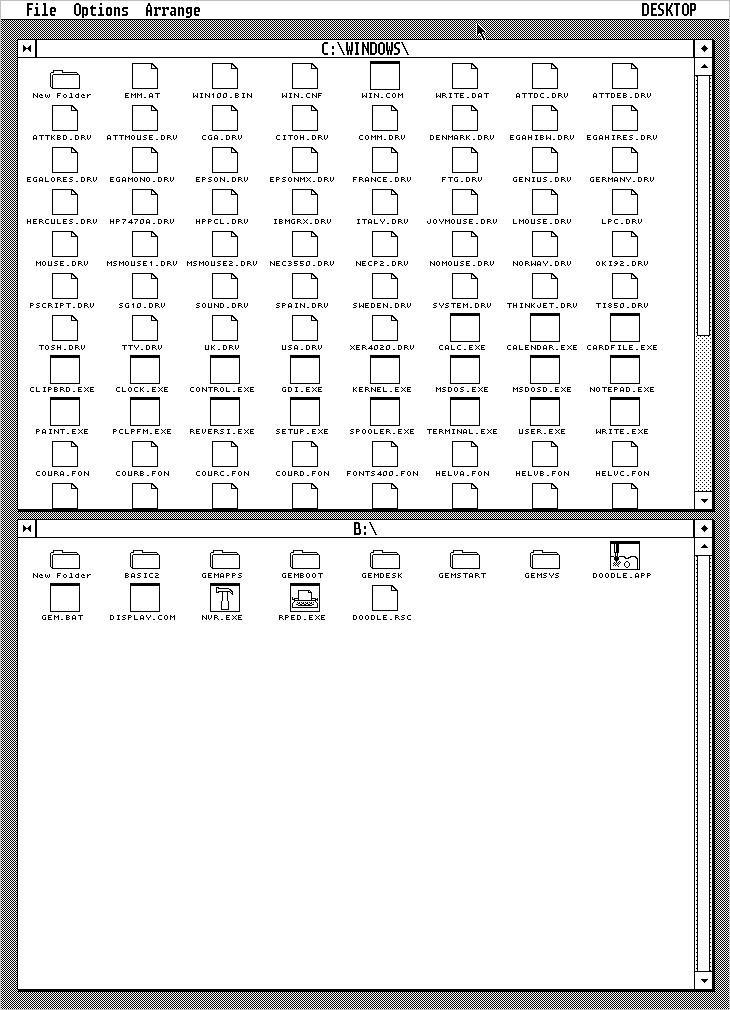
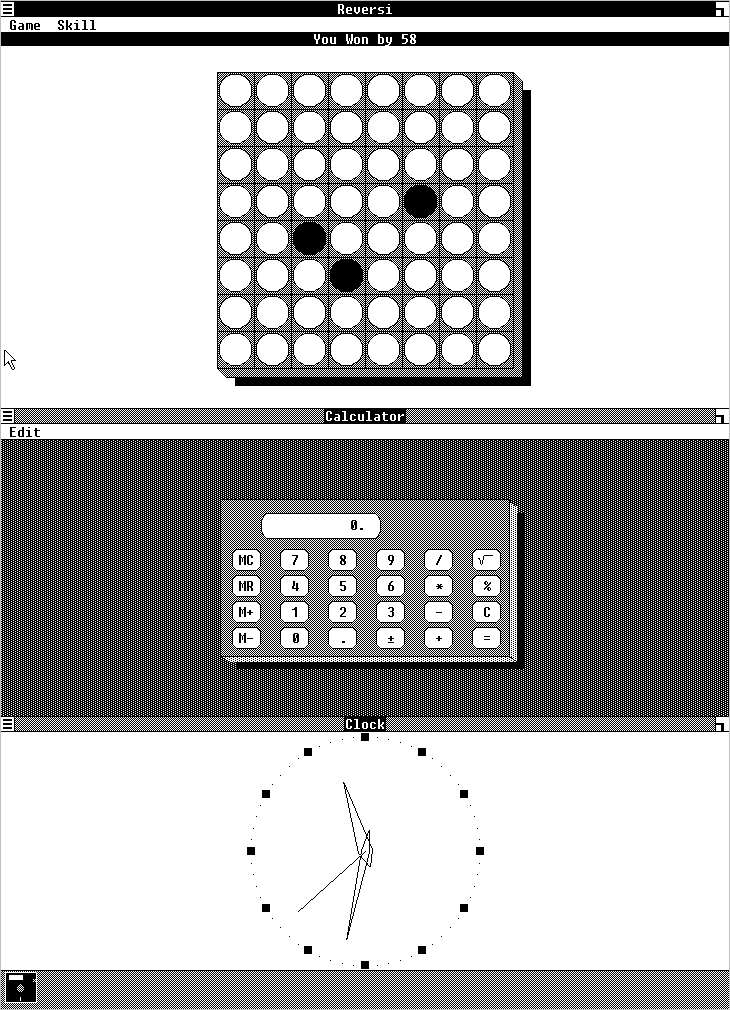
'MDSI Genius' card. Tonight I tried patching support for this card into
a PC emulator, and running GEM (and Windows 1) with the results.
<http://www.seasip.info/Gem/History/longgem.png> - GEM/2 desktop
<http://www.seasip.info/Gem/History/longwin1.png> - Windows 1.04
According to reviews, the card could also do other tricks; it could
superimpose MDA-style text on the graphics output, and do a dual-head sort of
display with MDA text in the top half of the monitor and CGA graphics in the
bottom. But without any documentation or its DOS driver (VHRBIOS.SYS), how
it did those will remain a mystery. Such information as I have managed to
glean is at <http://www.seasip.info/VintagePC/mdsi_genius.html>.
--
John Elliott
_______________________________________________
gem-dev mailing list
gem-dev at simpits.orghttp://www.simpits.org/mailman/listinfo/gem-dev
I have an AlphaStation 200 4/233 which was given to me without a video
board or floppy drive. I stuck an old Teac FD-235HF in the floppy bay to
fill the hole (no data cable), but have no idea what I really need for a
video board.
I'm planning to use this machine as a low end testbed machine for Debian
Linux since the Alpha port needs to be brought back up, so I know I
probably need a board that can handle more than 256 colors. I think this
eliminates the ZLXp-E1 (TGA 8-plane), but at the same time it may be a
good idea to be able to test with a TGA board as well since there are
going to be quite a few of these machines out there which have a TGA
board.
I will probably also want to run ULTRIX or OSF/1 on the machine at some
point, assuming I can find installation media.
Based on the datasheet I found online, these appear to have been (some?)
of the video boards offered as options for this system:
ZLXp-E1 8-plane PBXGA-AA PBXGA-AN [NT]
ZLXp-E2 24-plane PBXGA-BA PBXGA-BN [NT]
ZLXp-E3 24-plane PBXGA-CA PBXGA-CN [NT]
ZLXp-L1 24-plane PBXGC-AA
ZLXp-L2 24-plane PBXGC-BA
Does anyone have an extra video board laying around that they would be
willing to part with for postage costs? This machine has been sitting
unused for far too long and I'd really like to put it to work.
Guys,
I am sending this to all who have registered an interest in the IBM 7090 and museums. Sorry if I got some people wrong!
This computer started life at AWRE in the UK (nuclear weapons design?!) and finished in the Medical Computing department at Manchester Uni in 1970, where it ran for 10-20 years.
It had 4 channels, 32K memory, card reader, card punch, 300 LPM barrel printer and ?20 mag tapes. It also had an IBM 1401 for printer I/O.
I have now surveyed the stuff available. There is no hardware. It is a lot of (probably complete) hardware documentation, cicuit diagrams, s/w documentation (IBSYS, etc) also. Also a lot of mag tapes of mixed content and some card trays of mixed content.
Are any of you out there interested? It is all quite heavy so transport will be a challenge, but surmountable!
The stuff will be available in the first week of September. Any sensible offers will be considered. It might go on eBay but I will wait until you guys respond first.
Kind regards,
peter vp
|| | | | | | | | |
Peter Van Peborgh
62 St Mary's Rise
Writhlington Radstock
Somerset BA3 3PD
UK
01761 439 234
|| | | | | | | | |
Anyone have about 3 or 4 or so IBM 00K4151, FRU 10L6081 9.1GB disk drives in PC Server hot swap trays (76H7287)'s (preferably with non-broken locking levers) that they'd like to part with for ~$5-$10 each?
I need a few more to get my P/390 fully stocked... :)
Thanks in advance!
Hi. One friend told me yesterday that he has one Selectric in working
state available for me. Can this machine be converted in one Terminal
Typewriter ? Thanks.
Regads
Serhio