Hi,
I know it?s been a while (a long while) since I last posted about ordering new UA11 boards. I just placed an order for 25 boards. To get the best price I did a ?4 week turn? which means that I should be receiving the boards by the end of January.
I?m only doing bare boards this time, so what you?ll get is a board and a set of printed documentation (which is also available at: http://www.shiresoft.com/downloads/docs/ua11/UA11%20Manual.pdf). I just looked at the documentation and the address and phone numbers are old (so don?t try and use them!). I?ll try and get the documentation updated with current information before I ship any boards.
The cost will be less than what?s posted on the website, I won?t have exact numbers until I receive the boards however I expect to charge ~$100/ea + shipping.
I?ll let everyone know when the boards arrive, but feel free to email me (off list please!) if you?d like to reserve one (or more!). Do not send any payment until I have boards in hand!
Have a Merry Christmas (or whatever your preferred holiday this time of year is)!
TTFN - Guy
I have in mind to connect a machine to an IBM 1627 (CALCOMP 565) plotter
and then the XY11 which just arrive would fit nicely, I think.
But I cannot seem to find any manual for the XY11. Anyone know of a manual?
The board is rather simple so it should be possible to work out the details
on how to interface it by hand but it would be nice to have the proper
manual.
Then for software I found a diagnostic, XXYAD0 that supposedly should draw
a square and a rectangle.
Anyone know of other drawing software that uses the XY11
/Mattis
The DEC LSI-11, Western Digital WD16 (as used in the Alpha Micro
AM100), and Western Digital Pascal Microengine use variations of the
same chipset, called CP1600 for the LSI-11 and WD16, and WD9000 for
the Pacal Microengine.
The chipset consists of a control chip, a data path chip, and two to
four microcode ROMs, of 512 words of 22 bits each, known as
"Microms".
I built an apparatus on a breadboard to dump the contents of Microms,
using a PIC and a quad gate driver to produce the four-phase 12V
clock, three 74HCT163 four-bit counters and two 74HCT245 buffers to
drive the address onto the microinstruction bus, and a 74HCT4050 and
74HCT04 to level shift the MOS phase 2 clock back to 5V and invert it,
to enable the 74HCT245 buffers.
Photos:
https://www.flickr.com/photos/22368471 at N04/albums/72157662054690240
The apparatus cycles through the entire 2 kibiword address space
continuously. An HP 16701A logic analyzer with 16557D state/timing
card is attached to capture the addresses and data.
Because the microinstruction bus is active low, the addresses are
driven in reverse sequence, and the microinstructions captured on the
logic analyzer are inverted.
So far I have dumped the following LSI-11 Microms:
3010D, DEC P/N 23-001B5 (also designated CP1631-10) - addr 0x000-0x1ff
3007D, DEC P/N 23-002B5 (also designated CP1631-07) - addr 0x200-0x3ff
So far I have dumped the following Pascal Microengine Microms:
WD2171-10 - addr 0x000-0x1ff
WD2171-12 - addr 0x200-0x3ff
WD2171-13 - addr 0x400-0x5ff
WD2171-14 - addr 0x000-0x1ff
WD2171-15 - addr 0x200-0x3ff
WD2171-17 - addr 0x400-0x5ff
WD2171-18 - addr 0x400-0x5ff
There exists at least one other Pascal Microengine Microm which I
don't have, the WD2171-16. I expect that it probably occupies addr
0x400-0x5ff.
I have not yet dumped the WD16 Microms as I do not have an AM100 CPU
board at hand.
My next challenge is exporting the data from the 16701A to anything
else. The 16701A used to work fine on my Ethernet, but for mysterious
reasons it now claims that the network can't be accessed, despite that
plugging a laptop into the same Ethernet cable works fine.
I'll need to write a small Python script to post-process the output,
for use with my disassembler (also in Python).
Note that dumping the Microm contents is only part of the problem; the
control chip also contains PLAs that can force microcode jumps under
various conditions despite there being no corresponding jump
instruction in the Microms. This is used for macroinstruction decode,
and possibly for other purposes.
> From: Eric Smith
> The control chip and data chip are not Microms, and MUST be plugged
> into the correct socket.
Yeah, as you saw, I eventually figured that out.
In part, along with the bad diagram, I was thrown by a combo of the fact that
i) the DEC part numbers for the control chip started with 23- (which seems to
be a ROM part indicator), unlike the data chip, which as a 21-1; and second,
the control chip is 23-002C4/23-003C4, which was so close to uROM numbers
like 23-002B5 and 23-003B3, it sounded like they were all uROM parts.
> There are a number of variants.
Thanks for all the additional data. I'll add it all to the LSI-11 page on the
he Computer History Wiki (seems as good a place as any to accumulate it).
Noel
Has anyone written PDP-8 code for .XOR. that uses the MQ Register (when the
EAE isn't available)? If so, can you share the source code and/or the
algorithm?
Thanks,
Bob
resending with corrections!
it appears the pen kit for our plotter got LIFTED (aka stolen,
ripped off... etc... bummer..) before we had it glassed in living the
glassed in display a areas if anyone has a calcomp box with the solenoid
and pens that is extra to their needs please let us know
In a message dated 12/22/2015 9:31:22 P.M. US Mountain Standard Time,
COURYHOUSE at aol.com writes:
I had the large ibm calcomp plotter if big wide one we have the same
... it is in the hp display case at smecc museum
there was a fortran graphics text book we had adn I had gotten with a HP
3000 and it had a interface board ( parallel interface?? too many
years)
I made it plot squares etc .. as I remember the hp intrinsics may
have had some support for this..
once I did that i put it aside and went back to playing with the HP
multi-pen HP plotters we sold back them at Computer Exchange Inc.
In a message dated 12/22/2015 3:22:01 P.M. US Mountain Standard Time,
steven at malikoff.com writes:
---------------------------- Original Message ----------------------------
Subject: XY11 Manual, Anyone?
From: "Mattis Lind" <mattislind at gmail.com>
Date: Wed, December 23, 2015 2:53 am
To: "General Discussion: On-Topic and Off-Topic Posts"
<cctalk at classiccmp.org>
--------------------------------------------------------------------------
> I have in mind to connect a machine to an IBM 1627 (CALCOMP 565) plotter
> and then the XY11 which just arrive would fit nicely, I think.
>
> But I cannot seem to find any manual for the XY11. Anyone know of a
manual?
>
> The board is rather simple so it should be possible to work out the
details
> on how to interface it by hand but it would be nice to have the proper
> manual.
>
> Then for software I found a diagnostic, XXYAD0 that supposedly should
draw
> a square and a rectangle.
>
> Anyone know of other drawing software that uses the XY11
>
> /Mattis
The book 'The Minicomputer in the Laboratory' by James W Cooper covers
using an
X-Y plotter with an 11/05, and has assembly listings and a whole bunch of
related
stuff about scientific plotting. Also a lot of info on using the LPS-11
too.
There are plenty of copies out there and quite cheap too. It's an
excellent book
and could be of use to you.
Steve.
Hi,
I knew ST-251-0, ST-251-1 drives for ST506. Some time
ago I've got a ST-251 labled "MLC-1". Does someone
knows what the MLC stands for? What is different to
the other ST-251 variants? It looks like a regular
ST506 drive.
Oliver
There is one quite inexpensive on Ebay right now. Looks to be a match
for the system unit at the CHM as well. Maybe they need a spare. I
don't know if they want parts machines or not, but for the price it is
almost tempting to pick it up.
http://www.ebay.com/itm/321399704868
Hope Christmas brings everyone a lot of new toys. (as in old ones).
Thanks
jim
>
>Recently found some long-lost images of 5 1/4" floppies that were sent
>to me... 10-15 years ago. Here's one of them:
>
>http://www.corestore.org/RP06.552
Looks like a straight image for a 1.44 what we call "stiffy". The 522
is the version of RP06.
Google leads me to http://www.corestore.org/rp12.htm so you already
know what it's for :-)
W
yes I can... it got LIFTED! Ripped Off! Stolen! Bummer eh?
In a message dated 12/23/2015 9:43:59 A.M. US Mountain Standard Time,
cisin at xenosoft.com writes:
On Wed, 23 Dec 2015, COURYHOUSE at aol.com wrote:
> it appears the pen kit for our plotter got listed before we
had
> it glassed in living the glassed in display a areas
Could you rephrase that?
it appears the pen kit for our plotter got listed before we had
it glassed in living the glassed in display a areas if anyone has a
calcomp box with the solenoid and pens that is extra to their needs
please let us know
many thanks Ed Sharpe archivist for smecc _www.smecc.org_
(http://www.smecc.org)
In a message dated 12/23/2015 6:28:28 A.M. US Mountain Standard Time,
dave.g4ugm at gmail.com writes:
Surely there is a copy of CalComp Host Computer Basic Software (HCBS)
around somewhere that talks to the XY11. After all the Calcomp is pretty thick.
All it can do is move 1 step at once, well it can do diagonals as well,
but pretty thick...
Dave
G4UGM
> -----Original Message-----
> From: cctalk [mailto:cctalk-bounces at classiccmp.org] On Behalf Of Stefan
> Skoglund (lokal anv?ndare)
> Sent: 23 December 2015 11:07
> To: cctalk at classiccmp.org
> Subject: Re: XY11 Manual, Anyone?
>
>
> > > Then for software I found a diagnostic, XXYAD0 that supposedly
> > > should draw a square and a rectangle.
> > >
> > > Anyone know of other drawing software that uses the XY11
> > >
> > > /Mattis
> >
> > The book 'The Minicomputer in the Laboratory' by James W Cooper covers
> > using an X-Y plotter with an 11/05, and has assembly listings and a
> > whole bunch of related stuff about scientific plotting. Also a lot of
> > info on using the LPS-
> > 11 too.
> > There are plenty of copies out there and quite cheap too. It's an
> > excellent book and could be of use to you.
> >
> > Steve.
> >
>
> Boken finns i Ume? universitets boksamling (?ven p?
> fysikinstitutionen.)
> Det verkar inte finnas n?got exemplar i Uppsala d?remot. :-) Kastad ?
Back in the late 70s early 80s one of Dad's work colleagues came up with this circuit for interfacing
an IBM I/O Selectric to a microcomputer. We had one, which we planned to use with our Fairchild/Mostek
F8 development board, but it never got done - my brother and I wanted a computer with a screen, not a
printer! So we spent our pocket money (and Dad's too) on an S-100 kit system, but that's another story.
Recently I found the only remains of our I/O writer, the platen. Sadly I think it must have been junked,
the platen being kept to roll out photographic prints in Dad's darkroom.
I just finished scanning, cleaning up the degradation and turning the circuit into a PDF. These days an
Arduino or RasPi would be a simpler and more flexible way to go, but I hope you find it interesting
looking at how it was done with TTL and discrete components.
The circuit was designed by (I believe) Neil Taylor, possibly with the help of Derek Williamson, both
brilliant IBM Australia CE's. I know my dad always spoke very highly of them.
It's an 8-page PDF at http://web.aanet.com.au/~malikoff/misc/IBM_IO_Selectric_interface.pdf
Regards,
Steve Malikoff.
I had the large ibm calcomp plotter if big wide one we have the same
... it is in the hp display case at smecc museum
there was a fortran graphics text book we had adn I had gotten with a HP
3000 and it had a interface board ( parallel interface?? too many
years)
I made it plot squares etc .. as I remember the hp intrinsics may
have had some support for this..
once I did that i put it aside and went back to playing with the HP
multi-pen HP plotters we sold back them at Computer Exchange Inc.
In a message dated 12/22/2015 3:22:01 P.M. US Mountain Standard Time,
steven at malikoff.com writes:
---------------------------- Original Message ----------------------------
Subject: XY11 Manual, Anyone?
From: "Mattis Lind" <mattislind at gmail.com>
Date: Wed, December 23, 2015 2:53 am
To: "General Discussion: On-Topic and Off-Topic Posts"
<cctalk at classiccmp.org>
--------------------------------------------------------------------------
> I have in mind to connect a machine to an IBM 1627 (CALCOMP 565) plotter
> and then the XY11 which just arrive would fit nicely, I think.
>
> But I cannot seem to find any manual for the XY11. Anyone know of a
manual?
>
> The board is rather simple so it should be possible to work out the
details
> on how to interface it by hand but it would be nice to have the proper
> manual.
>
> Then for software I found a diagnostic, XXYAD0 that supposedly should
draw
> a square and a rectangle.
>
> Anyone know of other drawing software that uses the XY11
>
> /Mattis
The book 'The Minicomputer in the Laboratory' by James W Cooper covers
using an
X-Y plotter with an 11/05, and has assembly listings and a whole bunch of
related
stuff about scientific plotting. Also a lot of info on using the LPS-11
too.
There are plenty of copies out there and quite cheap too. It's an
excellent book
and could be of use to you.
Steve.
On Tue, Dec 22, 2015 at 10:17 PM, Nico de Jong <nico at farumdata.dk> wrote:
> ---- Original Message -----
> From: "Mike Ross" <tmfdmike at gmail.com>
> To: "General Discussion: On-Topic and Off-Topic Posts"
>> <cctalk at classiccmp.org>
>> Sent: Tuesday, December 22, 2015 9:41 AM
>> Subject: Odd disk image format... .552?
>>
>>
>>> Recently found some long-lost images of 5 1/4" floppies that were sent
>>> to me... 10-15 years ago. Here's one of them:
>>>
>>> http://www.corestore.org/RP06.552
>>>
>> Seems to be a MSDOS 5.0 boot disk, with just one important program,
>> RP06.EXE, on it, and then some support programs.
>> As far as I can see, it is a physical backup. Could the 552 just be a serial
>> number `?
>
>That's kinda what I expected actually... so you reckon they're just in
>normal raw image format for e.g. Rawrite?
>
Suppose so. They took a complete disc, sector by sector, and wrote it as a file.
/Nico
Hey everyone, just got my Apple1 powered up!!! The PIA is hot to the
touch, I heard they run hot, how hot is too hot??
Looking for an Apple II keyboard to convert for use on my Apple1. Anyone
have one for sale or trade?
Thanks!
-Nick
Recently found some long-lost images of 5 1/4" floppies that were sent
to me... 10-15 years ago. Here's one of them:
http://www.corestore.org/RP06.552
I've never seen that .552 file extension before. Any clue? It's
possible that refers to a version number rather than some obscure disk
image format...
(They are allegedly Setasi Shelby RP12 boot disks btw :-) )
Mike
http://www.corestore.org
'No greater love hath a man than he lay down his life for his brother.
Not for millions, not for glory, not for fame.
For one person, in the dark, where no one will ever know or see.'
> From: Adrian Graham
> Overblown salesmanship aside, technically I suppose they're right.
Well, I don't think so. According to Wikipedia (I know, I know), the Lisa was
released on January 19, 1983, but the Xerox Star (AKA Dandelion):
http://en.wikipedia.org/wiki/Xerox_Star
was introduced in 1981, almost two years before. The Star was supposed to be
a commercial product version of the Alto, and although it had many issues, it
did have an advanced version of the graphic-based user interface that is now
universal - icons, etc, etc. And it had a mouse.
Noel
Having typed that subject line I'm changing my attitude slightly:
http://www.ebay.co.uk/itm/ONE-OF-FEW-REMAINING-1ST-AVAILABLE-MICE-IN-THE-WO…
Overblown salesmanship aside, technically I suppose they're right. Even
given Doug Engelbart's introduction in 1964 the mouse wasn't a massive
commercial success by 1983 was it.
Still a lot of cash though, and when I bought my Lisa in 2005 it came with
that rodent so I'll put it alongside my little collection of VSXXX
workstation mice as WOW*R at RE*L@@K* items :)
--
adrian/witchy
Owner of Binary Dinosaurs, the UK's biggest home computer collection?
www.binarydinosaurs.co.uk
> From: Eric Smith
> So far I have dumped the following LSI-11 Microms:
>
> 3010D, DEC P/N 23-001B5 (also designated CP1631-10) - addr 0x000-0x1ff
> 3007D, DEC P/N 23-002B5 (also designated CP1631-07) - addr 0x200-0x3ff
Excellent work!
I was going to point out that there is another uROM (KEV11) for the LSI-11,
for the EIS/FIS, and also that there is some variation in the numbers of
the uROM chips, but along the way, I ran into a puzzle.
DEC documentation differs on the location of the two uROM's in the LSI-11/2
(KD11-HA, M7270): the 'Microcomputer Products Handbook' gives the order (from
the handle end) as KEV11, uROM 1, uROM 0, Control, Data Path; the print set
for the KD11-HA gives KEV11, Control, uROM 1, uROM 0, Data Path!
>From which I conclude that either: i) one of the documents, perhaps the
Handbook, is wrong, or ii) the 'Control' chip must also be a uROM, and that
there is some variation in how the 3 chips can be plugged in?
Here is more data from a couple of boards I have access to (from the handle
end):
- 2007C 23-002C4, 3010A 23-001B5, 3007D 23-002B5
- 2007C 23-002C4, 3010D 23-001B5, 3007D 23-007B5
- 2007C 23-003C4, 3010D 23-008B5, 3007D 23-007B5
Anyone know what's up here?
Getting back to the KEV11, the one I have seen is a 3015 23-003B5.
> the control chip also contains PLAs that can force microcode jumps under
> various conditions despite there being no corresponding jump instruction in
> the Microms.
Hmm. Any idea/way to read them out?
Noel
> DEC documentation differs on the location of the two uROM's in the
> LSI-11/2 (KD11-HA, M7270): the 'Microcomputer Products Handbook' gives
> the order (from the handle end) as KEV11, uROM 1, uROM 0, Control, Data
> Path ...
> From which I conclude that either: i) one of the documents, perhaps the
> Handbook, is wrong, or ii) the 'Control' chip must also be a uROM, and
> that there is some variation in how the 3 chips can be plugged in?
> Anyone know what's up here?
To answer my own post, I looked at the prints (should have done this before I
posted, sigh), and there is no way it can be ii). The Control chip has a
bunch of discrete signals on pins where the uROM's have micro-instruction bus
pins. So there's no way you can swap them around.
So the 'Microcomputer Products Handbook' diagram (pg. C-18) has to be wrong.
Noel
I have one side panel for a DEC corporate cabinet. It should fit VAX-11/780
or similar cabinets.
It is in good shape. Anyone need one? It is in Stockholm, Sweden. Also has
some other parts for the cabinet, like wheels and other steel parts.
/Mattis
Speaking of KiCad ....
Yesterday, I tried for the first time KiCad, and my first board design with it.
The very first part I was looking for .... I was not able to locate it.
Is it because I am a newbe or because this part does not exist yet, beeing "too old" ??
I was looking for :
Card edge connector ( fingers print ) , any contact count, BUT pitch = 3.96 mm
Any help ?? Thanks !!
---
L'absence de virus dans ce courrier ?lectronique a ?t? v?rifi?e par le logiciel antivirus Avast.
https://www.avast.com/antivirus
So I saw this NCR376 card punch on the German Ebay and placed a bid,
getting it for Eur 1.50 (approx $1.75).
Last Saturday I picked it up near Frankfurt and brought it back home and
came with a small user manual (in German), 2 sheets of diagrams (need to
find a magnifier to read it properly) and about 500 unused cards.
There are a few small issues, the rubber rollers of the feeder are
melted, but apparently can be replaced using some heat shrink tube, the
rubber layer seems to be very thin.
Another issue are the transport rollers which moves the card from right
to left where the hopper is. Those are also melted but again seem to be
repairable.
Last issue is that when I press some keys on the keyboard, the card does
not advance, only some clicking noises from the backplane is heard.
The backplane consists of s series of relays on a few cards, and a number
of capacitors on a few other cards. (Yes, this card punch is driven
by a series of relays).
This unit is OEM-ed from JUKI (Juki-1300), a Japanese company who made it.
Although the machine is small (about 100 x 100 x 45 cm) is weights 100Kg.
Anybody know a source for other manuals of this machine? Googling for it
did not return much for it.
Ed
--
Ik email, dus ik besta.
BTC : 1J5fajt8ptyZ2V1YURj3YJZhe5j3fJVSHN
LTC : LP2WuEmYPbpWUBqMFGJfdm7pdHEW7fKvDz
On Fri, Dec 18, 2015 at 8:27 PM, Fred Cisin <cisin at xenosoft.com> wrote:
> Was it the Processor Technology Sol that had oak strips on the sides?
Walnut.
> From: Mike
> The one question I do have for the older gentlemen on here is what in
> the world did the computers without a screen to look at do?
There are a number of different generations, and the way they were used
generally depended on what the computer in question had for I/O capabilities.
In the very earliest machines, the computations tended to be mathematical
modeling; things that needed a lot of computing, but had very modest I/O
requirements. The classic example was the hydrogen bomb calculations
performed on ENIAC (which was originally built to do ballistics
computations), but other similar ones included structural modeling, etc.
That class of application continued (and does so, to this day), but over
time, more and more things got done using computers, as their capabilities
(online storage, I/O, etc) grew. In general, the new applications were added
to the existing ones, but did not supplant the earlier ones.
Starting with a computer in England called LEO:
https://en.wikipedia.org/wiki/LEO_(computer)
they were also applied to business applications (inventory, payroll, billing,
etc), which typically did more modest computations, but more I/O, which
required better I/O capability (cards, tapes, printers, etc).
With the advent of timesharing in the early 1960's, it became common to add
individual character-output terminals (initially printing, moving mostly to
video terminals circa the mid-70's), and with the ability of users to
interact with applications running on a computer, applications broadened even
further; online text preparation was one common one.
The final phase came with the introduction of bit-mapped video terminals,
which allowed the interactive users to use graphics, and images; the very
earliest such systems were on time-sharing mainframes, but with the growth of
personal computers, that technology migrated there (note that the very
earlist PC's had only character-output terminals, mimicing their main-frame
big brothers of the time).
Noel
At 03:04 PM 12/20/2015, Eric Smith wrote:
>The problem has been solved.
Is the solution available online?
Dale H. Cook, Roanoke/Lynchburg, VA
Osborne 1 / Kaypro 4-84 / Kaypro 1 / Amstrad PPC-640
http://plymouthcolony.net/starcity/radios/index.html
Does anyone have a scan of the IEEE-696 (S-100) standard that has NOT
been run through OCR to screw up the typography (and even some of the
illustrations)?
I'm *not* looking for the draft, only the final standard.
Is anyone using this combination? I'm having problems getting it to work
reliably on a soft-sector controller in my Heath H89 and their forum is
essentially dead.
--
The WD9000 Pascal Microengine main box does not include floppy drives.
It can support up to four floppy drives, which can be either 8-inch
(500 kbps transfer rate), or 5.25-inch (250 kbps transfer rate), as
selected by a DIP switch setting on the WD900 board. Unfortunately
the DIP switch directly controls the clock rate into the 1793 FDC
chip, so it is not possible to mix 250 kbps and 500 kbps drives.
However, it should be possible to mix 8-inch drives with high-density
5.25 inch or 3.5 inch drives that use the 500 Kbps transfer rate.
The floppy connector on the back of the WD9000 box (and the WD900
board) uses a DC37S connector, and the pinout seems to be unique to
the Pascal Microengine. My Microengines did not come with the floppy
drives or cabling. I've designed a simple adapter PCB, and just got
the first boards back from PCBWay today. I haven't yet finished
assembling one because I screwed up ordering on some of the components
and connectors. Photos:
https://www.flickr.com/photos/22368471 at N04/albums/72157660580290148
The WD900 board uses an FD1791 double-density floppy controller. It
appears that the main board may have been originally intended for the
FD1771 single-density controller, as the board revs I've seen don't
have a suitable double-density data separator built in. On one of my
units, the FD1791 is on a daughterboard with a typical analog data
separator design using the WD1691 floppy support logic and a 74LS629
VCO. My other board has the FD1791 on the main board, but has some
significant rework to install an SMC FDC9216B digital data separator
chip in place of one of the TTL chips originally used by the main
board design. I've seen other WD900 boards with the FDC9216B
modification, so I think this was rework done at manufacturing time,
rather than a field change.
One aspect of the floppy controller design seems a bit unusual. The
WD controllers have a HLD output used to tell the floppy drive to load
the head, and an HLT input (Head Load Timing) to indicate that the
head is loaded. After the controller asserts HLD, it waits for HLT to
go true before proceeding with read, write, or format operations. A
typical 8-inch drive takes 35 ms to load the head, and maybe a few
more for head settling. A common way to wire the controller is to use
an external one-shot triggered by HLD, with its output wired to HLT,
and adjusted for a time delay a little longer than the drive requires
for loading the head. 8-inch drives typically can either be jumpered
to use a dedicated head load control line on the interface to control
the head load solenoid, or to automatically load and unload the head
as the drive select signal is asserted and deasserted.
Normal 8-inch drives have the head load solenoid to do what was
previously described, and run the spindle motor either all the time,
or whenever a disk is inserted and the door closed. 5.25-inch drives,
and some later 8-inch drives such as the Tandon TM848, do away with
the head load solenoid and instead are intended to operate with the
spindle motor active only when the drive is selected, or when a motor
control signal is active. As such, they don't require any head load
time, but instead require a motor startup time that is even longer;
the slowest drives require about a second for spinup. With a WD
controller, this is also sometimes accomodated by using the one-shot
between HLD and HLT.
Some WD-based controller designs, such as those in the TRS-80 Model I,
III, and 4, are only intended for 5.25-inch drives (or the 8-inch
drives that use motor control and no head load solenoid), and tie the
READY signal from the drive to the HLT input of the FDC.
The WD900 board tries to acommodate these variations by bringing the
HLT signal to its DC37S connector, for the system integrator to wire
up as desired. The only complete Pascal Microengine system I've seen
up close in recent history had a hand-wired drive cable to 8-inch
drives, with the HLT signal simply tied to a +5V pin on the same
connector. The net effect of that is that the FD1791 asserts HLD,
delays 15ms if the h bit of the command is 1, and does not delay any
further. Unless the drive can actually load its head that quickly,
this doesn't seem ideal, but I suppose it works because the FDC won't
be able to read a valid sector address field until the head is loaded.
For a write operation, I'd worry that the head might not have fully
settled by the time the actual write begins, possibly leading to
unreliable writes.
To support proper head load or motor spinup timing, I put an optional
PIC microcontroller and DIP switch on the adapter, to act as a digital
delay between HLD and HLT, with sixteen switch-selectable delays. The
drive select lines are wired to PIC inputs, so if desired, firmware
could actually use different delays for different drive selects, if
you mix drives with different head load timing requirements. I
haven't yet written any PIC code for it. The board should basically
work as described above with HLT jumpered to +5V, without the PIC and
related components installed.
The adapter has both a 50-pin connector for 8-inch drives, and a
34-pin connector for 5.25-inch or 3.5-inch drives. It is intended for
one connector or the other to be used, but not both. Even if you use a
combination of drives that all use the 500 kbps transfer rate, having
them cabled separately to the two connectors could result in
termination problems.
Naturally, only hours after ordering the PCBs I thought of
improvements that I'd like to make to the design, but I don't
anticipate that there will be a second run of boards.
I don't presently have any bootable disk for the Pascal Microengine,
so I'm not yet able to test the adapter. However, if anyone else needs
such a thing, I have a small number of bare boards that can be made
available inexpensively. (I don't have time to assemble boards other
than for myself.) If there's any interest, I'll publish the Eagle
design files, gerber and excellon files, a PDF of the schematic, and
source and object code for the PIC firmware. The firmware will be
GPLv3 licensed, and the other design files with be under a Creative
Commons license, probably CC BY-SA 4.0.
Hi there everyone.
I'm hunting for an NEC PC-8031A mini-disk module for the NEC PC-8001A
computer. I have the computer itself and PC-8012A expansion chassis
already.
Additionally looking for anything else relating to this computer that you
might have kicking around and be willing to part with. Including but not
limited to the "Wedge", expansion unit cabling, expansion cards, etc.
Note: I have seen the one floating periodically on eBay and am keeping a
close eye on eBay in general for this unit so am looking for leads outside
of that.
If anyone has stuff for this computer, please contact me off-list. I'm
near Philadelphia and willing to drive to avoid you having to pack/ship.
Not against shipping stuff either.
Thanks!!
-Todd
From: Mike Ross <tmfdmike at gmail.com>
> I have a 3172 controller; physically rough and needs restoration but *should* work if
> I can fake the remote connection and modem - bisync etc. B
From: Paul Berger <phb.hfx at gmail.com>
> you need a modem eliminator mostly to provide the clocks for the sync data line,
> other than that is is similar to a null modem.
Not sure if this would work here, but the Cisco IOS "IBM Feature Set"
has support for all sorts of weird bisync use cases. I've used it to
fake termination of an ALC (Airline Line Control) bisync connection
where a modem connection was expected. You can then convert, tunnel
or bridge to any number of other strange things.
There even exists an IBM channel attach card for the Cisco 7k routers
that turns it into the equivalent of a 3172 and/or 3745.
KJ
> From: Brent Hilpert
> I need to move to something newer but I haven't evaluated current
> schematic-drawing programs
Dave Bridgham got me started with KiCAD, and that seems like a pretty good
system to me. It has separate sub-systems for schematic capture; circuitry
checking; netlist generation; PCB layout; etc, etc. I've only worked with the
first three, but it seemed pretty good for them.
> I'm a little concerned they won't provide the degree of control or
> finesse I like
Well, you'll have to try it and see, but it's pretty customizable: they
provide libraries of common components, but it has a nice component editor
for drawing up new ones (or customizing the ones it comes with).
Component location and line routing (in the schematic capture) are manual,
but it's grid-based, so things line up.
Noel
I?ve been tinkering around with my IBM Mainframe terminals and I?m pretty close to having everything the way that I want it.
I currently have an IBM 3174-61R Establishment controller connecting to my ?mainframes? via TCP/IP. This allows me to not only connect to my Multiprise 3000 S/390 but also some PCs running Hercules to allow me to run older versions of the mainframe OS?s. I currently have 3 IBM 3179 terminals hooked up.
I?ve upgraded the 3174 to be able to boot from a hard disk (it was a supported option). I actually purchased the upgrade from a reputable vendor but after many attempts we could not actually get it to do anything useful. I learned about DavidG?s MFM emulator and that?s now installed in the 3174 which happily boots from it. I still have to figure out a permanent mount for it since the standard 3174 HDD mounts don?t work for the MFM emulator board.
One of the last things that I wanted to figure out was how to support multiple sessions. I had configured the 3174 to support multiple sessions on each terminal but following the documentation, I could never figure out how to actually switch between the sessions. Well today I managed to do that. Success! I finally figured out the key sequence for switching sessions. It doesn?t match the IBM documentation. It?s not clear to me if that?s because I haven?t configured something properly on the 3174 or if there?s some other reason behind it.
Since I also have the AEA feature that allows me to connect ASCII terminals to the 3174, my next project will be to hook up a couple of the terminals that?re deemed ?compatible? (VT100, ADM5 are on the list) and see how that works. But that also involves navigating the 3174 configuration process which is opaque to say the least (there are configuration screens but you need a manual because the fields only have numbers (e.g. 721) to identify them and no other indication as to how they need to be filled in).
Oh, the other bizarre thing about the 3174 that?s been configured with TCP/IP is that I can also connect to ?unix? servers with the 3174?s (and the ASCII terminals too). It?ll be interesting to see how that works on a CUT mode terminal. ;-)
TTFN - Guy
ok we have this
In the PS/2 days there where suitcase size machines with plasma displays
but they only had a single diskette drive that folded out of the front,
we also have the dual disc laptop 1st thing IBM made with lcd
then we also have a one that is like a suitcase compaq portable that
made compaq famous
ok thinks for it all being non scsi!
Ed# _www.smecc.org_ (http://www.smecc.org)
In a message dated 12/18/2015 1:15:22 P.M. US Mountain Standard Time,
ggs at shiresoft.com writes:
> On Dec 18, 2015, at 12:03 PM, Paul Berger <phb.hfx at gmail.com> wrote:
>
>>
> The screen on the convertable is not plasma, it is a LCD screen and
there where two versions one reflective and the other backlit. In the PS/2
days there where suitcase size machines with plasma displays but they only had
a single diskette drive that folded out of the front, one model is the
8573-P70. There where 386 and 486 versions of these machines with
microchannel card slots and a SCSI disk.
>
Again, no. They did not ship with a SCSI disk. They used the same disks
as were in the model 50 & 70 (which were *not* SCSI).
A number of us at IBM (who worked on the SCSI cards spock & tribble) did
fit the card (usually spock because it had 512KB of cache) and an IBM 320MB
SCSI drive in the P70. It was *not* a standard (ie orderable)
configuration but at the time created a wicked machine!
TTFN - Guy
Looking for some Fluke Micro System Troubleshooter stuff:
Looking for the following key caps: AUTO, BUS, RAM SHORT, and C
Bonus key caps (not needed, but better ones would be nice): RAM LONG,
I/O, 1, 2
Also looking for PODS for:
6502
Z80
6809
8080
If you have any of these available, please let me know what you have
and a price.
Thanks,
-- Curt
> From: Doug Ingraham
> I regret that when I obtained my Straight 8 system in the early 80's I
> chose not to take the ASR-35.
> ...
> A glass terminal is not the same experience as a teletype.
Thank goodness for that! I had the 'joy' of using exclusively Teletypes for
the first two years I worked with computers, and I didn't (and still don't)
miss them one bit!
Which is not to say I look down on those who collect/restore them, I
understand they are an important part of the history, and I salute those who
are into them. I'm just saying that, as a user, I was glad to move on!
Noel
Folks,
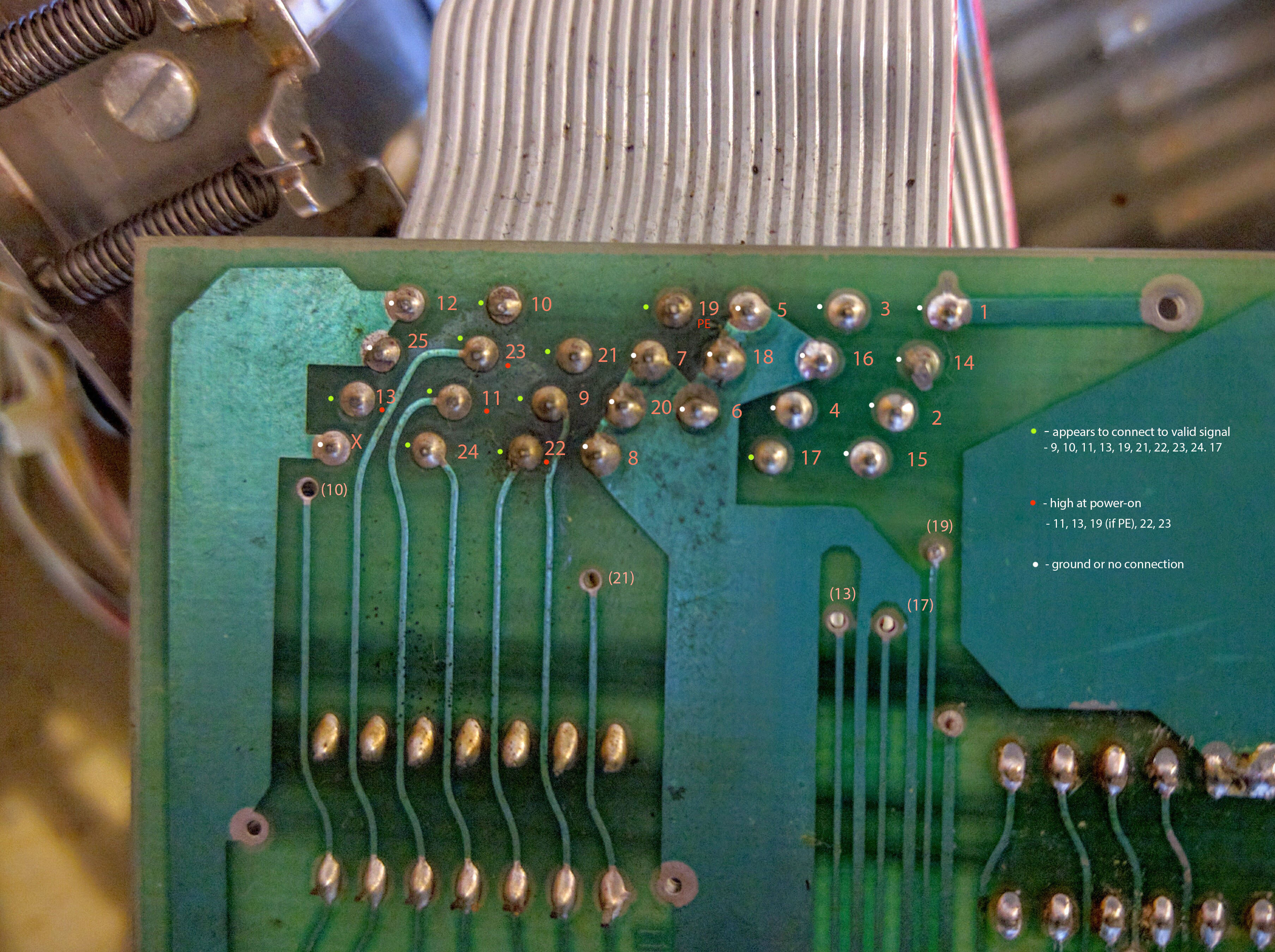
I'm still probing the alleged "parallel ASCII" interface that was
supposedly fitted to my 'Western I/O' converted IBM 2970 Selectric.
Here's where we're at:
http://corestore.org/2970pins.jpg
I've traced the pins from the DB25 connector back to the board; the
ribbon cable in the above pic is straight-through to the DB25. It
doesn't resemble any interface with which I'm familiar, and I can't
see how it can possibly be parallel. Only the following pins (these
are the DB25 pin numbers remember) connect to any pins or devices on
the interface board: 9, 10, 11, 13, 17, 19, 21, 22, 23, 24.
All other pins are either unconnected, or ground.
Of the above 10 pins, 11, 13, 22 & 23 are high at power-up (printer
NOT connected to any interface). The only pin with known function is
19, which is 'paper out'; if I toggle the paper out switch I can see
it going high and low.
There is no frigging way that can be a conventional 8-bit parallel
interface, obviously, with only 10 pins in use, and 4 or 5 of them
(depending on paper out) high on power-up - obviously signaling
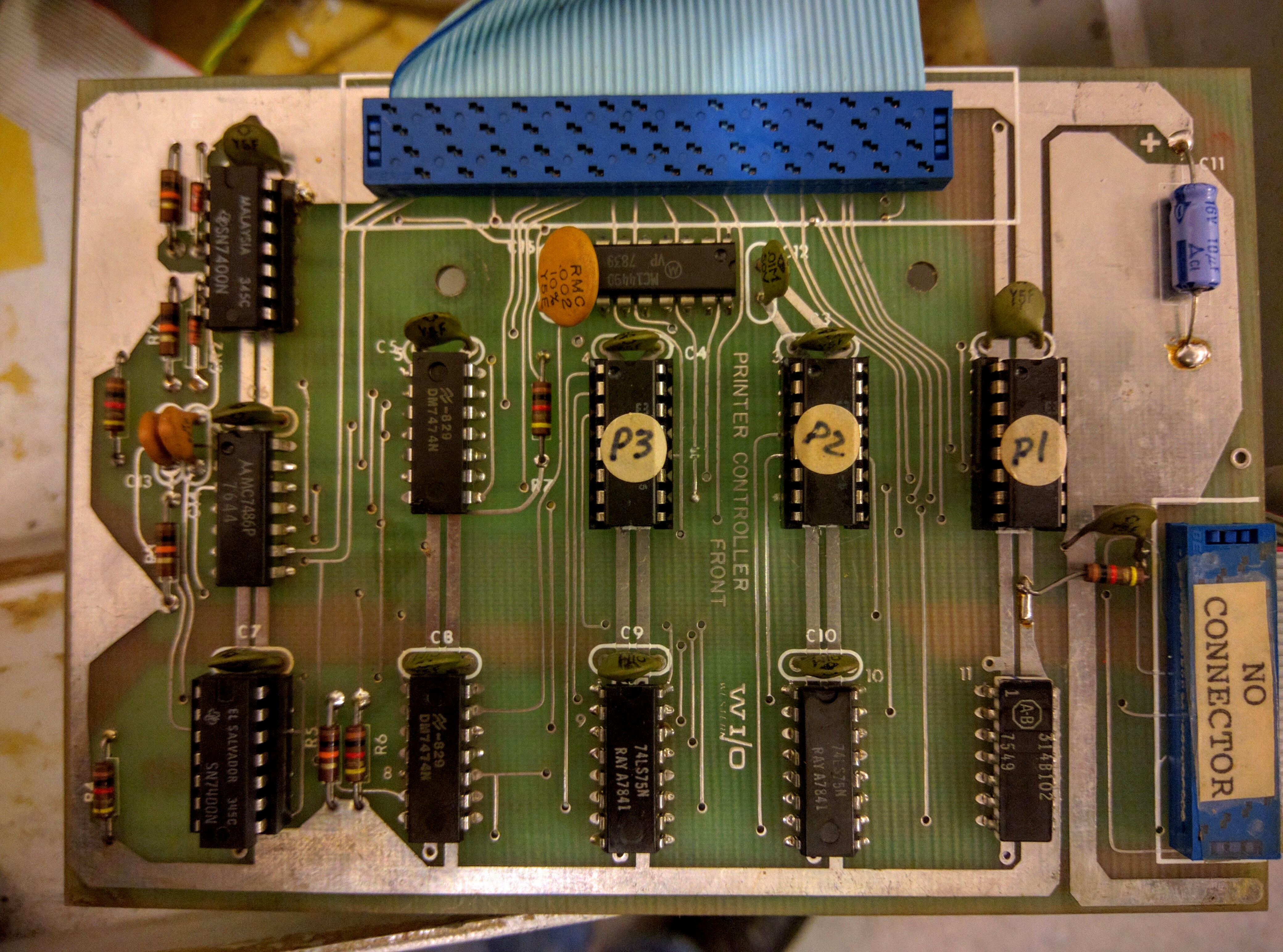
something. Whatever it is, most of the pins are driven by an IC - an
Allen Bradley 314B102. Google has nothing, except a few for sale. No
datasheet anywhere I can find.
Can anyone give me a clue as to the purpose and pinouts of an Allen
Bradley 314B102??!!
Here's the component side of the driver board, the interface and
314B102 bottom right:
http://corestore.org/2970driver.jpg
Help? Please? Anyone out there with old reference material? Anyone
make a stab at what the hell this interface might be??? Maybe, maybe,
it's some kind of custom 'internal' interface and was intended to be
used with a (missing) external converter box/cable that made a
standard parallel interface of it??
Mike
http://www.corestore.org
'No greater love hath a man than he lay down his life for his brother.
Not for millions, not for glory, not for fame.
For one person, in the dark, where no one will ever know or see.'
> From: Chuck Guzis
> It's also occurred to me that without screens, we might be better off
> today ... The average web-surfing experience blasts the user with tons
> of filigree and useless data, but very little useful information. ...
> Web sites that have multi-megabyte splash screens that serve no purpose
> other than tell you that you've arrived.
Agree completely. The amount of useless 'eye candy' on the average Web page
is, well, appalling. But then again, the low S/N on developing technologies,
as worthless content expands faster than high quality - well, that's nothing
new, look at TV.
> (oh boy, am I going to get flack on this one)
Not so much! Most seem to agree, actually! :-)
> Data is cheap and Parkinson's law applies.
"90% of _everything_ is crap!"
Noel
OK Yea they were odd inside we have tower here.. think it is a 70
and a 17" or 19 inch MONSTER ibm monitor ( alas B/W).
Years and Years ago someone dumped a bunch at a thrift shop.. lots of
them!
neat here I wish I had kept more of them... I kept the tower and let
the desk tops go you see seldom any of these around here. We also
kept a LAPTOP IBM with dual floppies and a odd plasma screen all in one IBM
computer...
and we have an IBM that is like the Compaq Portable and of course a
first PC ( where do I get Charlie Chapman look-a-like to have next to
it!?)
Ed# _www.smecc.org_ (http://www.smecc.org)
In a message dated 12/18/2015 12:08:25 A.M. US Mountain Standard Tim,
ggs at shiresoft.com writes:
No they weren't SCSI. Those were only through either a
"spock" or "tribble" MCA card. Those were the code names.
I have *no* idea what the "real" IBM designation was. ;-)
The desktop PS/2 machines (50, 50Z, 70, etc) were all
designed with robotic assembly in mind (that's why there
are no screws or cables in those machines). To accomplish
that the HDD was a non-standard connector.
TTFN - Guy
On 12/17/15 10:30 PM, COURYHOUSE at aol.com wrote:
> did all mod 70s have SCSI drives?
>
> Ed#
>
>
> In a message dated 12/17/2015 10:54:50 P.M. US Mountain Standard Tim,
> mokuba at gmail.com writes:
>
> I never saw this post, but did end up with a 30MB. I will take another
if
> available though.
>
> On Sat, Mar 21, 2015 at 1:27 PM, Daniel Snyder
<ddsnyder at zoominternet.net>
> wrote:
>
>> Still looking?
>> ----- Original Message ----- From: "Gary Sparkes" <mokuba at gmail.com>
>> To: "General Discussion: On-Topic and Off-Topic Posts" <
>> cctalk at classiccmp.org>; <unallocated-space at googlegroups.com>; "
>> Blabber at hacdc.org" <blabber at hacdc.org>; "HacDC Members Discussion
List" <
>> members at hacdc.org>
>> Sent: Monday, February 16, 2015 9:31 PM
>> Subject: IBM PS/2 Model 70 HARD DRIVE NEEDED
>>
>>
>>
>> Got a hard down situation and need to re-install/recreate the BBS
system
> I
>>> had running.
>>>
>>> HDD makes swishy noises when shaken, haven't tried stirring yet.
>>>
>>> I /guess/ a bootable MCA SCSI card would work too... ;)
>>>
>>> I had the 160MB drive, but anything above 30 would work - i guess i'll
>>> just
>>> have to use a SCSI Drive for the file storage area once i get an MCA
> SCSI
>>> card ....
>>>
>>> --
>>> Gary G. Sparkes Jr.
>>> KB3HAG
>>>
>>
>
> --
> Gary G. Sparkes Jr.
> KB3HAG
>
Did the email server fall over again?
--
--- Dave Woyciesjes
--- ICQ# 905818
--- CompTIA A+ Certified IT Tech -http://certification.comptia.org/
--- HDI Certified Support Center Analyst -http://www.ThinkHDI.com/
Registered Linux user number 464583
"Computers have lots of memory but no imagination."
"The problem with troubleshooting is that trouble shoots back."
- from some guy on the internet.
Noel wrote....
-----------------
Every time I think about it I kick myself... Sigh!
Although I suspect a lot of people here have stories like that...
-----------------
Yeah Noel, we all do. I had a couple different really great machines offered
to me long before I got into collecting. A DG nova 3 and an IBM System/3
come to mind, I'm sure there were others. I declined and they were scrapped.
But here's one with a good ending....
Many years ago (I was around 19 years old) I acquired two Microdata Reality
M1600 core machines (including full schematics and source code, completely
unheard of for those machines). These two particular systems were very
unique (basically one of a kind) even within the microdata world. After a
time my parents ordered them out of the house and a "friend" agreed to store
them. A few weeks after moving them to his house, he informed me that he
gave them away and wouldn't tell me to who/where.
Decades later I got into collecting, found the classiccmp list, met Jim
Stephens here, and we've talked on the phone and met due to our shared
history/interest in Pick-based machines. During one conversation it was
discovered that - not directly, but through several chains of
trades/sales/pickups - Jim Stephens had those exact two systems that I used
to own. Given the unique nature of the two machines, there's no doubt they
are the exact same ones. But we've also discussed the details of who we each
knew, and pretty much ironed out who all's hands they passed through between
him and I over the years.
So... while I am sad I "let those machines go"... it's great to know that
they eventually wound up in a great home of a fellow collector that I know -
instead of the shredder!
Best,
J
@ Brent Hilpert
May I ask what software you use for creating your schematics ??
I like the way gates are drawn.
Thanks !
---
L'absence de virus dans ce courrier ?lectronique a ?t? v?rifi?e par le logiciel antivirus Avast.
https://www.avast.com/antivirus
Has anyone had any luck re-inking printer ribbons?
I spent a few minutes looking at this Vic 1525 printer that I got the other
day - turned out that the carriage was just gummed up and there was a blown
fuse in the PSU section (probably related to the former problem).
Of course the ribbon is completely dried out. I'd originally intended for
the printer to be a static "Hey, that looks neat" item, but looking at it
briefly, it's a good example of how to make a printer as cheaply as
possible, so I'm wondering if there's a way of breathing life back into the
ribbon so that it can print again in all it's noisy, glacially-slow glory :-)
I don't care if it's not as black as an original ribbon would have been -
it just might be nice if it was able to print something legible.
cheers
Jules
From: "js at cimmeri.com" <js at cimmeri.com>
Subject: Re: Decisions you regret
> mark at markesystems.com wrote:
>>
>> Yep. Among the things that I have
>> given away (to Goodwill, or possibly
>> Salvation Army) - all in running
>> condition:
> ....
>
> I'm going to go shoot myself now.
> ~~
>
> I'm curious, why were these given to
> a Goodwill / Salvation Army of all
> places? These places don't have the
> first clue of what to do with items like
> these.. and they tend to be overwhelmed
> with stuff anyway. Not everything goes
> out for sale.
My reasons at the time:
- All equipment was pretty much at its minimum value-wise
- It could still be priced relatively highly for tax deduction reasons
- I was very space constrained, and not using it at the time
- I'd just gotten married (see "Spousal unit", in a later post)
None of them good enough in hindsight for the value that equipment would
have now, either to me or others.
Damn - too bad I pawned that old Colt Paterson - I bet it would be worth
something by now...
~~
Mark Moulding
did all mod 70s have SCSI drives?
Ed#
In a message dated 12/17/2015 10:54:50 P.M. US Mountain Standard Tim,
mokuba at gmail.com writes:
I never saw this post, but did end up with a 30MB. I will take another if
available though.
On Sat, Mar 21, 2015 at 1:27 PM, Daniel Snyder <ddsnyder at zoominternet.net>
wrote:
> Still looking?
> ----- Original Message ----- From: "Gary Sparkes" <mokuba at gmail.com>
> To: "General Discussion: On-Topic and Off-Topic Posts" <
> cctalk at classiccmp.org>; <unallocated-space at googlegroups.com>; "
> Blabber at hacdc.org" <blabber at hacdc.org>; "HacDC Members Discussion List" <
> members at hacdc.org>
> Sent: Monday, February 16, 2015 9:31 PM
> Subject: IBM PS/2 Model 70 HARD DRIVE NEEDED
>
>
>
> Got a hard down situation and need to re-install/recreate the BBS system
I
>> had running.
>>
>> HDD makes swishy noises when shaken, haven't tried stirring yet.
>>
>> I /guess/ a bootable MCA SCSI card would work too... ;)
>>
>> I had the 160MB drive, but anything above 30 would work - i guess i'll
>> just
>> have to use a SCSI Drive for the file storage area once i get an MCA
SCSI
>> card ....
>>
>> --
>> Gary G. Sparkes Jr.
>> KB3HAG
>>
>
>
--
Gary G. Sparkes Jr.
KB3HAG