Hello! New member to cctalk here. I am located in Seattle, and in the past have worked for a couple largish companies in the Seattle area you've heard of.
Through the 80s and 90s I had accumulated a fairly sizable collection of classic (and not yet classic) computers. Mostly this was along two branches of machines - Atari 8 bit computers and 80s-era minicomputers & workstations, including a couple smaller VAXen, a PDP-8 and a large stack of HP9000/300 machines. Also I had a couple of no-name S-100 machines and a pretty nice one from California Computer Systems.
When I moved from the Midwest following college I had to abandon much of that collection. In the last several years I have started to reconstitute that collection, at least in the basics. I'm still looking for a genuine VT100 (or stretch goal - VT278), and in 2020 I'm planning to finally bring up a simulated VAX cluster using Raspberry Pis and SIMH, since original hardware is pretty much impossible to find anymore (and fragile when you can find it). It's frustrating to be hunting for things I had three or four of at one point...
Happy to be here,
-mike begley
spam at hell.org
Good news! After a bit of a configuration nightmare (it is more complicated than Worldpay) I have got it working.
I will test a couple more times and then figure out what we need to do to make it live.
Mark
> Begin forwarded message:
>
> From: Vale Coaches - Office <office at valecoaches.com>
> Subject: Your Vale Coaches order has been received!
> Date: 31 December 2019 at 14:11:32 GMT
> To: mark.darvill at mac.com
> Reply-To: Vale Coaches <office at valecoaches.com>
>
>
>
> Thank you for your order
> Hi Mark,
>
> Just to let you know ? we've received your order #10075, and it is now being processed:
>
> [Order #10075] (31st December 2019)
>
> Product Quantity Price
> RHS Cardiff Flower Show - Saturday 18th April 2020
> Pickup Point:
> Sturminster Newton
> Packed Lunch Sandwich:
> Egg & cress on brown
> Packed Lunch Drink:
> Apple Juice
> 1 ?69.00
> Subtotal: ?69.00
> Payment method: Barclaycard
> Total: ?69.00
> Billing address
>
> Mark Darvill
> Test
> April Cotatge
> Sackmore Lane, Marnhull
> Sturminster Newton
> Dorset
> DT10 1PN
> 01258 820871
> mark.darvill at mac.com
> Thanks for using valecoaches.com!
>
> Vale Coaches
> Site built by Marnhull Computers Marnhull Computers <mailto:mark at marnhullcomputers.com>
On Mon, 2019-12-23 at 12:00 -0600, cctalk-request at classiccmp.org wrote:
> Re: First Internet message and ...
I read the caselaw in the GUI war cases of the 80's. Microsoft and
apple were battling over features and everyone else was being weighed.
There are nice comparative tables, TOS/GEM vs OS/2, vs Amiga, vs,
Windows..... Vs. Smalltalk.
The Xerox btw, comes out ahead of everyone.
Jeff
Is there a way to get an HP-IB disk unit with an ST412 or ESDI type HDA inside to perform a low-level format?
I think this is what 'mediainit' is maybe supposed to do (based on being able to change the interleave) but I don't see any way to map bad blocks (etc.) using it. The -r 'recertify' option is apparently only valid for tape.
I have a 7946A with a Vertex V170 that needs some new blocks marked bad. There's nothing on it I need to keep, but if I use 'mediainit' on it, it fails pretty quick with an I/O error. From the sounds it makes, it's hitting the first defect (at block 64) and giving up.
# ioscan -f
Class H/W Path Driver H/W Status S/W Status
=================================================
hpib 7 98624 ok(0x301) ok
disk 7.0 cs80 ok(0x220) ok
tape_drive 7.0 cs80 ok(0x220) ok
serial 9 98626 ok(0x10) ok
scsi 14 98265 ok(0x313) ok
disk 14.2 scsi ok(0x202) ok
lan 21 lla ok(0x30f) ok
# mediainit -v -i 1 /dev/rdsk/c7d0s0
mediainit: initialization process starting
mediainit: locking the volume
mediainit: performing a describe command
mediainit: running diagnostics
mediainit: initializing media
mediainit: initialize media command failed - I/O error
#
I know it's doing something to the disk because the data that was in the first 64 blocks is now zeroed out.
# dd if=/dev/dsk/c7d0s0 count=64 | od -x
0000000 0000 0000 0000 0000 0000 0000 0000 0000
*
64+0 records in
64+0 records out
0100000
# dd if=/users/bear/7946A.dd count=1 | od -x
0000000 0030 7375 2e72 0032 0000 0200 0000 0000
0000020 0000 0100 0000 0000 0000 0000 0000 0000
0000040 0000 0000 1190 1202 0644 0000 0000 0000
0000060 0000 0000 0000 0000 0000 0000 0000 0000
*
64+0 records in
64+0 records out
0100000
#
ok
bear.
--
until further notice
Well, I've been working on all these RL02 drives and such in an effort
to repair the pdp11/73 that I used to bring to science fiction
conventions in the 1980's and 1990's. TALOS was the new system, BALCON
(after Balticon) was the older system that ran on RL01's and would
require me hauling a 6 foot rack of gear in a 1971 station wagon. Oh
those were the days, splitting power with the laser frobs and running
multi-player games back in the late 80's....
Anyway, Talos suffered a failure a long time ago and has been dead
since. Now that I have time and space I've been working on fixing it.
First step was to find out if anything worked, turned out one of my RL02
controllers was flakey and one of my RL02 drives had a very naughty head
that resulted in the destruction of my RSXM38 boot pack. And the memory
was unhappy. But the 11/73 CPU was sound.
After fixing that junk I was able to boot RT11 and install it on one of
the partitions of the Fujitsu ESDI disk (MTI controller, has two
partitions per disk each about 70mb in size). So finally the system and
drive logic was working but trying to boot the RSX11M image just gave me
a trap to zero fault.
First step was to fix a RSX11M 4.2 system disk. Did a quick sysgen on
SIMH, built to a RL02 pack image, then once that was up and working with
DU: driver support (the out of the box disks do not support DU:) I was
able to transfer the image over serial using pdp11GUI (great tool!) to
the RL02 drive. Now I could boot RSX11M on the RL02. However I knew that
I had only one shot to fix the Fuji drive, and I wished I had a backup.
Wait! I can make a backup of the Fuji drive using PDP11GUI! Upped the
baud rate on the 11/73 from 9600 to 38400, loaded the drivers, fired it
up, and let it run for 7 hours to copy the disk image. Really
interesting that there were no errors, meaning the disk image itself was
not the problem. Hm....
Then I made a copy on my laptop (took less than a second, sigh) and
realized I could boot the RSX11M image on SIMH *and* mount the Fuji
volume copy to find out what was up.
Booted the image, mounted the disk, and took a look. Found it pretty
quickly: Back in 1997 I was doing a cleanup of the system and did a
purge of old versions of files in [1,54]. I must have had a later
version of RSX11M there from a VMR operation that I never committed to
disk, and when I purged the older version it was the one that the boot
block was trying to reference. Thus the system ran fine but when I shut
it down and booted it a few years later it could not find the deleted
file and crashed out.
Simple. Solution was to set the default to DU2:[1,54], then boot
du2:rsx11m, hit G when the XDT debugger came up, then type SAV /WB to
re-write the boot block with the correct version of the RSX11m file.
Sure enough, the system booted up, complained about not finding the
DZV11 cards (I had removed them for testing) and was working. Shut down
the RL02 drive, did a cold restart, and TALOS came up and online :-)
Now I need to figure out what to do with it. I think it has DecNet 11/M
4.0 on it, so I could do a Phase II link with another system over serial
ports/tcpip to serial gateways. If I can find the later versions of
Decnet 11/M I could probably gen an Ethernet card and do a gateway to
TCP/IP systems. Anyone want to peer with this old system?
Overall this was an interesting little project: It required me to dust
off my hardware, software, and OS level troubleshooting skills. Now that
the system is up I can start working on hooking up the RX01 drives to
get the PDT11/150 some fixed disks, then start thinking about the 20/20
core in the shed.....
Never dull, and thank you everyone for the help and the tools.
On 12/30/19 12:47 PM, Eric Hernandez wrote:
> Hi ,
>
> My name is Eric (engr.eric at gmail.com), I'm from Long Beach, California,
> USA. I have an original PDP-11 Rack (just the one rack with the Digital
> logo and no other components). I absolutely love this Rack and the
> vintage logo/sign across the top, but I have to find a new home for
> it and I can't bring myself to just craigslist it for it's usage as
> a general equipment rack or to just ebay the logo at the top. I was
> wondering if anyone here knew where I can sell it to a good home or
> what a fair asking price would be for it? Thanks for any insight you
> could provide.
Cross posting to a wider audience.
--
Grant. . . .
unix || die
FTGH - S100
This was a rescue (so its neither tested or power up) and some docs came
with it so I assume they belong to this machine (see pics).
http://koken.advancedimaging.com.au/index.php?/albums/s100-rescue-1/
The machine is located in Mortlake in the south west of Victoria
(Australia) and will need to be collected from there. Alternatively I
will be in Melbourne (Australia), more precisely Tullamarine, at various
times during January 2020 and it could be collected from there.
http://koken.advancedimaging.com.au/index.php?/albums/s100-rescue-1/
Kevin Parker
Hi!
As I work to repair my RL02 collection I need to check and fix the files
on the five disks in the original boot collection. Question: Does anyone
know which directories/files went on which RL02 disk pack?
Goal is to get the packs back to the point where I can do a good old
fashioned sysgen again.
Thanks!
Chris
Hey all,
I was wondering if anyone knows what system either of these two keyboards
came from:
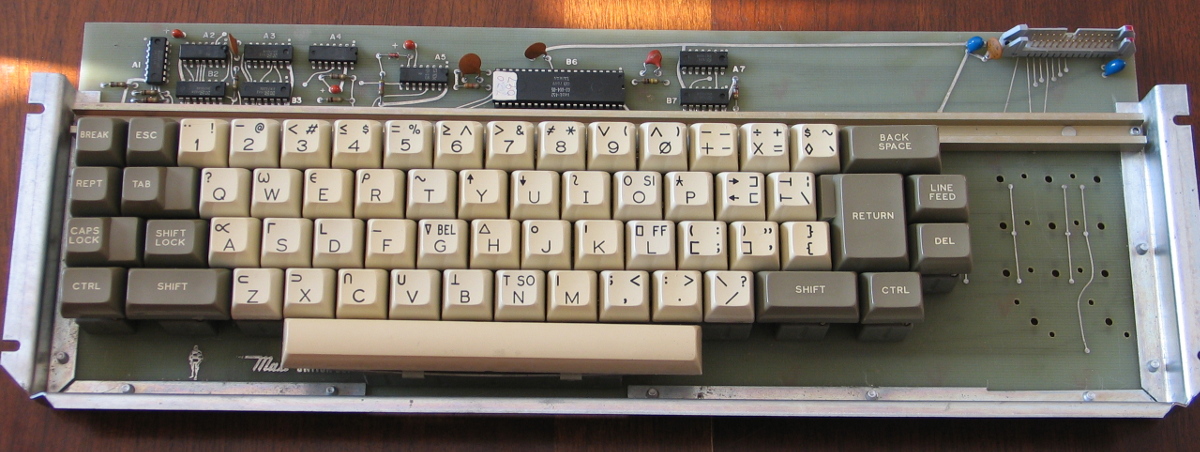
1) APL keyboard made by Maxi-switch, IC date codes in 1976, p/n 2129-009,
keyboard encoder has "NKBD-452 03-004-05":
http://www.classiccmp.org/acornia/tmp/maxi.jpg
2) Keyboard branded as Licon 55-500129, IC date codes in 1973 and '74. Has
three blank white keys, one blank gray key, and one blank black key, also
"home mem", "marg set" and "video rvs":
http://www.classiccmp.org/acornia/tmp/licon.jpg
I picked up both hoping that at least one would be simple parallel output
and so useful for homebrew stuff, but I am curious about what they
originally came from.
cheers
Jules
Greetings,
I'm trying to find a way to get my DEC Rainbow's monochrome output onto a
newer monitor than my aging VR201 (especially since I zapped something in
it and my diagnostic efforts to date haven't fixed it).
So, I found the bit in the Rainbow docs that said the output was DC Coupled
RS-170 signals and to convert to RS-170 (NTSC black and white) I needed to
put a 10uF cap inline to make it RS-170. So I did this, and fed it into a
generic NTSC composite video to VGA thing, and got only a little joy. The
first few lines seem to be missing, then the next few are OK and then
nothing else.
I tried to google this, but found nothing. My google foo has failed me.
Does anybody else have a working setup?
Warner
Gentlepeople,
I'm doing some work with my Pro 380 over the holidays, but have run into a snag because both my LK201 keyboards are dead. They fail poweron self test -- LEDs stay on and no response to any keypresses.
The odd thing is that the circuit board itself seems ok; I had a spare board that tests fine by itself, so I installed it as a replacement control board on one of those keyboards and now it fails. So that suggests there's something wrong with the key array that breaks selftest.
I don't understand that because the documentation says a stuck key would produce a selftest pass along with an indication reporting stuck key. And while I know LK201 keyboards don't like spilled liquids, one of those keyboards definitely hasn't been abused that way and I don't see signs the other one has, either. So having both fail the same way is puzzling.
Any ideas?
I'm considering building a PC keyboard LK201 emulation, should be a fairly simple bit of Arduino code.
paul
Are there any surviving Lockheed MAC-16 machines anywhere? And/or does
anyone have a good photo of the front? (All I've been able to find online
is the angled shot that's on the wikipedia page, plus a few grainy images
>from marketing info).
I rescued a couple of panels a little while ago, but all I have are the
PCB, switch and bulb-holder assemblies; it might be fun at some point to
mock up a surrounding bezel/overlay, but I'd need some good quality
reference material for that.
cheers
Jules
Hi folks,
Maybe a long shot, but does anyone have a 3B2/1000 running SVR 3.2.3
that I could get an account on? Specifically, I need one with a compiler
installed. There's a publicly accessible one at the Living Computer
Museum, but unfortunately there are no compilers or assemblers installed
on it at all :(
I'm working on adding 3B2/1000 support to my 3B2 emulator, and need to
run some tests against a real one to be sure my behavior is correct.
All the best,
-Seth
--
Seth Morabito
web at loomcom.com
Looking for an old midi sequencer called Voyetra Sequencer. The Gold
version for DOS is all over the internet, which was a later version.
I have a Yamaha C1 laptop now running after repairs, and from the demo
disk another collector published I have the MIDI driver for Voyetra
Sequencer Plus. But the driver I have from the demo disk is too old for
the Gold version of the software.
Looking for Voyetra Plus II or III. The increase in number matches the
increase in allowed number of channels.
Any leads appreciated.
--
: Ethan O'Toole
I'm curious if anyone recognizes the system this board went to.
Has an? E with a circle spot and a CM-8 badge on the carrier board.
A core board on the carrier is probably a 4k board made by Standard
Memories, Santa Ana, CA.
I put up photos of the board on my toy blog.
https://jimsoldtoys.blogspot.com/2019/12/4k-or-8k-core-board.html
Grumpy Ol' Fred cisin at xenosoft.com
*Wrote:*
*?More worrisome is that Murray is NOT A "NEWCOMER" who will be "scared off" *
*by corrections of his facts! This is not the first time that he has *
*needed to be admonished to be VERY specific about what was "FIRST" about *
*something. He wrote about the exact same event three weeks ago, on the *
*correct date, with much more accurate details, other than calling it "the *
*first inter-computer communication". Not sure where he got the November *
*21 date, nor the "SIXTY years ago" (probably a simple misteak)*
*He is quite capable of some fairly good writing. I don't remember any *
*prior time that he had to be reminded to "PICK A TOPIC!" rather than *
*string together eight unrelated concepts into four sentences.*
*On the other hand, if his confusion was recreational, that's OK, too.*
*Let's have a toast with him to the people who got the idea to work, *
*disunirregardless of who was "first".?*
********** *
Things we historians talk about are ?firsts? and ?facts?. If we go to
original source(s) maybe then we will get things right. I guess the best
that can be said is we agree to disagree. A sad commentary in this age of
what my ?facts? and your ?facts? are, are not the same but we historians
should do our best to state ?firsts? and ?facts? are indeed that to the
best of our knowledge. The 60 yrs. as noted was a math error and here I
spent years as a BASIC, C and C++ programmer as isn?t mathematics the basis
for all programming languages? Let's indeed toast to all micro-computing
progenitors for making our hobby possible.
I?ve been a hobbyist and experimenter since the 1970s though I worked on
mini-computers(PDP-8/11) in the 1960s. I got to work on them in high
school; I know we were rather privileged.
For microcomputers it began in April 1978 when I built the Heathkit
H8($2500 Cdn.) a computer based on the PDP-11 with 4K(B) of an 8K(B) card;
now $2500 will buy a truly powerful home computer with 16/32GB of memory.
My second, the Coleco ADAM, computer was Aug. 1984. A bit more powerful and
more useful to be sure. Finally in 1989 I moved into the IBM PC world ? the
Compaq Deskpro 386 which ran DOS, Lotus 1-2-3 and Windows 2 that could run
Word and Excel. Wow! Notebooks followed.
And now(well Aug. 2019 to be precise) I built my own custom Mini-ITX PC
>from parts sourced here and there for $750 Cdn. This makes me nostalgic for
the old days of computing we talk about on cctalk.
Happy computing.
Murray ?
Hello everyone,
I've got these Nixdorf boards since recently. Does anyone know to what kind of machine this belongs? The word "Kernspeicher" clearly points to magnetic core memory. And when I look to the amount of power transistors it seems to be 12 bit. I really wonder from what kind of machine these were. The boards date from early seventies...
And I wonder if anyone could actually use them to repair such a machine.
Regards, Roland
Some pictures of the boards on VCFED:
http://www.vcfed.org/forum/showthread.php?72836-Nixdorf-computer-AG-boards-…
I'm looking to pick up a set of at least some hand tools for wire wrap,
though I'm interested in wrap guns/bits as well.
I'm specifically looking for hand tools for 26awg wire, as well as 22
and 24awg. I already have a hand tool for 30awg. Mainly interested in
tools for .045" square posts rather than the .025" for those sizes of
wire. These tools were commonly used for telephony wire wrap.
I'm interested in those sizes for wrap guns as well, but additionally
would be interested in 30awg/.025" post bits as well.
I'm not entirely opposed to 26awg/.025" post, but that seems like a bit
thick of wire for that size post, IMO.
Feel free to contact me on or off list.
Best Regards,
Joe Zatarski
So after looking at the mess the mice had made of my third RL02 drive I
decided it would probably be better to pull the heads and put them in my
second drive (the one with the bad top head and plugged filter).
Getting heads out was simple, and I decided to put them side to side
with the heads in drive 2. The following images show some interesting
details.
https://i.imgur.com/tcmkUmO.jpg
Note that O is original (the heads from drive 2) and the top heads are
>from drive 3.
First, the heads on the third drive were in pretty good shape and looked
clean. Under the loupe though I could see some fragments of gunk that
needed to be removed. More importantly I did a side view comparison
between the bad top head in #2 and the top head in #3:
https://i.imgur.com/D6HOxND.jpg
This was a really tough picture to take, and you have to zoom in on the
heads in the upper right. But what you can clearly see here is that the
better head from #3 (left one) is pretty much rectangle shaped while the
crashing head from #2 (right one) is shaped like a wedge, with the top
part being narrower than the bottom.
https://i.imgur.com/fEGuOFE.jpg
And of course the filter removed from #2. Note the silicon sludge, I
think this is 100% blocked (and was why the drive made a lot of air/wind
noises when spun up, the fan was cavitating)
This sums it up: I think what happened is the unit was run in a very
dirty environment, the absolute air filter plugged up, and the heads
don't fly as well without that blast of clean air coming in. So they
dragged on the disk, and the ceramic rubbed off (and onto the packs)
which led to the eventual disk damage.
Moral: Change filters. I cleaned up the #3 heads, put the heads from #3
into unit #2, put the air filter from #3 into #2, and fired it up with
the test pack. Goes to ready no problem, will do a full dir/bad with
RT11 later this afternoon to see if I still have two errors on the pack.
It is interesting to note that the bottom head from drive 2 didn't look
too bad, and did not pick up any dirt/oxide from the disk after I
replaced the filter. It was probably flying very close to the platter
but had just enough airflow to make it fly. Still, I'll put it in the
spares pile and think about it for awhile...
Otherwise, back in business. I'll be checking the filter on #1 just to
be on the safe side. It was my RL02 drive from 30 years ago and was not
one of the Solarex ones. Then I'll put fixing this third RL02 on the
calendar (will need new wiring, long ribbon cable, filter, heads, and a
massive clean-up inside), and start working on restoring my darn RSX11M
4.2 disk packs...
I have a POST error on my VAXmate, which I think is related to the hard
disk. I get error codes 81 or 82 depending on whether my MFM emulator is
running or not. I suspect the hard disk controller itself may be faulty,
because I don't see much activity on the MFM emulator itself (it is the
David Gesswein one).
>From the table of contents in Volume 1 of the Technical Reference Manual it
looks like the error codes might be in Volume 2. Only Volume 1 appears to be
available online, does anyone have Volume 2, ideally scanned, or failing
that, who can tell me what those codes mean?
Thanks
Rob
It is called The History of the Personal Computer part 2
He goes to the Xerox building to find the first graphic interface. He walks around and then stops an puts his hand on a Dioblo 30 hard disk drive.
I think he might have missed something.
Dwight
So I got the third RL02 out of the shed this afternoon and after
cleaning the outside I brought it in to disassemble and check out. Being
in an outdoor shed for 15 years is not good for technology, I could see
debris behind the front panel and just knew that mice had gotten into
the unit. The question is how far...
Taking it apart gave me some clues. On the positive side there was no
infestations or dirt/debris/anything past the absolute air filter. As a
bonus, the filter was very clean and there was no debris past the motor
air impeller. This is good, and it gives me a clean air filter with
which to test the other drive to see if the heads will fly (my other
drive had a 100% clogged filter. I need to take some pics)
Bad news is I can see mouse debris down the four tubes on the intake. It
looks like they made a little house under the power supply, which is
where the intake is to the high pressure air system. So I think I'm
going to be pulling the whole AC/DC power supply out and do a major
cleaning.... Hopefully they did not chew the wires.
Never dull.