Rumor has it that David V. Corbin may have mentioned these words:
> >>> > The free software from Atmel & Lattice are geared around
> >>> the newer FPGAs that you could build a 6809 out of....
>
>Has anyone actually done this? The reason I ask is I developed a bunh of
>code around the 6809 architecture. Some of it would be worth resurrecting IF
>I code get a "micro-codable" implementation with some other features...Just
>an idea...or maybe the dementia is surfacing....
Yes... Off the top of my head:
http://www.inicore.com/
They made an FPGA-based 40Mhz 6809... (they say it'll do 10Mips!)
Otay, memory served, but here's a page directly to the info:
http://www.inicore.com/core_lib/inicpu.htm
[[ I have *no* idea on cost -- just stumbled across it during a google
search a couple of years ago. ]]
Also, if you're looking for something "more updated" there's always the
Hitachi 63C09 - it's 4 Mhz, and has more registers, a 16-bit integer
multiply (with a 32-bit result) and clock for clock is faster than the 6809.
Laterz,
Roger "Merch" Merchberger
--
Roger "Merch" Merchberger --- sysadmin, Iceberg Computers
zmerch(a)30below.com
Hi! I am a .signature virus. Copy me into your .signature to join in!
to re-iterate, the separate sections I am proposing let the emulator do this very easily. Embed the format and the data together as pyhsical information and then the matter of extracting a file for emulation becomes difficult and not universal.
best regards, Steve Thatcher
-----Original Message-----
From: Vintage Computer Festival <vcf(a)siconic.com>
Sent: Aug 11, 2004 2:30 PM
To: "General Discussion: On-Topic and Off-Topic Posts" <cctalk(a)classiccmp.org>
Subject: Re: Let's develop an open-source media archive standard
On Wed, 11 Aug 2004, Sean 'Captain Napalm' Conner wrote:
> It was thus said that the Great Vintage Computer Festival once stated:
> >
> > HOWEVER, this makes it very difficult to use the imagefile on an emulator.
> > To use the floppy disk example again, if the emulator wants Track 14
> > Sector 8 (or Block 417) but it has not been explicitly laid out in the
> > imagefile because it was originally zeroes, then the emulator, if poorly
> > designed, may crap out.
>
> Are you trying to create an archive format, or a format that is to be used
> by emulators? I say skip the emulators and concentrate on archival
> purposes. An emulator can then use the archive format to create a disk
> image in whatever internal format it requires.
This is exactly what I have in mind. It's an archive format that can be
used by emulators. The emulator would only need a front end that can
interpret the archive image into an internal data structure that it can
use.
> Don't complicate the problem.
We're not trying to at least ;)
> -spc (And don't try to become everything for everybody ... )
Not trying to do that, but we are trying to make it a format for
everything (or at least as much as possible that makes sense).
--
Sellam Ismail Vintage Computer Festival
------------------------------------------------------------------------------
International Man of Intrigue and Danger http://www.vintage.org
[ Old computing resources for business || Buy/Sell/Trade Vintage Computers ]
[ and academia at www.VintageTech.com || at http://marketplace.vintage.org ]
Thanks Tony - I have swabbed it with Isopropyl alcohol - I assume that's the same thing.
They're a real bugger as you have to pull the drives out to get to the heads because the things are so big.
I figured an alignment disk was needed but was fishing a bit too as I suspect an 8" one is hard to find.
Another theory I had was that I figured that Drive 0 has probably had a lot more use so I might try swapping them around if I can sort out the jumpers (if they have any) and see if I can get it to boot.
+++++++++++++++++++
Kevin Parker
Web Services Manager
WorkCover Corporation
p: 08 8233 2548
e: webmaster(a)workcover.com
w: www.workcover.com
+++++++++++++++++++
-----Original Message-----
From: cctech-bounces(a)classiccmp.org
[mailto:cctech-bounces@classiccmp.org]On Behalf Of Tony Duell
Sent: Wednesday, 25 August 2004 9:08 AM
To: cctalk(a)classiccmp.org
Subject: Re: Drive alignment
>
> I have a TRS80 Model 12 that's been upgraded to a 16B (with two 8"
> slim-line floppies). I am trying to copy some discs but not having much
> joy.
>
> One theroy is the media is cactus.
>
> The other theory is that following some reading about these machines,
> because of the size of the drives they tended to get out of alignment
> regularly. How do I check alignment on the old classics.
Take a known-good blank 8" disk and format it on one of your drives. If
you can then read/write to it in that drive without problems, then the
only thing that could be wrong with the drive is the alignment. If it
fails, then you have other problems with the drive.
To check the alignment properly, you need a CE (Catseye) disk and a
'scope. Basically the disk has a special patern recorded on it (this
cannot be copied using a normal drive, BTW) and you look at the outputs
of the read amplifier with a the 'scope. You see a pattern of 2 lobes on
the 'scope screen -- if they're the same height the head is alighed, if
one is larger than the other it's offset from the correct position.
It's not hard to do, but the Catseye disk is expensive (I am still
looking for the 8" and 3" ones, BTW...).
My experience suggests that head radial alignment is not normally a
problem unless you've replaced parts of the drive. More likely is a dirty
head (you have cleaned it, right? With a cotton bud dipped in
propan-2-ol, not one of those useless cleaning disks), a worn-out head,
other mechnaicl problems, or an electronic failure.
-tony
************************************************************************
This e-mail is intended for the use of the addressee only. It may
contain information that is protected by legislated confidentiality
and/or is legally privileged. If you are not the intended recipient you
are prohibited from disseminating, distributing or copying this e-mail.
Any opinion expressed in this e-mail may not necessarily be that of the
WorkCover Corporation of South Australia. Although precautions have
been taken, the sender cannot warrant that this e-mail or any files
transmitted with it are free of viruses or any other defect.
If you have received this e-mail in error, please notify the sender
immediately by return e-mail and destroy the original e-mail and any
copies.
************************************************************************
I've been searching the net for DOS based electronics software, and I'm
coming up pretty dry. Was hoping someone had suggestions with all the
electronics folks here.
1) Looking for a dos based databook application, primarily for 74xx series
and such. Something that will give me quick access to pinouts, data sheet
info, etc. I did find a promising dos app called ICID, but alas, when it
goes to display pinout info it just blanks the screen on my Toshiba 3200
(only on the pinout page, the rest of the app displays fine).
2) Also need a DOS based semiconductor cross reference guide. I've found a
few out there that are free, but they are all windows based.
3) Lastly, looking for a program that will collect data from and control my
1631 logic analyser via HPIB. I can't find anything on this.
4) Any other handy dos programs for the bench.
Please help, I can't stand the thought of a Windows machine being on the
bench next to me vintage gear :>
Regards,
Jay West
---
[This E-mail scanned for viruses by Declude Virus]
>From: "Terry Yager" <tyger69(a)chartermi.net>
>
>What I've seen (numerous times) with those double-sided 8" drives is when the
drives are shipped/moved without the proper head protecting cardboard inserts,
the heads themselves tend to slam against each other every time the truck hits a
bump. This causes the heads, which are made of glass, to chip, crack and break.
In the most extreme cases, the broken head will actually cut a groove in the
media. Look for holes or grooves in your floppies.
>
>--T
>
>Jam the computer...trash every lethal machine in the land! -- Timothy Leary
>
Hi
The other thing is, if this is a single sided disk, the pressure
pad may have accumulation on it such that it causes the media
to not set flat against the head. A little cleaning with a nail
file work well on these pads. It removes deposits and flattens
the surface. Just don't file it down to nothing.
Dwight
What I've seen (numerous times) with those double-sided 8" drives is when the drives are shipped/moved without the proper head protecting cardboard inserts, the heads themselves tend to slam against each other every time the truck hits a bump. This causes the heads, which are made of glass, to chip, crack and break. In the most extreme cases, the broken head will actually cut a groove in the media. Look for holes or grooves in your floppies.
--T
Jam the computer...trash every lethal machine in the land! -- Timothy Leary
I was on the original team that developed ABEL, the Data I/O PLD language.
I co-authored a book "Digital Design using ABEL" in 1994 that came with
a special copy of ABEL version 5.0. I have this book in electronic form.
I also have versions of ABEL from 1.0 to 5.0 that run without a dongal.
These are DOS versions. I have a mag tape of ABEL 1.0 for VMS (I think.)
Xilinx owns the current ABEL software and Prentice Hall owns the copyright
on the book. However I will post a copy of my book and a full version of
ABEL 5.0 on the web somewhere. I will make the link available on request.
-------------------------------
Michael Holley
swtpc6800(a)comcast.net
www.swtpc.com
-------------------------------
> I just landed hands on a Mac SE. It is currently running system 6, I
>only have a bout 2mb of memory
>and a 20mb hard drive. I even have an imagewriter to go with it!! :^)
If you want to raise that to 4 MB (the max it can handle), give me a
mailing address (off list), I'll send you 2 more 1 MB SIMMs for it.
>Will system 7 run ok on this machine?
Run? Yes, Ok? Eh. Not at all if you don't go to 4 MB, but yes it can run
7.5.5, it just runs it a bit slower then 6.0.8 (both are downloadable
>from Apple's Web site)
-chris
<http://www.mythtech.net>
>I don't know if it would work at all in your vintage of Mac SE, but I
>have piles and piles of the Macintosh high density 'super drive' floppy
>disk drives from a lot of different ages of Macs. Can someone chime in
>on wether your SE could be upgraded to use one just by swapping the
>drive? If so, you can have one or several for the cost of postage.
No, you can't just swap the drive. The FDHD or SuperDrive requires newer
ROMs. You would have to swap the logic board as well.
-chris
<http://www.mythtech.net>
"Jay West" <jwest(a)classiccmp.org> wrote:
> I'm assuming there are no ISA wireless cards, especially with DOS drivers.
Actually I have in front of me an ISA card that accepts a PCMCIA
Lucent wireless card.
I have no clue as to whether you can get DOS (packet) drivers
for that card, but the card *is* supported under Linux/*BSD
Best Regards
**vp
Hello,
I've recently added an IRIS 3130 machine to my collection. It is a
MultiBus based SGI with a Motorola 68020 CPU, additional Floating
Point unit and the typical 5 or 6 board graphics subsystem. It's
complete with original UNIX documentation and owners guide as well
as the original extras (monitor, keyboard, mouse).
I'd like to get it up and running again but I can't get any of the
backups back on a "fresh" ESDI drive (the original died). According
to the Old IRIS FAQ the drive is supported. As far as I can see it
is also detected but the process that should restore the
installation back to harddisk dies quite early in the copy stage.
Thus the current status is: The machine passes POST without
problems, it can be talked into booting the installer and
partitioning tool from tape but it crashes during the copy
operation.
As I said I'd like to get this beast up and running (i.e. have an OS
Installed). A "nice to have bonus" would be having a working TCP/IP
stack on it so that it can run in my network (an Ethernet board is
present).
Any hints / help is *very* much appreciated. I can -of course-
provide additional information if it is needed.
--
Best regards,
Gerhard mailto:mail@g-lenerz.de
Old SGI Stuff http://sgistuff.g-lenerz.de/
Has anyone got any models of the Toshiba Dynabook or Sharp Moebius? These
were models that were not generally sold within the US. This is for the
same project I referenced before, so I'm interested in acquiring certain
models.
Please contact me directly if you have any.
Thanks!
--
Sellam Ismail Vintage Computer Festival
------------------------------------------------------------------------------
International Man of Intrigue and Danger http://www.vintage.org
[ Old computing resources for business || Buy/Sell/Trade Vintage Computers ]
[ and academia at www.VintageTech.com || at http://marketplace.vintage.org ]
I have been looking for a card like this for 3 years. I would like to buy it, if it is still available.
My Name is Gene Mc Mullin
I live in the USA
My EMail is genemc41(a)cox.net
Please reply.
Thank you......Gene
I'm working on a research project for a client and am looking for a large
lot of mid-90s laptops.
They do not need to be in functional condition, nor do they even need to
look pretty, but the screen should be intact (i.e. not missing, no
breakage). Otherwise, missing parts (keys, drives, batteries, etc.) is
fine.
I'm willing to pay a reasonable fee plus shipping for each. If you have
any of these, please e-mail me directly.
Toshiba T1000LE
Acer AcerNote 750C
Acer AcerNote 760CX
Acer AcerNote 780CX
Ambra N450T
AMS TravelPro 5325
Apple PowerBook 270c
AST Ascentia 900N
AST PowerExec 173W
AST PowerExec 203W
AST PowerExec 4/33SL
AT&T Globalyst 200
AT&T/NCR Safari 3180
Business Audio
Compaq Contura 400C
Compaq LTE Elite 4/40CX
Compaq LTE Elite 4/50CX
Compaq LTE Lite 4/33C
CTX LMT-5020
Dell Latitude XP
Dell Latitude XP 4100CX
Everex StepNote
IBM 701C
IBM ThinkPad 360C
IBM ThinkPad 360CE
IBM ThinkPad 750C
IBM ThinkPad 755CD
IBM ThinkPad 755CE
Midwest Micro Elite 486SX/DX
Midwest Micro SoundBook
MPC 799
MPC 875
MPC 899
MPC CD-Book 800
NCR 3150
NEC LCD1280
NEC UltraLite Versa 33c
NEC Versa M
NEC Versa P
NEC Versa S
NEC Versa V
NEC Versa V/50C
Notemaster S394ST SENSLite 200
Panasonic V21
Panasonic V41
Samsung SENS 700
Sharp LC-10C1U
Sharp PC-8900
Tadpole P1000
TI TravelMate 4000E
TI TravelMate 5000
TI TravelMate TM4000M
Toshiba Portege T3400CT
Toshiba Portege T3600CT
Toshiba Satellite T1950CT
Toshiba T2100CT
Toshiba T2150CDT
Toshiba T2400CT
Toshiba T2450CT
Toshiba T3400CT
Toshiba T4600C
Toshiba T4800CT
Toshiba T4850CT
TwinHead SlimNote 486E
TwinHead SlimNote 5100T
WinBook XP
Zenith Z-Note 433Lnc Plus
Zenith Z-NoteFlex ZNF75CT8/5
Zeos Meridian 400A
--
Sellam Ismail Vintage Computer Festival
------------------------------------------------------------------------------
International Man of Intrigue and Danger http://www.vintage.org
[ Old computing resources for business || Buy/Sell/Trade Vintage Computers ]
[ and academia at www.VintageTech.com || at http://marketplace.vintage.org ]
So here I am... doing backups of an 80GB Maxtor drive when it craps out in
the _middle_ of the backup. :-(
>From my digging around this morning, there appears to be a problem reading
the reserved area that results in it being detected by the BIOS as a "Maxtor
ROMULUS" (the class of drive).
>From further digging, it appears that I won't be able to shake this thing
loose without professional help. I got 25GB of data off of it before it
died, but since I don't have a directory, I can't even evaluate if it's
worth $$$ to get the rest.
So... before I proceed, I was curious who on the list has used professional
data recovery services, and who does a good job at a good price. I've already
written to a company in N.Z. that has a base rate of under $300 NZ + recovery
media (DVD-R, CD-R, blank drive...) I've seen companies ask 400 Eur. and
up to $700 US.
Obviously, I'm not in a hurry now... it's still about 2 months to the first
plane.
Thanks,
-ethan
--
Ethan Dicks, A-130-S Current South Pole Weather at 23-Aug-2004 23:00 Z
South Pole Station
PSC 468 Box 400 Temp -85.7 F (-65.4 C) Windchill -127.3 F (-88.5 C)
APO AP 96598 Wind 11.6 kts Grid 036 Barometer 676.1 mb (10772. ft)
Ethan.Dicks(a)amanda.spole.gov http://penguincentral.com/penguincentral.html
Unless anyone is willing to save them (Massachusetts).
Corona Data Systems MT14KS monitor
Taxan 630U 12" monitor
Leading Edge DR-1240 monitor
Okidata microline 292 printer
Okidata microline u84 printer
Data Impact Products D-92 Dot Matrix printer
I can't speak as to the working status of any of these. They are in the
storage shed I am cleaning out and looked to be a little more interesting than
the mounds of generic PC schlock I'm plowing through.
__________________________________
Do you Yahoo!?
Yahoo! Mail is new and improved - Check it out!
http://promotions.yahoo.com/new_mail
I have a TRS80 Model 12 that's been upgraded to a 16B (with two 8" slim-line floppies). I am trying to copy some discs but not having much joy.
One theroy is the media is cactus.
The other theory is that following some reading about these machines, because of the size of the drives they tended to get out of alignment regularly. How do I check alignment on the old classics.
TIA!!!
+++++++++++++++++++
Kevin Parker
Web Services Manager
WorkCover Corporation
p: 08 8233 2548
e: webmaster(a)workcover.com
w: www.workcover.com
+++++++++++++++++++
************************************************************************
This e-mail is intended for the use of the addressee only. It may
contain information that is protected by legislated confidentiality
and/or is legally privileged. If you are not the intended recipient you
are prohibited from disseminating, distributing or copying this e-mail.
Any opinion expressed in this e-mail may not necessarily be that of the
WorkCover Corporation of South Australia. Although precautions have
been taken, the sender cannot warrant that this e-mail or any files
transmitted with it are free of viruses or any other defect.
If you have received this e-mail in error, please notify the sender
immediately by return e-mail and destroy the original e-mail and any
copies.
************************************************************************
>From: "Fred Cisin" <cisin(a)xenosoft.com>
>
>> > Jif is a brand of peanut butter.
>www.jif.com
>
>On Tue, 24 Aug 2004, Adrian Graham wrote:
>> Heh, is it? That'll confuse any holidaying Brits over there :D
>
>Not half as badly as vacationing Americans who want a sandwich over there!
>
>> Cif (as it's now called) is a cream cleanser for kitchens/bathrooms etc and
>> bits of me think it's ever-so slightly abrasive but I could be remembering
>> wrongly. I thought it had been renamed from Jif for the global market - do
>> you not have Cif over there?
>
>Peanut butter is commonly suggested for cleaning chewing gum
>out of kids' hair and dog fur.
>I wonder how well it would work for cleaning plastic cases?
>
>
>
Hi
Another thing to try that I've used is melted butter.
It seems to work well on removing grim on textured surfaces.
I don't know if margarine will work because I've never
tried it.
Dwight
I have a Commodore 1080 monitor (Amiga branded, non-stereo version) and the
original cardboard box. The box and monitor have matching serial number
stickers. I've saved the box for a while for completeness's sake, but now
I want to get rid of it. Maybe someone has a loose 1080 they want to trade
for a "1080 with original packaging"?
The monitor was working the last time I tried it, and I will test it again
if anyone is interested. The front panel hinge is intact. The box is a little
scuffed/torn but not ripped to shreds. There is a noticeable tear along one
side. I do not have any documentation, cables, styrofoam, bags, etc.
In trade I will accept a working Commodore/Amiga 1080/1084/1902/S/whatever.
I am in the Los Angeles area and am willing to deliver/pick up within a
reasonable radius. I'm willing to ship, but I'll be slow and you'll have to
pay shipping.
OK, so it's a long shot, but is anyone interested?
-- Adam
>From: "Barry Watzman" <Watzman(a)neo.rr.com>
---snip---
>
>The "modern" (about 1981) way was with a digital alignment diskette. This
>was a normal data disk, almost, but various tracks on the diskette were
>either correctly aligned, or intentionally mis-aligned by varying known
>amounts. By seeing which tracks could be read, and which could not, you
>could determine the alignment status of the drive. This was useful for
>checking alignment, but not nearly as good for setting it. SOME of these
>disks ALSO had the analog patter on track 38. You needed the digital
>alignment disk and software that knew what to do with it.
>
---snip---
Hi
This track is created by having two signals recorded a half
track apart. One signal has one extra cycle in it per revolution
of the disk. This makes the cats eye pattern when the two signals
add together in the head.
Another method used was to microstep 5 times across the track
with a tone. The tone centers on the track would be the highest.
If you take my ascii art and lay it on its side, that would be
what u see on a scope:
|
#
#
###
###
#####
#####
###
###
#
#
|
#
#
###
###
#####
#####
###
###
#
#
|
A misaligned track might look like:
|
#
#
###
###
#####
#####
#####
#####
#
#
|
#
#
###
###
#####
#####
#####
#####
#
#
|
This tended to look more blocky than smooth like the cats eye
pattern but didn't require a tone to be exactly one cycle different
per revolution of the disk. One could make there own disk
like this with a micro stepping controller for the stepper
and a micrometer to set the track position relative to the center
of the disk.
Dwight
Hello list,
Anybody can give an authoritative answer as to the difference between a 11/03 and a 11/03-L?
What I can gather is that the 11/03 used a BA11-M/H9270 (4-slots) while the 11/03-L used a BA11-N/H9273 (9-slots).
Another important thing is that the DEC logo is different! :-)
On the 11/03 the font used is the regular lower-case font, while on the 11/03-L the font used looks like uppercase Avant Garde..
/wai-sun
--
___________________________________________________________
Sign-up for Ads Free at Mail.comhttp://promo.mail.com/adsfreejump.htm
Hello List,
Help. I rescued a Mac SE, mouse, and keyboard. My problem is it has the 800k low-density diskette drive and a wiped hard drive. I don’t have a Mac compatible drive needed to create the boot disks.
Would anyone have a set of boot disks?
Sincerely and thank you in advance,
David
---------------------------------
Do you Yahoo!?
New and Improved Yahoo! Mail - Send 10MB messages!
I used to work for a company that repaired and
refurbished monitors.
What we used to do was use SoftScrub with bleach on
the yellowed plastics, and once cleaned as best we
could...
Hit the pieces with Armor-All.
That combination did a good job of making the plastic
whiter, and restored a shine to it.
I also think Armor all has chemicals in it that help
protect the plastic from the Sun.
Give that a try...
(I also use spray cleaner with bleach to get into the crevices.)
__________________________________
Do you Yahoo!?
Take Yahoo! Mail with you! Get it on your mobile phone.
http://mobile.yahoo.com/maildemo
>
I'd like to get it up and running again but I can't get any of the
backups back on a "fresh" ESDI drive (the original died).
--
Have you formatted the drive with the stand-alone formatter?
Dan, I'll forward your message to the Classic Computer Collector
mailing list at http://www.classiccmp.org/cctalk.html . There are
many people there who might be able to help.
- John
At 07:39 AM 8/4/2004, "Dan Chambers" <dchambers(a)shapemastertool.com> wrote:
>To Whom It May Concern:
> I have a PDP-8 that’s down and about all I’m good for is swapping boards. Do you know anything about these systems or do you know anyone who would. I need to get mine repaired.
>Thanks,
>
>
>Dan Chambers
>Technical Support and Tooling Engineer
>Plant 888-PCD-PCBN (723-7226)
>Cell 815-766-0775
>Fax 815-522-6229
>
Here's what I do:
1.. For stuff in fairly good shape I use Simple Green and a Black and
Decker "Scum Buster" rotary brush that uses the B&D rechargeabe batteries. I
use the soft brush attachment. I usually remove the case and take it out in
the driveway with a hose. If it is really yellowed I use Purple Power this
will remove some , but not all of the yellowing, but it can stain metal so
be careful. Simple Green is safe and works great for dirt and grime.
2.. For magic marker and stickers I use Goo be Gone and elbow grease.
3.. To finish things off I use automobile protectant
Looks alot better after that.
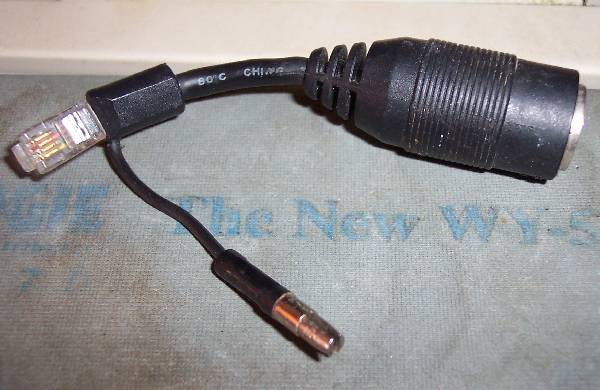
I've come across this adapter in my junk box...
http://www.irrelevant.com/rob/adapter.jpg (37Kb)
It's a 5 pin DIN socket, to an RJ11 + lead with a single large pin with a
slot in it.
I /think/ it was for a Wyse AT computer to allow the use of a standard PC
AT Keyboard, but don't quote me on that.
There is a part number on the moulding of the DIN - 940398-02 REV. A - but
googling shows nothing.
If anybody wants it, it's theirs for free; just cover the postage.
Talking of Wyse ... I have two Wyse 120 terminals, a Wyse 30+, and another
serial terminal I can't remember the brand of - (not a major one, and has
reseller's name on the front) - all free to anybody who wants to come
collect from Salford, UK.
Rob
A friend is seeking information on a DRAM chip found in Nintendo game
carthridges. The ID is:
LH2833-15
SHARP Japan
8652 1D
Does anyone have the data sheet? Looks like 1986ish.
--
Sellam Ismail Vintage Computer Festival
------------------------------------------------------------------------------
International Man of Intrigue and Danger http://www.vintage.org
[ Old computing resources for business || Buy/Sell/Trade Vintage Computers ]
[ and academia at www.VintageTech.com || at http://marketplace.vintage.org ]
>Searching around for a PC [or compatible] that NEEDS a Torx................
I have a few Compaq computers that used Torx screws.
-chris
<http://www.mythtech.net>
I've got a spare MacPlus Case Cracker i'd part with...
Send me a private e-mail if you're interested.
> From: Gene Buckle <geneb(a)deltasoft.com>
> I've got the Torx tool, I need the gadget that's
> used to split the case without destroying it in
> the process.
__________________________________
Do you Yahoo!?
New and Improved Yahoo! Mail - Send 10MB messages!
http://promotions.yahoo.com/new_mail
RE: Drive Alignment
8" drives are usually pretty stable once aligned, but perhaps not over a
period of decades.
There are two ways to check/set alignment.
The "classical" (mid-70's) way is to use an analog alignment diskette and a
dual-channel oscilloscope. You connect the scope to two channels of the
read head amplifier and seek to the alignment track of the disk (my
recollection is track 38 decimal, the center of the 77-track diskette). You
should see a kind of "filled in dual sine wave". If it's symmetrical or
close, the alignment is correct. If one lobe (every other one) is of
significantly greater amplitude than the lobes in between, you are out of
alignment and you adjust the position of the head to get it right (this part
varies from drive to drive). Then you have to check some other things, like
the track 0 sensor and track 0 phase (on some drives). You need the analogy
alignment disk, a scope and an "exerciser", or a computer with software that
could let you manually seek and load the head as desired.
The "modern" (about 1981) way was with a digital alignment diskette. This
was a normal data disk, almost, but various tracks on the diskette were
either correctly aligned, or intentionally mis-aligned by varying known
amounts. By seeing which tracks could be read, and which could not, you
could determine the alignment status of the drive. This was useful for
checking alignment, but not nearly as good for setting it. SOME of these
disks ALSO had the analog patter on track 38. You needed the digital
alignment disk and software that knew what to do with it.
The problem today is that the alignment disks (of either type) are not
readily available, and most PC hobbyists don't have a scope. Documentation,
knowledge and experience are also issues.
Hiya,
has anyone got a early copy of the SCSI spec which just covers SCSI 1
(i.e. 8bit bus, 5Mb/s transfers only)?
I want to see if I can get the parallel port on a modern PC hooked up to
one of the old SCSI/ST506 bridge boards that I have, but given that I
only have 12 data out lines to play with and 5 data in (13 in if I
assume a bidirectional port) things are pretty tight and I obviously
need to do some loading of stuff into external registers.
I've got some reasonable info on the SCSI protocol, but having a better
idea of which signals do what (and at what time) would be useful.
All the docs out on the web seem to be for the latest SCSI revision
though (and therefore contain a lot of info that I don't need).
Furthermore I only really need the low-level protocol now;
software-driven higher level command structure can wait for a few days!
cheers
Jules
I have available for those who want them, 3 CDC disk drives (model
NSOMPI) with 8 80Mb disk packs.
Each drive is approx 8 inch by 10 inch by 27 inch in size and they
have an SMD interface. 6 of the packs are brown, 2 are blue.
Ed
P.S. the drives are in The Netherlands, shipping is possible, but
it would not be cheap!.
--
edward(a)groenenberg.net | Collector of PDP-11's.
http://www.groenenberg.net | Politici zijn vieze oplichters.
Unix Lives! M$ Windows is crap.
'97 TL1000S
Here?s a question for you guys. One of my HP2000 friends asked me
what the difference was between a 2100a and a 2100s. Now, I have
done a fair amount of maintenance on both and I can?t recall that
I ever paid any attention to any difference between the two.
Does anyone know of any differences between the two other than the
name on the front plate?
Thanks,
Mike Gemeny
I was given a PDP-11/04 recently, in the short 5 1/4" chassis, but it is missing its power supply. Looks like it was removed to use as a replacement for another 11/04. Does anybody have one they don't need? Anybody even know what kind of power supply goes in a 11/04 in the short chassis??
Thanks,
Bob Armstrong
Need some help making a disk bootable under RSX11M V4.6 (not Plus).
Need to copy a bootable system volume to another.
Usually I use standalone BRU with no problem.
Problem (I think) is that I have 2 MSCP controllers,
one drive on one controller, other drive on the other controller
and their low level formats aren't compatible so can't swap drives around.
Unfortunately I have no working tape drive at the moment either.
(I do have 5 TK50's with tapes hanging out their mouths though).
Dragged out a Cipher 550 cartridge tape drive, plugged in MSV05 controller
(MS:),
bought some new DC600A tapes after the ones I had in the attic for 10 years
didn't work,
but it didn't work either.
Disk and controller configuration is:
An Emulex QD01 controller CSR=172150 Vec=154 (Standard MSCP address)
with an RD54 as DU1:
This is the system disk and it hardware boots fine into M.
And a RQDX3 CSR=172154 Vec=150 (Secondary)
with an RD32 that shows up as DU4: under M.
I can BAD it, INI it, MOU it etc. -- drive works fine.
Using standalone BRU to copy DU1: to DU4:
it gives error -65 (device offline - it can't see it) for DU4:
Ok, I use CNF to change DU4: to alternate CSR,
it give me error -65 on DU1:
Apparantly CNF changes DU CSR for both drives.
(I did find I could make standalone BRU bootable RX33's though which I did
as they boot much faster than TK50.)
So, standalone BRU not working as I wanted,
I made the RD32 DU4: drive a Files11 volume (BAD, INI etc.)
Created all the UFD's from DU1: (system disk) on DU4: (target).
(Still haven't found anything better than TECO for making command files
>from directory listings,
have a PC version of TECO I use today)
I then copied all the files to the target disk:
BRU/NOI/MOU DU1: DU4:
Worked fine. I can mount DU4: and look at all the files fine.
But, how do I make DU4: bootable as DU0: on an RQDX3 at standard address of
172150??
VMR and SAV only seem to work on the current SYSTEM disk, not a target.
For example, tried to VMR DU4:[1,54]RSX11M.SYS --- no joy.
When I try to boot the DU4: on another system, it give me what INI wrote in
the boot block:
"THIS VOLUME DOES NOT CONTAIN A HARDWARE BOOTABLE SYSTEM"
Any suggestions on how to make DU4: bootable?
Best I could find Googling was:
http://www.miim.com/faq/hardware/diskfaq.html#mscrscpy
But I don't see how that effects a drive other than SY:
Any help would be appreciated.
Thanks,
Ed Kelleher
This message is for Steve Loboyko,
Steve,
Please give me a call at your earliest convenience.
THANKS!
John Calvert
502-240-6100 ext.107
502-718-1224 cell
Spotted yesterday at RE-PC Tukwila: A nice DEC MicroPDP-11/23 in a four-foot rack, along with two tape drives of a type I've never seen before (definitely DEC'ish, they look like they take a smallish cartridge). Also had what looked like a third-party 16-port serial MUX installed, probably an Emulex or similar board.
No price on the thing, but probably available for cheap.
RE-PC is at 510 Andover Park West, at the opposite end of the complex from the UPS customer counter.
Keep the peace(es).
-=-=-=-=-=-=-=-=-=-=-=-
Bruce Lane, Owner & Head Hardware Heavy,
Blue Feather Technologies -- http://www.bluefeathertech.com
kyrrin (at) bluefeathertech do/t c=o=m
"If Salvador Dali had owned a computer, would it have been equipped with surreal ports?"
This problem has been fixed, thanks for suggestion from Tony of the UK.
-Bill
>Do you mean you get thje CASS? prompt when you turn the machine on
>without holding BREAK down?
>If so, then the machine is not detecting the disk controller (that's why
>it's not trying to read the disk). I'd check the tapewire that links the
>CPU board to the disk controller board (I've had a lot of problems with
>this cable!), then check the signals round the WD1793 chip.
>-tony
>
> Looking for diagnosis or URL with troubleshooting guide:
> TRS 80 Model III with two mini drives.
> Powers up, drives spin and do not stop.
> Does not attempt read, no red drive light.
> Cass? and Memory Size? Ok
I recently aquired an HP 9133XV combination 3.5" floppy and 15M HD with an
HPIB interface and Amigo protocol.
I tried to use the drive with an HP 86B and an HP 85B computer. The floppy
works fine but the computer will not recognize the hard drive. The HD seems
to spin up normally.
I tried an "INITIALIZE" command without success.
Can the series 80 computers use this large drive? Does anyone know how to
use the test function on the drive?
Thanks
AFAIK spreadsheets are a fairly old engineering practice, originally done
manually on paper and slowly ported to automation and computers. What about
the old accounting machines, they are sort of spreadsheets.
Just got a Facit N4000 unit. Looking for DOS based PC software to read &
store images, etc.
Can anyone point me to any freeware/shareware that they find works well with
such units?
Regards,
Jay West
Don't think I posted this stuff to the list before, if I have, my apologies.
But when you have CRS syndrome.... For some of the ones listed below, I have
like 30 copies (all originals) of the manuals. For others I only have one
original copy. Some of these are off-the-beaten-path manuals and quite cool.
Micro-Term Mime I & II
Micro-Term 420
Micro-Term 5A
Micro-Term Ergo 2000
Micro-Term ACT IV
Micro-Term Mime 340
Micro-Term 2A (which does Soroc IQ120 emulation - cool, and I have the
terminal :)
Mini Bee IV
Some of the manuals above are operating guides, some are programming guides,
some are service/technical manuals.
I actually have a Micro-Term ACT 5, very cute terminal.... and a 2A. I would
VERY much like to find a Mime I, and maybe a Mime II.
Anyways - thought I'd list the manuals in case someone is desperately
looking for any of them.
Regards,
Jay West
Help! I've been trying to recreate an 8" floppy from the Altos Diagnostic
disk .tdo file recently added to the Commercial CP/M Software Archive site
(http://www.retroarchive.org/cpm/) so I can try to diagnose a hard drive
problem on my ACS8000-10A, and have so far been unsuccessful. I've been
using a Shugart 800 8" drive connected to a PC/AT floppy controller with a
34-to-50 pin adapter, and have been wearing myself out with Teledisk,
Anadisk and 22Disk for the last few days with no luck. I think I've got the
adapter pinned correctly since I'm able to use certain functions OK, but not
make that disk. When I try to use Teledisk, it tells me the .tdo source was
a 3.5" high-density FM formatted disk (?), and when it tries to write out to
the new disk, it comes up unable to find any of the sectors.
Has anyone out there been able to do this, or know of another source for the
Altos Diagnostic disk that has the hard drive utility?
Thanks,
Richard Lynch
Ok, I am at it again...
Powering up the "really nice" ASR-33 that I pickjed up last weekend. After
checking thing out [voltages mechanical inspection, etc] I have powered it
up.
[F4 the fuse for the motor WAS blown, a replacement of the ssame rating is
holding].
Motor spins up nicely (real quiet and sweet!), with the mode set to local,
the break and here-is keys do the "right things", however NONE of the other
keys do. My first thought was an issue with the keyboard unit, but a swap
>from my other (dirty, smashed case, etc) unit yields the same results. My
next thought was the distributor [since checking the schematic shows that
the break key does NOT require the distributor connectivty]....
Powered down, disassembled to look at the brushes, they look brand new [cant
wait till I get to post some pictures of this baby!!!!].
Every thing also seems to buzz out as I would expect.
This indicates that the failure mode might well (once again) be me......
Hopefully someone here will think of something I am missing.....
A reply e-mail would be appreciated, a call bfrom anyone with an idea and a
few minutes would be great! [If it is long distance, I can call anyone
willing to help].
My weekend will be some mich better if I get this working and buttoned up
tonight [It's so cleen that it is even scheduled to go in the living space
rather than my lab when buttoned up and working!
Thanks in advance.
David Corbin
Sayville, NY
631-244-8487
dvcorbin(a)optonline.net
>From: "David V. Corbin" <dvcorbin(a)optonline.net>
---snip---
>
>That of course will involve replacing the h-plate later...Oh well...
>It only took me about two weeks to get the other one [on the other unit]
>in....
>
Hi David
Once you've fine the right size of flat bladed screwdriver
to jam into the slot of the H-plate, you'll see that it is
actually quite easy. One should be able to do is in just a
few seconds. You do need to manually reset both sides to
be in the same state so the angles are the same.
Dwight