> From: Jules Richardson
> On 5/15/19 9:29 PM, Steve Malikoff via cctalk wrote:
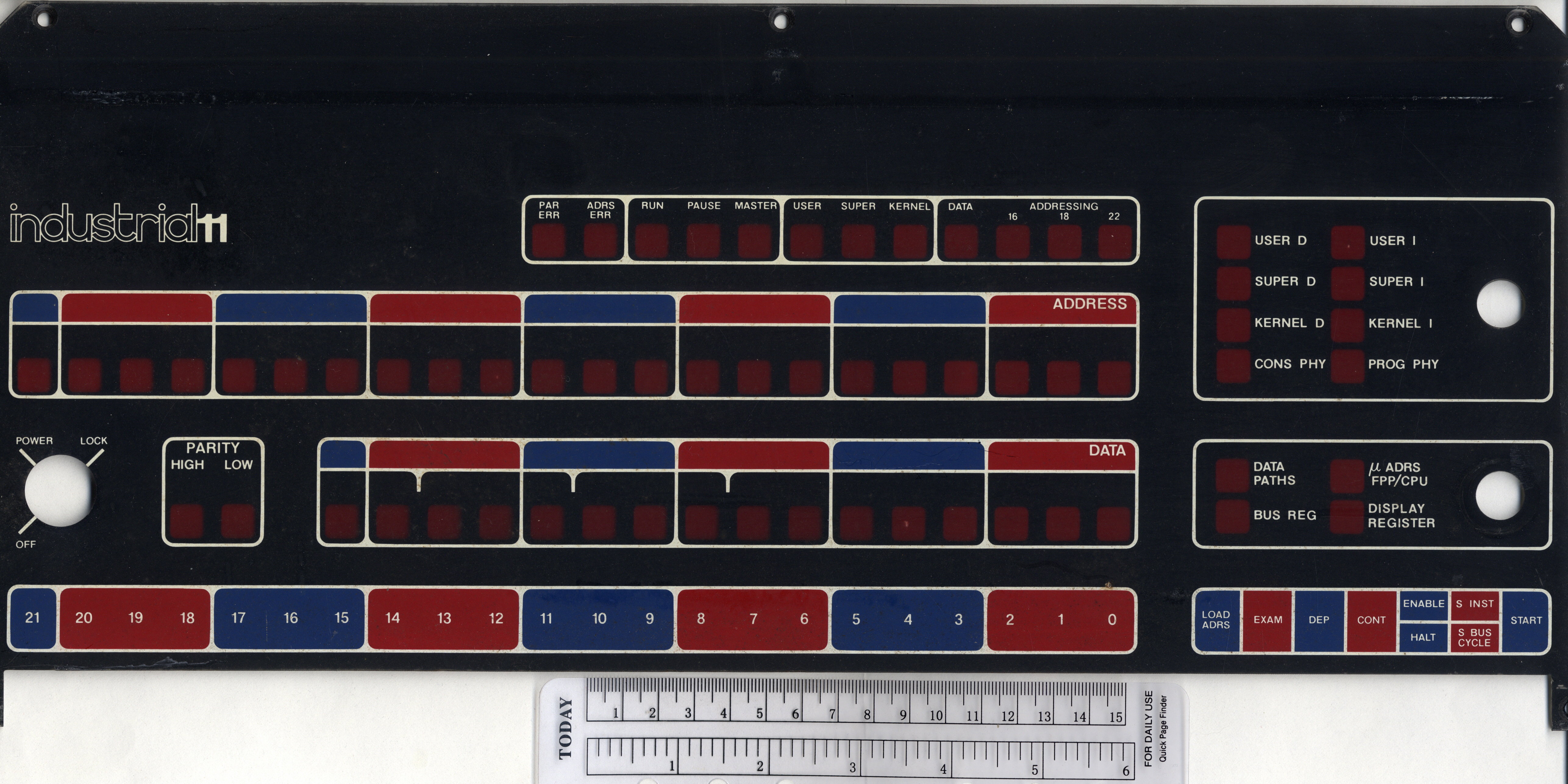
>> Here's the Industrial 11 version of the 11/05
There's an Industrial 11 version of the -11/70, too:
http://ana-3.lcs.mit.edu/~jnc/tech/pdp11/consoles/1170IndustCenter.jpg
So the only one missing (of the early -11's) is the /45, but I wouldn't be
surprised if that existed too. I've no idea about the /20 (I don't think the
/20R counts), or the later machines without physical switch registers (/04,
/34, etc).
> and /5 or /10, or in fact what the difference is between the two
> anyway, I'm not sure
The paint on the front console inlay (I'm not joking :-).
Other than the /15-/20 (which do have slight hardware differences), none of
the OEM/End-User pairs have hardware differences in the circuitry that I know
of (although the /35 was _usually_ supplied in a BA11-D 10-1/2" box, and the
/40 in the BA11-F 21" - and there are rare counter-examples to this rule).
Noel
A kindly donor sent me an external numeric keypad from Data General. It
has the right keycaps and color for a DG One laptop. Model number
2568. Connection is via a 3-terminal plug; basically a miniature
stereo headphone plug.
I'll give this up to a One collector who can identify this for certain.
Otherwise, I'll probably repurpose it. FWIW, it appears to be
unsued--not even the rubber feet have dirt or wear.
--Chuck
I recently obtained a Mac 1K in a Mac 512K box. It does not power on, and it
smells a bit toasty. Does it require a keyboard to power on? I have a
M0110A.
Cindy Croxton
Electronics Plus
1613 Water Street
Kerrville, TX 78028
830-370-3239 cell
sales at elecplus.com
---
This email has been checked for viruses by Avast antivirus software.
https://www.avast.com/antivirus
Due to severe weather, the trip did not happen last week, and will not
happen this week. Tornadoes and floods are not fun, and much of the drive is
on very low roads. I will see if next week looks clear enough.
Cindy Croxton
Electronics Plus
1613 Water Street
Kerrville, TX 78028
830-370-3239 cell
sales at elecplus.com
---
This email has been checked for viruses by Avast antivirus software.
https://www.avast.com/antivirus
Hi,
On 5/3/19 3:22 PM, Pete Turnbull via cctalk wrote:
> Anyone know much about early MIPS workstations? I'm trying to get a
> MIPS RS2030 to boot, without much luck so far. It goes through the
> selftest but stops with the internal LED display at "5" accompanied by
> a continuous beep.
>
> Known problems:
>
> - The Dallas DS1287 battery is flat; I can hack a 3V lithium onto that.
> I assume it should still work to some extent
> even if the contents are lost?
I have the same problem with a cloned MIPS machine, a Sumitomo
Sumistation SP300. The biggest problem with my machine is that the
NVRAM holds the ethernet address. If it goes flat, there seems to be
no way to reprogram the NVRAM. If you find any solution for this,
please tell me.
Aside from the now broken ethernet, the machine works fine. It?s a
25MHz R3000 with 32MB RAM. The box runs SEIUX, something like
Risc/os 4 in SVR3 mode with extra japanese localization, but adapted
to the hardware.
Some people said that some of the old MIPS machines used a M48T02
NVRAM and that you could plug the NVRAM in a SPARCstation to restore
the ethernet address. So far, I have found no mentioning of the DS1287.
A special problem with my machine is that most parts are soldered,
including the NVRAM.
Dennis
While digging for a KY11-LB for a fellow list member, I came across a few
operators panels and programmer panels for 8-As. Sorry, I don't remember
the part numbers. I have extra M8315s, M8316s M8316s, and a bunch of other
8-A boards. Please contact me off list if you have any interest.
Thanks, Paul
On 5/13/19 11:58 AM, Grant Taylor wrote:
> On May 12, 2019, at 10:17 PM, Chuck Guzis via cctalk <cctalk at classiccmp.org> wrote:
>> Don't know a thing about gaming and never wanted to--wrong generation, I guess.
>
> Perhaps ?gaming adapter? is the wrong term for this audience.
>
> Let me describe it as a type of switch that you plug the wired computer into, go to a management webpage there on and give it the wireless network information.<snip>
I don't want to get into a long discussion; I merely wanted to point out
that you're unlikely to find the term "gaming adapter" in Linux tech
docs as they're not written for that audience. And it's very likely that
something with the Debian kernel will be used on an OPZ.
--Chuck
Hi
I was wondering if there were any people who were wanting to sell any HP 1000 computer peripherals. Preferably disk oriented Such as a disk controller or a 79xx drive
(I live in the UK so shipping may be an issue for larger things)
Thanks for the tips. The reason I?m not using Ethernet cable is because the
Vintage Computer Room (where this PC resides) is on the 2nd floor around a
couple of corners, and my DSL modem/router and unfiltered phone line are in
the 1st floor study. Would take a long run and some drilling, or duct taping
it to the banister and hoping the dog and cats don?t eat it ;)
However, after finally giving up on the wireless cards... I realized that I
had a simple Linksys LNE100TX Ethernet card in the PC junk pile. I installed
that (it was recognized by 98SE and the drivers worked first time too), then
brought my laptop upstairs and set it up as a bridge. That works, but is
clumsy and requires another computer.
My next idea was to find a wireless device to connect to the Ethernet card.
I found out about WLAN, bridging, and most importantly, that many models of
router can be reflashed with dd-wrt software, and act as the bridge I
needed! Also in the closet was a Linksys E1200 router, which is one of the
models supported by dd-wrt. So I flashed it and hooked it up.
After a bit of struggle (incomplete directions but I managed to fill in the
missing pieces) I now have wireless network and Internet access on the old
machine :)
Incidentally, PUTR now works perfectly since I?m running 98SE/DOS.
> From: John Foust
> I missed the start of this discussion... exactly why did you want to
> rely on a wireless connection and couldn't string a network cable?
The list archive:
http://www.classiccmp.org/pipermail/cctalk/
is your friend. (That's actually how I read it, so my emailbox won't
get buried in sludge.)
Noel
>You could have installed a gaming adapter, opened the web page,
>connected it to the wireless and been done.
Sure, but you assume I know anything about online gaming (I don't); it would
require purchasing one, *and* I already had the Linksys router and card,
just gathering dust for years!
I like to improvise with what's on hand rather than spending money on a
really ancient PC :)
So, I've been porting Frotz to TOPS-20.
https://github.com/athornton/tops20-frotz
It's been going fine, except that I have something going on with the linker
I don't have enough expertise to understand.
On Mark Crispin's panda distribution, "cc -o frotz *.c" does the trick.
But on TOPS-20 on the LCML's TOAD-2, I get a bunch of undefined global
symbols, which all seem to be from libc.
That suggests to me that KCC at LCML isn't configured to automatically
trigger the linker with the right library path (something like
unix:<root.usr.lib>) for the C standard libraries.
So the first question is: where's the KCC configuration stored, so we can
add the right library path, and the second one is, failing that, how do I
link all my .rel files against the C library to get a working executable
(an answer simplified from "read the linker manual" would be appreciated;
I've started that but it's a little daunting and I suspect it will take me
a while to chew through)?
Adam
JUST? ?DOWN THE? ?ROAD A? FEW? HOURS? FROM? US HERE!
ED#
In a message dated 5/11/2019 2:33:48 AM US Mountain Standard Time, cctalk at classiccmp.org writes:
Great! Good luck with the visit. The other day I wrote to Kristina to express interest.
> On 11 May 2019, at 04:38, Fritz Mueller via cctalk <cctalk at classiccmp.org> wrote:
>
>
>> On 5/10/19 6:42 PM, Adam Thornton via cctech wrote:
>> I have been invited out to the site tomorrow morning to take an inventory of what?s there (I live near the machines).
>> I imagine that I may well have a lot of photos that I bring to the list and say ?what is this??
>
> Standing by to help out!? Go get it, Adam -- (come on, you can _make_ room! :-))
> Message: 1
> Date: Sun, 12 May 2019 17:41:24 -0500
> From: "Charles" <charlesmorris800 at centurytel.net>
> To: "cctalk digest" <cctalk at classiccmp.org>
> Subject: Network cards and Win98SE
> Message-ID: <4F49BB9C660F44B8B67371D3BAB651AA at CharlesDellLap>
> Content-Type: text/plain; format=flowed; charset="iso-8859-1";
> reply-type=original
>
> I have tried for two days to get wireless networking running on my old PC
> under Win 98SE, so I can use PUTR without a separate partition or boot. XP
> is on an 8.4 GB drive. 98SE is on an older 540 MB drive.
>
> There are two network cards (a Netgear WPN311 with Atheros chipset, and
> an
> Encore ENWLI-G2 with Realtek 8185 chip) and neither will work with
> Win98SE.
> I have tried the manufacturer's drivers, Atheros drivers, Realtek
drivers...
> none of it works. The Realtek driver installs but gives a fault in
RUNDLL32.
>
> Netgear's website claims that the WPN311 can run under 98SE and later.
> Some
> sources for that driver package say it starts with XP. Although I would
tend
> to believe the manufacturer...
> The same Netgear card in the same motherboard was working correctly with
> the
> XP drive.
>
> I even did a fresh install of 98SE. Then installed the WPN311 software,
then
> the card. Windows says the card is installed and working properly.
> But the Netgear utility won't run (hangs, Task Manager showing wlancfg5
not
> responding). That's usually because it can't see the card.
>
> Searching the net including various forums from years ago hasn't helped.
> So I'm about to give up. Wasted enough hours on this. Back to XP with a
DOS
> partition for running PUTR.
> Unless someone has a better idea :)
>
> thanks
> Charles
Hi Charles,
About 5 years ago I spent way too much time trying to sort out a PC platform
that would meet my needs for disk imaging (ImageDisk), PUTR, network file
transfers and ISA-based EPROM programmers. I eventually settled on a
Pentium II bare motherboard, AHA-1522A SCSI card (for its floppy controller
which supports single-density disks), CF card as a hard drive, FDADAP
adapter (for 8" drives), a generic ISA network interface card, MSDOS 6.22,
Norton Commander and Michael Brutman's mTCP package.
With this setup I can run PUTR and ImageDisk without any Windows-related
issues. File transfers to other computers are a breeze: mTCP includes an FTP
server and I just run FileZilla on my Windows machines to connect to the
MSDOS machine. Alternatively I can power down the MSDOS machine, and plug
the CF card into a USB adapter and copy files that way instead.
I appreciate these suggestions won't help if you need to have Win98 on the
same machine for other reasons.
Malcolm.
I use? ? 3? com? stuff? I? think? ? the other brands? ?I? toss in a? box in the warehouse.
later? ?3? com? stuff auto? finds? etc? works? fine... lats a long? time!
( paint it? grey and It? will not? rust )
Ed#
In a message dated 5/13/2019 3:39:15 PM US Mountain Standard Time, cctalk at classiccmp.org writes:
On 5/13/19 3:56 PM, Charles via cctalk wrote:
> Thanks for the tips. The reason I?m not using Ethernet cable is because
> the Vintage Computer Room (where this PC resides) is on the 2nd floor
> around a couple of corners, and my DSL modem/router and unfiltered phone
> line are in the 1st floor study. Would take a long run and some
> drilling, or duct taping it to the banister and hoping the dog and cats
> don?t eat it ;)
>
> However, after finally giving up on the wireless cards... I realized
> that I had a simple Linksys LNE100TX Ethernet card in the PC junk pile.
> I installed that (it was recognized by 98SE and the drivers worked first
> time too), then brought my laptop upstairs and set it up as a bridge.
> That works, but is clumsy and requires another computer.
So you turned your laptop into a gaming adapter.
> My next idea was to find a wireless device to connect to the Ethernet
> card. I found out about WLAN, bridging, and most importantly, that many
> models of router can be reflashed with dd-wrt software, and act as the
> bridge I needed! Also in the closet was a Linksys E1200 router, which is
> one of the models supported by dd-wrt. So I flashed it and hooked it up.
You turned the Linksys into a gaming adapter.
> After a bit of struggle (incomplete directions but I managed to fill in
> the missing pieces) I now have wireless network and Internet access on
> the old machine :)
You could have installed a gaming adapter, opened the web page,
connected it to the wireless and been done.
> Incidentally, PUTR now works perfectly since I?m running 98SE/DOS.
Ya.
--
Grant. . . .
unix || die
I've been working on an MSCP controller implemented on top of Joerg Hoppe's
Unibone and that's been going fairly well, modulo a few oddities here and
there (if you have a Unibone and want to beta-test it, it's up at
https://github.com/livingcomputermuseum/UniBone).
It'd be nice to extend it to do TMSCP as well. Is there an equivalent to
the "MSCP Basic Disk Functions Manual" (AA-L619A-TK) for TMSCP? I can
probably glean most of the information I need from various *nix device
driver sources out there, but it'd be nice to have the definitive reference
on hand, and so far it's been eluding me. But maybe I'm just not looking
hard enough...
Thanks!
Josh
I'm building my own 8-bit CPU from TTL chips, and this caused me to think:
how were 32-bit minis built in the late 70s and early 80s? In particular,
how was the ALU built? I know about the 74181 4-bit ALU, and I know (from
reading A Soul of a New Machine) that PALs were also used.
Did companies get custom chips fabricated, or was it all off-the-shelf chips
with a few PALs sprinkled in?
Thanks, Warren
> From: Christian Corti
> 3710 Euro... someone with definitely too much money ... So no, we did
> not get the system, and it probably won't go into a museum.
Well, I did send you email offering to contribute, to help you all buy it.
Did my email not make it to you?
Noel
I have tried for two days to get wireless networking running on my old PC
under Win 98SE, so I can use PUTR without a separate partition or boot. XP
is on an 8.4 GB drive. 98SE is on an older 540 MB drive.
There are two network cards (a Netgear WPN311 with Atheros chipset, and an
Encore ENWLI-G2 with Realtek 8185 chip) and neither will work with Win98SE.
I have tried the manufacturer's drivers, Atheros drivers, Realtek drivers...
none of it works. The Realtek driver installs but gives a fault in RUNDLL32.
Netgear's website claims that the WPN311 can run under 98SE and later. Some
sources for that driver package say it starts with XP. Although I would tend
to believe the manufacturer...
The same Netgear card in the same motherboard was working correctly with the
XP drive.
I even did a fresh install of 98SE. Then installed the WPN311 software, then
the card. Windows says the card is installed and working properly.
But the Netgear utility won't run (hangs, Task Manager showing wlancfg5 not
responding). That's usually because it can't see the card.
Searching the net including various forums from years ago hasn't helped.
So I'm about to give up. Wasted enough hours on this. Back to XP with a DOS
partition for running PUTR.
Unless someone has a better idea :)
thanks
Charles
Just an update... I spent an entire long afternoon wrestling with that old
PC, trying to find some combination of HDD jumpers and BIOS settings that
would allow the XP hard drive to boot with another drive attached (either on
the slave connector or the secondary channel with the CD-ROM removed). No
dice.
So I had the bright idea to use Minitool's Partition Wizard, and shrink my
Windows partition so there'd be room for a newDOS partition.
But it won't even run (probably because I have only 64 MB RAM on that box).
Grrr. It's unbelievably slow anyhow, so more SDRAM on order, which is really
cheap these days.
I'd get a newer PC for the workbench, but need to keep the old motherboard
because there are a couple of devices (including a PB-10 PROM programmer)
which are ISA slots.
So, this has become a Windows/PC (ugh) project instead of just being able to
play with my PDP-11...
As a result of an inventory error on my part, I wound up with an extra copy
of "LSI-11, PDP-11/03 User's Manual" (EK-LSI11-TM-003).
I'd like to pass it along to someone, provided I'm reimbursed _most_ of
my eBait expenditure on it (it was not, alas, cheap). Anyone interested?
Noel
I have been invited out to the site tomorrow morning to take an inventory of what?s there (I live near the machines).
I imagine that I may well have a lot of photos that I bring to the list and say ?what is this??
The owner has assured me the machines will not be sent to the scrapper and that there are multiple interested parties, which is good, because I really don?t have a good place to put 8 cabinets of PDP-11. Not that having an 11/40 running Sixth Edition Unix wouldn?t be cool.
I?ll report back once I have an inventory.
Adam
Aficionados;
I'm interested in acquiring an HP1000 A900, in any form-factor.
(http://www.hpmuseum.net/display_item.php?hw=594)
Basic need would be a chassis/backplane/PS and minimal set of
CPU/memory/HPIB-controller/terminal-IO PCA, however I'd be interested in
simply acquiring a PCA-set and I'll work the chassis/backplane/PS
separately. Even single PCAs would give me a helpful push forwards.
And I need to stick to my hobby (beer") budget.
I'm located in Maryland, USA, and pretty sure that the cost of overseas
shipping would be ghastly for a chassis. But maybe not as bad for the tower
configuration as for the rack-mount.
If I understand correctly, the CPU consists of:
12201A A900 Sequencer Card
12202A A900 Data Path Card
12203A A900 Cache Controller
12204A A900 Memory Controller
12220A 768KB RAM (Or I presume 12103D 1MB, 12221A 3 MB, or 12221B 8 MB.)
I imagine that I'll need to synthesize my own OTT "frontplane" for the
memory.
12009A HP-IB Controller
12040D Asynchronous Multiplexer interface board
Thank you for your insights, and opportunities (I hope),
paul
(offlist at pbirkel at gmail.com)
John Wilson confirmed that his program was designed to work with one floppy
and an HDD. He says strange things happen if one tries to use two floppy
drives instead... just as I found ;)
I removed the second floppy drive, dug out an old 540 MB hard drive (with
Win 95 on it) and hooked it up to the PC. Started Win95, then "Restart the
computer in MS-DOS mode", copied PUTR to the C: drive and started it.
PUTR now works perfectly, transferring files in both directions to an the
emulated RX33 (3.5" floppy). The PDP-11 can read and write those disks on
its generic 3.5" floppy "RX33", too. :)
Now I just have to figure out the PC partitions/hard drives to make using
PUTR as simple as possible.
I'm having trouble copying files from my PDP-11 (RT-11 format) into an old
Windows box using the last version of PUTR.
It appears that WinXP does strange things with the hardware (3.5" 1.44 MB
drives aren't actually RX33's although my RQDX3 controller believes they
are).
So I made an MS-DOS boot disk and run PUTR directly on MS-DOS (instead of
the WinXP DOS window). Unfortunately MS-DOS 6.22 can't recognize my hard
drive since it's NTFS-formatted, so it all has to be done in floppies.
Both WinXP and MS-DOS know that A: and B: are two separate drives. Likewise
the BIOS settings. I can copy files in DOS and Windows back and forth
between the two drives.
And I can MOUNT B: as a logical device DU0: (or without a logical device
name, as B: /RX33 /RT11), and read its directory.
But when I try to copy a file from A: to DU0:, the B: drive light flashes
briefly, and then PUTR tries to write over the A: drive (blocked by the
write- protect tab once I wised up)!
So how on earth can the BIOS, MS-DOS and WinXP all know that A: and B: are
two separate drives, but PUTR tries to write to A: even though the command
is to write B: ??
I also tried switching the PUTR disk into B: and the RT-11 formatted disk to
drive A:. Same problem (tries to write over the source disk which is now B:
even though the output filespec is clearly A). I had a look at the code but
nothing's leaping out at me. Although it's been many years since I wrote any
8086 code...
Hello,
As part of my H11A project, I am trying to debug my M7264-CB LSI-11 CPU
module. When powered on, the CPU does not respond to the Run/Halt switch
either on the front panel or via the console. I found engineering
schematics for the M7264 online, but I was wondering if any in depth
troubleshooting material existed online (Logic probe points, debugging
steps, etc...).
Thank You, Gavin
> From: Mister PDP
> the 'Run' light does not come on when the switch is toggled
Yeah, it wouldn't come on full unless it somehow fell into a loop of some
kind - very unlikely. (Does that model LSI-11 have the on-board memory? I'm
too lazy to look it up! :-) And what do you have the CPU jumpered to do on
power-up? (ODT, 173000, etc.)
But I would expect to see a brief flash. (Note: I don't have an LSI-11
plugged in to check this, I'm going by memory - the -11/23 certainly does the
brief flash; if need be, I can pull out an -11/2 and plug it in, once I
figure out if they are safe in Q22 backplanes.)
I'd check the power voltages, and the clocks on the CPU board, and then look
at BSYNC, etc to see if there's any hint that the ODT ucode is trying to read
the console registers. No activity on BSYNC -> the ucode's not running.
'Small' QBUS systems - i.e. a single backplane - are OK to run with no
termination on the far end of the bus (the CPU board includes pullups for
that end), that shouldn't be an issue.
Noel
> From: Mister PDP
> I was wondering if any in depth troubleshooting material existed online
I am not aware of any; I would be glad to be corrected. Unlike the early
gneration of UNIBUS CPU's, these generally weren't intended for internal
fault analysis and repair - module swapping and replacement was the
intended approach.
The LSI-11 manual (EK-LSI11-TM-003) has a tiny bit of detail on how the
CPU board works (pp. 4-3 - 4-13), it's probably worth reading that before
diving into the CPU board internals.
Things I'd check to start with - all the power voltages, and then the clocks.
If those are all OK... BTW, for any serious fault analysis on these things,
you'll need a 'scope/logic analyzer.
> When powered on, the CPU does not respond to the Run/Halt switch either
> on the front panel or via the console.
When you say 'does not respond', what's the symptom? Is the console ODT not
running (which could have any number of causes)? The whole system has to be
more or less running for ODT to work. I'd start elsewhere - e.g. does your
mounting box have the 'run' light? (It's driven by an output of the CPU
card.) Does that display any activity?
Time to look at e.g. BSYNC, etc to see if the CPU is trying to read/write the
console registers.
Noel
I have no affiliation with the person who owns these items, I'm merely
relaying information. These machines were offered to the LCM+L but we've
met our 11/40 quota :). We figured someone here might be able to provide a
good home, and the seller asked us to pass the offer along. Contact
information is below:
Email:
kristina.kaur at mac.com
List of items offered:
DEC PDP 11/40 from approx 1973
Other associated equipment may include punch card machine (key punch), tape
drive(s), free standing dot matrix printer, terminals (approx. 12).
Condition of items:
Very good condition. Running or close to running. Most peripherals have
been offline and stored.
How have these items been used and/or stored?:
Running in filtered air. Desert, dry climate.
Extent or weight of these items:
The DEC PDP is 6-8 cabinets.
On 4/28/19 6:27 PM, Ray Jewhurst wrote:
> I already have a Hobbyist License.? I am just interested in
> experimenting with different OSes and different versions of OSes.
ACK
I don't know what VAX hardware VMS 1.5 supported, what VAX hardware that
Simh supports, or what the overlap is between the two.
There's a reasonable chance that someone will chime in with experience.
--
Grant. . . .
unix || die
On 06/05/2019 23:38, John Forecast via cctalk wrote:
> The release notes on bitsavers indicate that the RX33 was not supported
> until RT-11 V5.04.
>> On May 6, 2019, at 6:20 PM, Charles via cctalk <cctalk at classiccmp.org>
>> wrote:
>>
>> I have installed an RQDX3
>> But, when I boot the system (with RT-11SJ V5.01), it can't see the drive
>> at all.
Not only was the RX33 not supported until 5.04, there's a bug in the
MSCP DU driver that wasn't fixed until 5.03 (IIRC) or maybe 5.04, which
means nothing on an RQDX3 can be guaranteed to work properly before
that. It caused me a lot of grief, way back in 1994.
See the files at http://www.dunnington.info/public/RQDX/ and
particularly http://www.dunnington.info/public/RQDX/DUX.TXT if you're
interested.
--
Pete
Pete Turnbull
=========================================================================
thanks for the additional info. Will check out the links.
Meanwhile, I found an RK05 image of RT-11 "5.4" on bitsavers, made an RL02
bootable -SJ image on SIMH, then copied it over to the hardware with
VTserver.
(I didn't have to wait for the entire 10 MB since the contents were all on
the first 3 MB anyway and no bad blocks).
The system booted up to a 5.04 prompt and DU0: is fully usable with 2382
blocks on a 3.5" diskette :)
My TSX+ 6.50 copy also didn't have DU enabled in TSGEN.MAC so I had to
uncomment that DEVDEF line and reassemble/relink. It's SLOW on my 11/23+...
we're spoiled with GHz PC's and GB of RAM.
Now I can use the floppy under TSX+ too.
But the generic 3.5" drive in my WinXP box can't successfully emulate an
3.5" RX33 with PUTR, apparently. (Nor an RX23).
I only get read/write/directory errors after several seconds of head
activity even with /RX33 and /RT11 switches set.
Time for more reading and maybe drive swapping/tweaking...
Does anyone know if there is a comprehensive list of changes from version
to version for VMS? Wikipedia's list only shows the models that were
introduced and I am more interested in the evolution of features. If anyone
knows a website that shows this it would be much appreciated.
Thanks
Ray
On 05/07/2019 11:15 AM, Douglas Taylor via cctalk wrote:
> Very interesting , now that you got it to work, what can you use it for?
> Will it be an exchange media with PUTR?
>
> Doug
>
> On 5/6/2019 6:20 PM, Charles via cctalk wrote:
>> I have installed an RQDX3 and the M9058 distribution board in my
>> 11/23+. Since I don't have a 5.25" drive yet, I hooked up a 3.5" HD
>> (1.44 MB) drive from an old PC.
>> After a struggle (which I documented on VCFED's DEC forum), I managed
>> to get all the jumpers and cables set correctly, and now my XXDP
>> diagnostics (ZRQA?? ... ZRQF??) recognize the drive as an RX33 (DU0:,
>> logical drive 0 since no hard disks are attached). It passes all the
>> tests, and I can INIT, DIR, and copy files to it using the limited OS
>> with the XXDP suite. The LED on the RQDX3 blinks once when the drive
>> is accessed. So far so good.
>>
Did you actually test the drive by formatting, reading and writing?
>> But, when I boot the system (with RT-11SJ V5.01), it can't see the
>> drive at all. Attempts to access it result in the command hanging
>> indefinitely, the drive does not select, and the RQDX3 lamp flashes
>> rapidly. SHOW DEV:DU does say that the handler is installed for the
>> correct 172150, 154 location. However, SHOW DEV:DUn where n=[0..3]
>> displays two blank lines then back to the dot prompt.
>>
>> Is my version of RT-11 just too old to recognize an RX-33? If so,
>> what do I need to fix this? Presumably a later DU.SYS?
>> Thanks for any help. Most of my experience is with PDP-8's so this is
>> slow going...
>> -Charles
>>
>
RT11V5 works for me using RQDX3 and the distribution board in the BA23
box assembled as a MicroPDP-11 with RX33
and RD52 (Quantum 31mb). Never thought much about it other than to make
sure the RX33 was jumpers were correct
and making a dummy panel for the smaller than RX50 drive.
The 11/73 system has the RQDX3 and the signal distribution board (m8058)
out of BA123 to hook up
RD52, RX33, RX23 and never had issues due to addressing devices under RT11.
Is it possible you have a interrupt grant gap between the various boards
and the RQDX? That would cause a hang.
If you successful it makes using PUTR easier though RX50 works for that
too just smaller.
===============================================================================
Not a hardware or installation problem (once I got everything hooked up
right, that is)...
As another member helpfully pointed out, 5.04 is the first version of RT11
that supports RX33. I have 5.01 on my TSX+ RL02 pack.
Once I booted with an RT11XM 5.04 disk, I can format, read and write the
floppy :)
Now I have to figure out how to upgrade to RT11SJ 5.04 or later without
bombing the contents of the RL02. Remaking a pack with VTserver is a pain.
Yes, the plan is to use PUTR on an old Windows box that I use with my PDP's.
I'll probably use Front Panel Express to make a nice rack panel for a 3.5"
and a 5.25" drive, instead of having the bare drive sit on top of the RL02
in the corporate cabinet ;)
I was going through some items of my fathers-in-law and found a photocopy of a 1972 conference paper that
mentions the IBM 4506 Digital TV display unit being used by reporters and editors at the New York Times.
These and other terminals (2741 I/O selectric, 2265 VDU) were connected to a 360/40. Apparently they could
take a TV camera input as well as output from the Mod 40, and had a keyboard.
I found the article pdf online, it was 'System quality through structured programming' by FT Baker, 1972 at
https://www.computer.org/csdl/proceedings/afips/1972/5080/00/50800339.pdf
My google-fu hasn't found any picture of the IBM 4506 or even a reference outside this article, and I'm mildly
curious as to what they looked like. Anyone?
Steve.
I? ?remember? giving the database? some? w/? ?Orley? Larson? ?in Brighton UK? when I was there? giving? invited? paper on? FORUM/USA.... ---Ed Sharpe
In a message dated 5/7/2019 1:35:00 PM US Mountain Standard Time, cctalk at classiccmp.org writes:
Thanks for the awareness.
TurboImage Release History - get it while available!https://support.hpe.com/hpsc/doc/public/display?docId=emr_na-c020…
Keven Miller
----- Original Message ----- From: "Frank McConnell via cctech" <cctech at classiccmp.org>To: "General Discussion: On-Topic and Off-Topic Posts" <cctalk at classiccmp.org>Sent: Mon 06 May 2019 05:02 PMSubject: Re: VMS versions
On May 6, 2019, at 15:48, Antonio Carlini via cctalk wrote:>> On Mon, May 6, 2019, 5:17 PM Zane Healy <healyzh at avanthar.com> wrote:>>>> It would be nice to see this through 8.4-2L1 (I think that?s the latest>> version).>>>> Zane>>>> There used to be an article about OpenVMS release history, naturally it's > been wiped.
Likewise, there used to be an article about MPE release history.? Links I know for it are:
<http://community.hpe.com/t5/General/MPE-Release-History/td-p/4075425> (20 Aug 2014)<http://h30499.www3.hp.com/t5/General/MPE-Release-History/td-p/4075425> (28 Apr 2016)
Naturally it?s been wiped, and archive.org *doesn?t* have a copy, even though they have other pages under that t5/General directory in both cases.
-Frank McConnell
Last weekend I made an unannounced visit out to Roswell, GA to visit
our brothers-and-sisters-in-hoarding at the Vintage Computer Festival
Southeast. They were hosted by the new location of the Computer
Museum of America, not yet open to the public. The show was a solid
representation of the hobby, with a wide range of micros, minis and
workstations as well as a few calculators and computing ephemera. On
the museum side, I've never seen so many Crays in once place - and
they're not even done yet!
Here is my photo set: https://photos.app.goo.gl/aiKGadREX511xeUt5
(contains computers, computer collectors and one giant rabbit)
Big thanks to Earl and the gang for putting on another great VCF and
showing me that southern hospitality.
More VCF Midwest news coming soon!
-j
> From: R. Stricklin
> I saved a copy in 2012. ... Grab them while you still can.
The tendency of links to go bad is momumental; the probability of it
happening over long time periods seems to asymtotically approach 1.0.
So everyone ought to make a habit of down-loading a copy of anything they
have an interest in; the existence of multiple copies seems to be the best
safeguard that material will not be lost.
Noel
Firstly, does anyone have the printset (schematic) for the DEC LA50
printer? It's
not on Bitsavers and I can't find it anywhere else.
Secondly (and more interesting/less likely to be known) I have a thing here
called a 'Computest 3020'. It seems to be a luggable data logger. A case,
very deep from front to back, with a carrying handle. The front hinges down
and contains a keyboard, this reveals a monochrome monitor (about 9"
diagonal CRT) and a pair of half-height 5.25" Teac floppy drives.
Inside there's a logic board that slides in from the back. It contains a Z80A,
boot ROM, 64K DRAM, a pair of 8251 USARTs (oddly, only one is brought out
to a connector, there is a single DB25 on the back), Intel 8276 video chip,
Western Digital FDC (I think 2797, but don't quote me!) etc. It plugs in on
what seems to be separate sets of edge fingers for the floppy drives, keyboard,
monitor and a 50 wire link to the motherboard that is located above this
logic board. The motherboard has 8 edge connectors for '64 channel
switch' PCBs (look to be analogue multiplexers, full of 4052s), a 'measurement
PCB' (ADC, etc) and a 'control PCB' which I think is to control the thing you
are taking measurements from, it has 3 DE9 connectors).
Anyway, I can't find anything about it with Google. Manuals would be useful
the software disks (which I don't have) even more so.
-tony
I have installed an RQDX3 and the M9058 distribution board in my 11/23+.
Since I don't have a 5.25" drive yet, I hooked up a 3.5" HD (1.44 MB) drive
>from an old PC.
After a struggle (which I documented on VCFED's DEC forum), I managed to get
all the jumpers and cables set correctly, and now my XXDP diagnostics
(ZRQA?? ... ZRQF??) recognize the drive as an RX33 (DU0:, logical drive 0
since no hard disks are attached). It passes all the tests, and I can INIT,
DIR, and copy files to it using the limited OS with the XXDP suite. The LED
on the RQDX3 blinks once when the drive is accessed. So far so good.
But, when I boot the system (with RT-11SJ V5.01), it can't see the drive at
all. Attempts to access it result in the command hanging indefinitely, the
drive does not select, and the RQDX3 lamp flashes rapidly. SHOW DEV:DU does
say that the handler is installed for the correct 172150, 154 location.
However, SHOW DEV:DUn where n=[0..3] displays two blank lines then back to
the dot prompt.
Is my version of RT-11 just too old to recognize an RX-33? If so, what do I
need to fix this? Presumably a later DU.SYS?
Thanks for any help. Most of my experience is with PDP-8's so this is slow
going...
-Charles
I sent a mail to Al at aek at bitsavers.org on 4/11 regarding a bunch of IBM
manuals.
http://www.myimagecollection.com/manuals/
Never heard back so they went into the trash. These manuals are decades
older so I don't want to trash them.
If Al jumps in here, fine. He can get them. Otherwise, based on timing, Bob
gets them.
Donald