> From: Mark Kahrs
> there are very nice SRAMs available: for example, the Cypress CY62167
> is a 2Mx8 1Mx16 RAM in 48 pin TSOP. So you'd need two ...
> (n.b. there is a 4Mx8 but it's only in BGA, so fuggitaboutit).
Actually, one 4Mx8 (assuming it's really only 8 bits wide) wouldn't be as
easy to work with as two 2Mx8; since most QBUS cycles are 16-bit word, not
byte, you'd have to do two memory cycles for each QBUS cycle -> more
complexity.
Noel
A discussion about sync rates on a TV signal.
Christian Corti <cc at informatik.uni-stuttgart.de> Wrote:
> This has absolutely *nothing* to do with NTSC or PAL (or SECAM or
> whatever). NTSC etc. are colour encoding standards and don't describe in
> any way how a image signal is generated (fields, syncs, timing). They only
> describe how to put colour information into the signal.
> Christian
Sorry, but this is UNTRUE.? There have been several NTSC standards. The first one defined the signals for standard Black/White TV, it dates from the 1940s.? It defined such things as horizontal sync, vertical sync, field definitions,? and equalizing pulses (among other things).? This version used a horizontal sync rate of 15750Hz, and a vertical sync of 60Hz (field rate).? The later NTSC standard (from the 1950's) added the color definitions (color burst, re-definition of horizontal sync, color phase signals, color sub-carrier, etc.).? This version reduced the sync rates by 0.1%, yielding a horizontal rate of 15734Hz, and a vertical rate of 59.94Hz.? This was needed to make things proper multiples of the color burst rate.? A later definition added stereo audio (related to horizontal sync).
If you know things about the signal, you know that there are 4 field types in NTSC color that differ with phase start of color burst, and odd/even field.? I believe that PAL has 8, but I'm not exactly sure.
Yes, PAL and SECAM are color definitions.? They are encoded over various underlying TV sync systems.? One can make a SECAM receiver work a PAL signal.
Many of the broadcast standards have been dictated by governments.? I believe that the 625/50 standard is "CCIR"? What devices generate is anybodys guess.? What TV sets accept is a crap shoot if it isn't "standard".
I've recently been in the midst of repairing an EAE set for the Omnibus. I
finally got it working tonight. Surprisingly, unless I was simply reading
it wrong, it appears as though the M8340 etch rev. D is in fact compatible
with M8341 etch rev. D, despite what the DEC ECO Log suggests. Now, on the
other hand, the M8340 does have some ECO changes, but some of these are not
cited in the log, perhaps indicating that it was brought up to an
equivalent revision E or F, but there are still some big differences
particularly involving the inputs to the instruction register.
Anyways, here's an album: http://imgur.com/a/QVRLs
The TL;DR of it all is I replaced one bad IC. I also ended up making a
board that replaces the hard-to-find Signetics N8235 with easy-to-find
7400-series components.
A big thanks to all those involved (you know who you are!) in helping get
this set functional again, just in time for VCF East and Southeast!
Kyle
This is a classic case of "Great minds run in the same ruts" (sometimes
rephrased as gutters...)
I've almost designed a 4 MB card twice now. Because I'm a cheapskate, I
didn't want to use FRAM. And there are very nice SRAMs available: for
example, the Cypress CY62167 is a 2Mx8 1Mx16 RAM in 48 pin TSOP. So you'd
need two, that's ~$30 total. (n.b. there is a 4Mx8 but it's only in BGA, so
fuggitaboutit).
So, you'd only need the bus interface (no, I'm not going there) and the
control logic.
These SRAM parts are so speedy (45 ns) that cache isn't needed (obviously).
Maybe I'll almost design it for the third time!
Jay.. think of the children! ..and wives...and other non octal folk and how long it will take to explain the shirt! ;-)
<div>-------- Original message --------</div><div>From: Jay West <jwest at classiccmp.org> </div><div>Date:03/17/2015 1:33 PM (GMT-06:00) </div><div>To: "'General Discussion: On-Topic and Off-Topic Posts'" <cctalk at classiccmp.org> </div><div>Subject: RE: VCFMW 10 Hotel Rooms </div><div>
</div>
...Defcon alread did the hexidecimal thing with their 10th being "0A."
012 because Octal is where it's at ;)
On 18 March 2015 at 19:18, tony duell <ard at p850ug1.demon.co.uk> wrote:
> Not part of the _video_ signal, but part of the overall signal : IIRC continental Europe (mostly?) put the sound
> carrier 5.5 MHz way from the video carrier, but the UK had a 6MHz offset.
>
> -tony
SECAM comes in two variants, one with a 5.5MHz sound carrier offset
and another with a 6.5MHz offset. The Russians apparently use a
variant of the latter - many years ago I visited a family living close
to the Russian border and they used to tune in to Russian TV on their
black&white TV. But they had a hard time getting picture and sound at
the same time, IIRC it was either one or the other. They would tune to
sound or video depending on what was on - there are some great
classical music programmes so presumably that's when they tuned to
sound only.
As for NTSC - 'never twice same color' - that sounds cumbersome, what
we learned in (TV repair!) school was 'Never The Same Colour' :-)
(PAL means Phase Alternating Line, except for the lines/frequency
differences it is really just NTSC but with the phase of the colour
subcarrier alternating every other line. Thus automatically cancelling
out transmission phase errors which would otherwise change the colour.
That's all really: NTSC with automatic colour phase error
cancellation.)
-Tor
BASIC Week 4 starts on RetroBattlestations on Saturday, March 21st. The program this time around is a Space War inspired turn based game with simple graphics, so it doesn't need a fast computer.
This will be the 4th BASIC Week we've done on RetroBattlestations, the previous two used ASCII graphics, and the first one used simple vector graphics. The challenge is about getting out old computers and doing something with them, in the spirit of the old type-in magazine listings. Usually there a lot of ports to various platforms, although the past programs have been a lot smaller. This will be the largest one yet and might be almost too big to actually type in. While the contest is more about having fun with your old computers, there are prizes. At the end of the week I randomly select five winners and send them their choice of two retro themed vinyl stickers:
http://imgur.com/a/iAS5T
So far the only versions of the program are for an Apple II and the original HP 3000 which used terminal graphics. If anyone would like to contribute a another port, that would be awesome! The program is on github, you can find the link here:
http://redd.it/2yi2d2
--
Follow me on twitter: @FozzTexx
Check out my blog: http://insentricity.com
I recovered a bunch of old floppies for a friend of mine. Her documents are
>from the 1980s, but all in LEWP format. Alas, I could not recover the disk
with the binary on it. :-(.
I am hoping someone has a copy of the binary or a pointer to the file
format so I can write my own converter. I can't find either
On Tue, Mar 17, 2015 at 4:22 PM, Pontus Pihlgren <pontus at update.uu.se>
wrote:
> On Tue, Mar 17, 2015 at 04:08:26PM -0400, Ethan Dicks wrote:
> >
> >... How many 11/70s are in the hands of folks like us?
>
> Quite a few I would think. We have no less then three at the club. And
> of the top of my head there are at least three more owners on this list.
>
> Given how many of the more rare machines people have, I'd venture that
> there are at least 25, if not more, 11/70 machines in private hands.
>
> /P
>
So, I've never thought of the 11/70 as being "that rare", but "at least 25"
still sounds to me as being fairly uncommon as PDP-11's go?
How (relatively) common are the remaining early 11's these days? With some
lumping, and ignoring the F11/J11-based ones, in these categories: 20/15;
10/05; 40/35; 45; 50; 55; 60; 70; 34/04; 44? The last two I'm thinking are
still quite common; really no idea about the others ... although the number
of remaining 11/60's seems to be in the bare-handful category. 50's and
55's might be similarly low?
-----
paul
> From: Paul Koning
> if the CPU generates an address in the range 17000000 to 17577777, it
> lands on the Unibus and is then mapped by the Unibus map.
Umm, I think you meant "to 17 757 777", no? (Too many 7's - I find it helpful
to break them up into groups of 3, the way DEC does, to prevent that kind of
confustion.)
> More precisely, it works that way for 11/44 and 11/70 - but not for the
> J-11. That's a difference not documented in the PDP-11 Architecture
> handbook model differences table
But, but, but... the J-11 doesn't _have_ a UNIBUS map! Well, the 11/84 and
11/94 do, but not other J-11 machines. (And the Architecture Handbook table
does not have separate columns for the 11/73, 11/84, etc.) So an 11/73 can't
have a reference in the range 17 000 000 to 17 757 777 go out the UNIBUS -
there isn't one! :-)
So what happens if one does a reference to something in the range 17 000 000
to 17 757 777 on the 11/84? The 11/84 _does_ support having memory on the
UNIBUS (up to 248KB), _but_ how it appears depends on how much there is. (See
section 3.13.2, EK-1184-TM-PR2.) There's a special register to configure it
(the 'KTJ11-B Memory Configuration Register', KMCR), which includes _how
much_ UNIBUS memory there is.
If there is _no_ UNIBUS memory, then PMI memory appears (to the CPU) at 0 up,
and the UNIBUS Map is enabled. References to 17 000 000 to 17 757 777 go to
PMI memory ("PMI memory, as seen by the CPU, resides in contiguous locations
>from 0 up to as high as 17 757 777"), and presumably if there is no PMI
memory there, they fail, they don't even go out the UNIBUS to see if anyone's
home.
If there is _no_ PMI memory, then _UNIBUS_ memory appears (to the CPU) at 0
up, and the UNIBUS Map is _disabled_. (And I assume references to the range
01 000 000 to 17 757 777 just immediately fail.)
If, on the other hand, there is a _mix_ of PMI and UNIBUS memory, things get
really wierd. UNIBUS memory does not appear at 0, _or_ at 17 000 000 up to 17
577 777; instead, that memory appears to the CPU (depending on how much there
is) from 17 757 777 _downwards_ to (17 600 000-UNIBUS_memory_size); UNIBUS
memory apparently has to be assigned UNIBUS addresses from 757 777 _down_
("[UNIBUS] DMA Address XXX XXX accesses the same UNIBUS Memory location
accessed by CPU addresses 17 XXX XXX").
(Which is slightly odd because in the case where there is no PMI memory, the
UNIBUS memory needs to be assigned UNIBUS addresses from 0 up, which is quite
different from how to assign UNIBUS addresses to that memory in the 'mixed'
case. But never mind... :-)
The UNIBUS map will not respond to UNIBUS cycles in the address range
assigned to the UNIBUS memory.
And, to look at the original point, I would _guess_ that references to
locations in the range 17 000 000 to 17 757 777, but below the configured
UNIBUS memory, again don't go out the UNIBUS, but try and perform a PMI
cycle, which may or may not fail.
Basically, it seems like DEC was determined not to waste any address space on
the J-11/UNIBUS machines. Either it's configured as UNIBUS memory, or it's
PMI.
The KTJ11-B can also be configured to operate in 18-bit mode, with a mix of
PMI and UNIBUS memory, but I will leave the ugly details unless someone is
particularly interested in them! :-)
Noel
> From: Michael Holley
> The French standard is SECAM, which stands for "System Essentially
> Contrary to American Method"
The French! Don't get me started on the French!
(If there any French people on here, don't worry, you're all forgiven, because
of CYCLADES! For everyone who doesn't know what CYCLADES is: Google it!! These
bits are coming to you via its descendant! :-)
Question: Why is the ATM cell payload 48 bytes?
Clue #1: Multiply 1/c by the largest diameter of France.
Clue #2: What is a camel?
Noel
> From: John Wilson
> I used battery-backed SRAM in the Unibus RAM card I prototyped a while
> back (and just recently got working and have been finishing the XMOS
> firmware for).
UNIBUS RAM cards? Neato-keeno!! When will they be available, and how do I
order some? :-)
BTW, what's an 'XMOS'? Google didn't enlighten me...
> From: Ethan Dicks
> As much as I would like one (or two), what's the actual market for such
> a thing?
Oh, probably almost as large as all the other custom UNIBUS/PDP-11 cards
people are building these days... :-)
> I'd rather have a faster machine while I'm using it.
Somehow, I'm thinking that if it's speed we're after, a hardware PDP-11 isn't
where I'd turn... :-)
Noel
> From: Johnny Billquist
> But this is still way too little to actually know for sure how things
> works.
Even if you don't have the documentation, it's possible that the ENABLE at
Update can answer some questions for us. Does Update still have their ENABLE?
Is it still plugged into a machine, or has it been pulled (and is now sitting
on a shelf somewhere, perhaps)? If the latter, are there any pictures of it
in the machine?
Thanks!
Noel
By now, many have seen the 2100A on ebay (item # 141602578927). Those are
truly wonderful machines and a great example of HP engineering at the time.
IMHO, the best (usability) front panel of any machine I've ever touched. It
looks to be in good shape and from what little I can tell from the pictures
it looks to be complete (foggy memory makes me think there was an A9 card as
well, but don't recall for sure, probably optional). Only downside is it has
8K (give HP-IPL/OS a try), no terminal board, and no disc controller; the
only thing missing that is really essential is the terminal board (either
12531 {HS TERMINAL} or 12966 {BACI} is what it needs). I suspect it will go
for "substantially" more than the current bid ($290). Note that by and
large, I/O boards for the 1000 series (21MX M/E/F) are compatible with it.
The auction states there is no key, I have a whole box full of keys for the
2100 if someone here gets it. I have several 2100's, plus a couple spare
machines, so I have no dog in that hunt. Hope someone gives it a great home.
Whoever gets it - there is a chance I have a spare set of rails for it, not
sure.
Also of note is the 7970E tape drive (ebay item # 141603907013). I can't
really tell from the pictures, but careful inspection of them makes me
wonder if there isn't some corrosion present. Of particular concern is the
condition of the capstan surface. It may be completely fine, but the grainy
picture raises that question. On the bright side, the seller says the load
button produces the expected results which is a fair sign of some amount of
life. Bidders should be aware that the electrical interface for this drive
is "HP Only", not a common standard. I asked the seller to get a picture
inside the unit, particularly so I could see the date code and options
placard but didn't get a response. At the least it would be nice to know
what speed the drive is and more importantly if it is a "slave only" unit
(requiring a master). Lastly, can't tell from the pictures, but I'm guessing
it does not include the oddball HP mounting bracket. It is unlikely you'd be
able to mount this thing in a rack at all without that bracket. If someone
here gets this unit, contact me off-list as I did actually get one extra
bracket manufactured in the recent order that is unspoken for. I was going
to bid on this unit because if it arrived and was in poor condition - it
would be a complete spare board set for my other two units. However, the
bidding has already gone above what I was willing to pay for a spare
boardset J Again, hope someone gives this a good home!
Best,
J
On Mon, 16 Mar 2015, John Foust wrote:
> I'm trying to understand at a low level how some early computers
> and game consoles generated a non-standard form of NTSC.
>
> The Wikipedia http://en.wikipedia.org/wiki/Low-definition_television says:
>
> "Older video game consoles and home computers generated a nonstandard NTSC
> or PAL signal which sent a single field type which prevented fields from
> interlacing. This is equivalent to 240p and 288p respectively, and was
> used due to requiring less resources and producing a progressive
> and stable signal."
[...]
This has absolutely *nothing* to do with NTSC or PAL (or SECAM or
whatever). NTSC etc. are colour encoding standards and don't describe in
any way how a image signal is generated (fields, syncs, timing). They only
describe how to put colour information into the signal.
Christian
> From: John Wilson
> I think Guy's MEM11 is going to be way cooler. ... I'll be doing a new
> rev one of these months ... and then I'll certainly make them
> available, but not seriously expecting anyone to order one. Guy's MEM11
> is nicer!
Yeah, but for some machines I wouldn't mind having pure memory boards.
> it plugs into the A/B positions of a MUD/SPC slot, which makes it
> useless on an 11/20 which doesn't have those (right? unless you add a
> BA11K?)
I haven't checked, but I suspect there might be a way to power like a DD11-C
through some sort of conversion plug, but I'm not up on 11/20 power (would
have to read the H720 manual, which I'm too lazy to do).
> Naturally I've gotten way sidetracked writing that firmware ...
> Totally out of hand.
Hah, what else is life for? :-)
> it sounds (from the MS11P manual) as if the 11/24 and 11/44 extended
> Unibus would be easy to support as an option (seems like the four extra
> address bits on AN1, AP1, BE1, and BE2 are all that's new
I'm pretty sure. If you look at the MS11-M prints (FMPS #742, pg. 4), they
have a jumper called 'UNIBUS/Extended UNIBUS' and basically all it does is
disable listening to those 4 extra bus address lines. (It also affects CSR
stuff, but not the basic memory operation, other than disabling the 4 extra
address lines.)
I've got some MS11-P cards (which are now really cheap, compared to real
UNIBUS MOS memory) here, and I'm planning on hacking them so they are UNIBUS
cards, via a similar hack. (I'm not going to use MS11-M cards because they
use some wierd voltage that's only easily available in the 11/44; the
MS11-P's use +5V only.)
Noel
> From: John Wilson
> But for 18-bit machines, emulating the Enable thingy might be fun for a
> tiny handful of people, which is always enough to justify months of
> work in my book.
D'accord! :-)
> But thinking about how it must work hurts my head.
OK, let me give you my best understanding/recollection of how it works.
The UNIBUS from the CPU is pretty much only used as a CPU<->ENABLE bus. The
CPU does reads/writes (which all go to the ENABLE) on it, and interrupts from
devices come in on it, but that's all. (I don't think the CPU did NPR
arbitration any more.)
The CPU's internal PARs are used to distribute various chunks of CPU address
space across that UNIBUS' address space. Most code set up that mapping
statically at startup, and afterwards played only with the PARs in the ENABLE
(which could map chunks of the UNIBUS space to the 22-bit address space) from
then on. With a total of 256KB of UNIBUS address space, that means it will
hold a full-sized Kernel I+D, and a full-sized User I+D. There is therefore no
Supervisor (I or D), _unless_ you skimp on one of the other 4, or dynamically
re-allocate the address space in the CPU<->ENABLE UNIBUS (e.g. when switching
>from User to Super).
The Enable had two (maybe three) other bus connections: one was a device
UNIBUS in/out (for all DMA, and possibly other, devices), one was the 22-bit
address memory bus, and the potential third was the bus to the optional cache.
(Except I think maybe the latter two were combined into one; see below.) In
theory you could put non-DMA devices on the CPU<->ENABLE UNIBUS, but I don't
know if anyone did.
The second UNIBUS had a UNIBUS map on the end of it inside the ENABLE,
through which all incoming DMA cycles were fed to the 22-bit memory. So, NPR
cycles on it acted just like those on the 11/70's UNIBUS (they even used the
same register locations/etc, so programming-wise an 11 with the ENABLE looked
just like an 11/70, as far as the UNIBUS went).
There are code/.h files which give all the register locations, bits in the
CSR, etc so it should be possible to build a replica (so that existing code
for it still works).
If you look at a picture of an ENABLE (there's one in the Product Summary),
it's a hex card which has i) the normal edge connector, ii) a pair of DuPont
headers (which are, I'm pretty sure, the cache connector), and iii) a UNIBUS
connector stuck on the top edge of the card. I think one UNIBUS came in the
edge fingers (but I could be wrong, that's just a guess); the other clearly
used the one of the top of the card.
I don't know if it plugged into a 'normal' Extended UNIBUS system unit, or if
it was a special backplane that Able supplied. I suspect the latter, because
one way or another, that backplane had to have normal UNIBUS on either the
input or output A/B slots, and I can't see how that would work with EUB
memory cards plugged into that backplane. But maybe I'm missing something?
(This is why I'd really like to have the documentation - to see how it was
hooked up. How it worked, I can tell from looking at the software.)
It's possible the cache connector doubled as the memory bus; all memory cycles
would have been sent out that connector to the optional cache card, and if it
hit, cycle done; if not, it went out (over the backplane?) to the EUB
memory. So maybe if there was no cache, there was a different 'null' card
there with a connector for the ribbon cable, and minimal circuitry, to connect
up to the EUB - but that's a pure guess. Another possibility is that only the
cache used the DuPont connectors, and memory cycles went out other 'fingers'
on the edge connectors. (Grr! Wish we had installation instructions!!)
It would really help to know if the ENABLE needed a special backplane. Maybe
someone can look at the one at Update, and see what kind of backplane it's
plugged into? That could also tell us whether the UNIBUS connector on the back
edge was the 'in' or 'out' UNIBUS. (And of course they should make sure their
card looks like the one in the Product Summary brochure!)
> It's emulating Unibus memory at the same time that it's emulating the
> Unibus map -- i.e. CPU accesses (which should be relocated through the
> onboard PARs) are coming over the same bus as DMA (which should be
> relocated using the Unibus Map).
Nope. Two separate UNIBI.
> Does it need to tap into each model of CPU somehow (like how a
> Microverter gets at MMR3)?
AFAIK, it doesn't connect up to the CPU at all.
> And what if there's a cache, like the KK11A, that doesn't know about
> the outboard PARs?
Good question! Probably you should pitch the KK11A, and use Able's optional
cache for the ENABLE. Or flush the KK11A whenever you change the mapping
(does the KK11A have a register to do that)?
The one thing I'm still confused about is that I'm pretty sure that on our
11/45, with the ENABLE and its cache, running 'mips' produced 3. But could it
really get that much speed out of the UNIBUS? I had thought that somehow the
one we had plugged into the FastBus on the 11/45, but maybe my memory is
(somehow) playing tricks on me?
Noel
On 2015-Mar-16, at 7:20 AM, John Foust wrote:
> I'm trying to understand at a low level how some early computers
> and game consoles generated a non-standard form of NTSC.
>
> The Wikipedia http://en.wikipedia.org/wiki/Low-definition_television says:
>
> "Older video game consoles and home computers generated a nonstandard NTSC
> or PAL signal which sent a single field type which prevented fields from
> interlacing. This is equivalent to 240p and 288p respectively, and was
> used due to requiring less resources and producing a progressive
> and stable signal."
>
> Another source says this was true for the "NTSC Atari 2600, Apple II
> family, Commodore 64, Nintendo Entertainment System, Sega Master
> System, and the vast majority of games for NTSC Genesis, Super NES,
> PlayStation, and Nintendo 64."
>
> This page http://www.hdretrovision.com/240p/ calls it a "special timing
> signal" and gives examples of how contemporary flat-panel TVs can
> misinterpret the old signal. The issue has spawned the creation of
> dozen of devices to give the retro look on new TVs.
If you're just referring to the interlaced vs. 'progressive' scan issue, it comes down to the relationship between the vertical and horizontal scan rates.
The standard RS-170/NTSC sync-pulse frequencies of V=60Hz and H=15,750Hz [*], give an H/V ratio of 262.5, which of course is the number of lines which will be scanned during the vertical scan period. The half fraction results in the vertical sync ' interrupting' the last line of half the scan fields half way through the line and the first line of the other half of the fields starting halfway through the line so the fields are vertically offset slightly and thus interlaced.
(Multiplying 262.5 by 2 gives the proper 525 NTSC lines per frame (and of course notice it's an odd number)).
When ones looks at the V and H sync pulses in relation to each other, they are alternating/oscillating in relative phase to each other.
In the properly-implemented standard, that alternating phase relationship necessitated equalizing pulses in the signal at twice the H rate around the V sync/retrace period to keep the old analog-implemented sync-separators happy.
If the H/V ratio is adjusted slightly off the standard to an integral relation, for example by setting the H scan rate to 15,720Hz to give 262 (lines), the H & V sync pulses are always in the same phase relationship, and there's no interlacing.
The altered scan rates were still within the sync-lock range of the analog TVs of the day, perhaps needing a slight tweaking of the horizontal-hold control.
I was trying to find what the -exact- frequencies are for some of those early computer/game systems but nobody seems to want to readily present them on the interwebs.
[*] In NTSC, the rates were adjusted slightly from the original B&W spec with the introduction of colour, to, 59.94 & 15,734; IIRC, to deal with the colour information in the signal displaying artifacts when displayed on existing B&W TVs.
Ok,
I will scan in this way...
I just ordered an used semi-pro HP scanner with front/back ADF... I hope
it will arrive sooner.
In the end, when the documents will be ready, I will but them on dropbox.
Whom should I send the link then?
Andrea
The VCFMW hotel room group rate is active! Follow the Holiday Inn
link under "location" on the main vcfmw.org page or mention "vintage
computer festival" or group code "CCC" when calling 1 (877) 834-3613.
The rate is $84/night, only $5 more than last year for a finer venue.
That rate covers either the single-King or double-double "executive"
room, which means you get a microwave and mini-fridge for your
leftovers.
The block is held until 8/7, so there is plenty of time yet if you're
not sure you can make it. But if you are, book soon so we have an
idea of how many are coming and whether we need to expand the block.
See you in August!
> From: Eric Smith
> The power draw of the 11/45 and 11/70 is almost the same, with the
> exception of the separate memory box(es)
Well, the 11/70 does have the cache, the UNIBUS map, etc that the 11/45 does
not. I forget how many extra cards that all works out to, but my vague memory
is that it's roughly half a dozen.
Noel
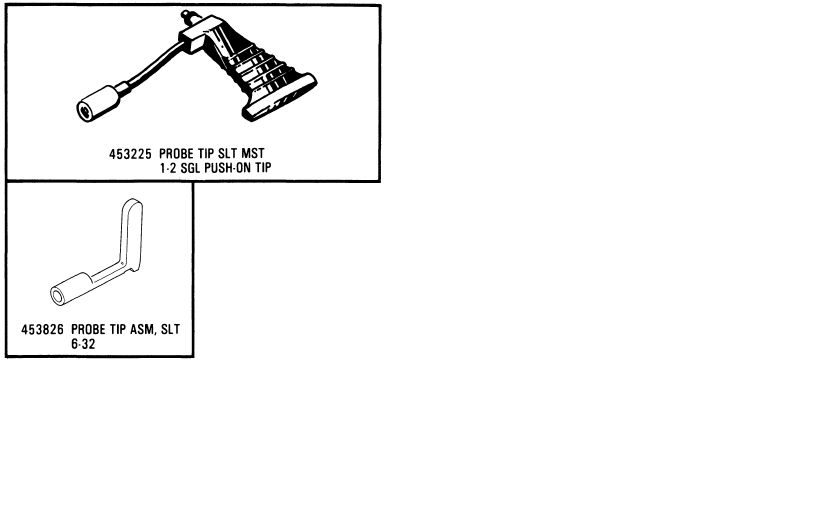
Hi,
Who can help me with a source (not IBM) for logic probe tips
used with IBM MST and SLT backplanes.
See: http://home.hccnet.nl/h.j.stegeman/IBM_logic_probes.jpg
Prefably the lower one (P/N 453826).
Thanks for your replies.
Regards Henk
>Glen Slick wrote:
>>On Mon, Feb 16, 2015 at 11:47 AM, Noel Chiappa <jnc at mercury.lcs.mit.edu> wrote:
>
>
>>This may be common knowledge here, but I was unaware of it (and, AFAIK, the
>>DEC documentation doesn't point this out), so here goes...
>>
>>It turns out one doesn't need the fancy cab-kit to connect up to an 11/23+'s
>>console. The headers on the card are completely compatible with standard
>>DLV11-J connectors, and a DLV11-J cable can be used to connect up to an
>>11/23+ card. (One has to select the desired baud rate with the DIP switches
>>on the card, of course.) I have verified this by trying it, and it worked.
>>
>>The cabkits merely allow one to select the baud rate at the console connector
>>(via a clock generator on the cabkit, and the 'external clock' input on the
>>serial interface). This implies that one should be able to plug a cabkit into
>>an appropriately configured DLV11-J (external serial clock select), and
>>select the baud rate via the switch on the cabkit. I haven't tried that,
>>though.
>>
>If anyone is looking for the real cabkit for the M8189 PDP-11/23+ JT
>Computer currently has some listed on eBay for $45. There were 5
>listed, 2 sold last week:
>
>http://www.ebay.com/itm/151615474481
>CK-KDF11-BA M8189 CABKIT INCLUDES PANEL AND CABLES
>
>I finally got around to buying a CK-KDJ11-D cabkit for the M7554
>KDJ11-D directly from their website ( www.jtcomputer.com ) a week ago.
>I've had good results buying a few things from them.
>
Check
John Foust <jfoust at threedee.com> wrote:
> I'm trying to understand at a low level how some early computers
> and game consoles generated a non-standard form of NTSC.
>
> The Wikipedia http://en.wikipedia.org/wiki/Low-definition_television
> says: (...)
Adam Sampson <ats at offog.org> wrote:
> There's a pretty good description here, with diagrams of the video
> waveforms involved for both PAL and NTSC (both use the same idea):
> http://martin.hinner.info/vga/pal.html
>
> (...) in the kind of non-interlaced
> signal you're talking about, every frame starts with the odd field
> vertical sync, so the monitor always pulls the electron beam back to
> the same place.
A-ha, interesting to see that this sort of shortcut was actually taken
in commercial products. I pretty much accidentally ended up with that
sort of signal when I, back in 2010ish, tried to coax a Sun cg3 style
framebuffer (onboard FB of a SPARCclassic) into outputting a (50Hz) TV
displayable RGBs Signal by feeding it a hand-crafted "mode line" after
working out what the registers on the video timing ASIC do. I'm
pretty sure there will be some accounts of that adventure in the list
archive as a list member helped me through it.
I got the picture to display on my Commodore 1081 Monitor via a 13W3
to SCART cable I had fashioned therefore, but of course wasn't very
impressed with the vertical resolution, and couldn't find out how to
enable interlaced mode on the ASIC - if it's capable of that at all.
So Long,
Arno
This may be common knowledge here, but I was unaware of it (and, AFAIK, the
DEC documentation doesn't point this out), so here goes...
It turns out one doesn't need the fancy cab-kit to connect up to an 11/23+'s
console. The headers on the card are completely compatible with standard
DLV11-J connectors, and a DLV11-J cable can be used to connect up to an
11/23+ card. (One has to select the desired baud rate with the DIP switches
on the card, of course.) I have verified this by trying it, and it worked.
The cabkits merely allow one to select the baud rate at the console connector
(via a clock generator on the cabkit, and the 'external clock' input on the
serial interface). This implies that one should be able to plug a cabkit into
an appropriately configured DLV11-J (external serial clock select), and
select the baud rate via the switch on the cabkit. I haven't tried that,
though.
Noel
On Mon, Mar 16, 2015 at 8:20 AM, John Foust <jfoust at threedee.com> wrote:
> I'm trying to understand at a low level how some early computers
> and game consoles generated a non-standard form of NTSC.
There were several non-standard aspects of the Apple II "NTSC" video
signal which made it not actually NTSC-compliant. It was mostly a
matter of timing. The most significant deviations were lack of
interlace (60 frames per second, rather than 30 frames per second each
comprised of two interlaced fields), and that each horizontal scan
line was 228 color carrier cycles long rather than 227.5, which was
done so that the color carrier phase relative to horizontal timing was
the same on all scan lines. Early revisions of the Apple II were also
missing the serrations in the vertical interval.
Some people claim that the way color was generated in the Apple II was
somehow "fake" and refer to it as "artifacts" that somehow "trick" the
television or monitor, but in actuality it was just a clever way of
having the hardware produce various signal amplitudes and phases, just
as "real" color does. It was clever enough to be patented, but it's
not in any way "wrong" or "fake".
When other devices have an issue with Apple II video as a source, and
don't reproduce the colors properly, in my experience it is usually
the 228 vs. 227.5 color carrier cycles per scan line that is at fault.
In the early 1980s, Video Associate Labs sold a product for the Apple
II called the VB3 Microkeyer. This consisted of a long slot 7 card,
and a larger card that installed atop the power supply, connected by a
ribbon cable. You had to pull about a dozen chips out of the Apple II
motherboard (thus it would only work with the II and II+, but not the
IIe or IIgs), and install in their place ribbon cables to the VB3
boards. The results were:
1) The Apple II would generate fully-compliant broadcast-quality NTSC
output. (IIRC, there was a way to selectably disable interlace, which
would break NTSC compliance.)
2) proc amp and gen lock: The Apple II video could be overlayed on an
external video input. This could be done selectively (keying), and it
was also possible to do software-controlled "wipes" between two video
inputs, using the Apple video bitmap as the input selector.
3) A special "linear" high-res graphics mode was added, in which the
addressing of the frame buffer was linear rather than having the
normal Apple II interlaced addressing. This made it easier to program
keying and wipes, but could be used for other purposes.
I used and programmed one of these in the instructional television
studio of a community college. I wrote some "wipe" programs for it,
and licensed them to Video Associate Labs in exchange for a VB3 of my
own. Alas, I no longer have it. :-(
Years later Apple introduced a Video Overlay card, which did produce
broadcast-quality NTSC output, and would work in the II, II+, IIe, and
IIgs. It supported all of the IIgs graphics modes, even when used in
an earlier model computer.
> From: Johnny Billquist
> I need to see if I can locate the manual in the summer when I get close
> to where I had that 11/34
That would be wonderful, if you find it! In addition to showing for sure how
it basically worked, I still also have a number of questions as to exactly
how it connected up to the optional cache, EUB memory, etc.
> we still seem to talk about two different ENABLE products, though... :-)
I saying what I'm about to say, I am not in any way trying to be
argumentative (truly, I would be as happy if you were correct, just as much
as if I were, _provided that we had found out what the correct answer really
is_), but I really do think that your memory is playing tricks on you, with
the 'it didn't require any software changes at all'.
The "Enable/34" described in contemporary posts here:
http://gopher.quux.org:70/Archives/usenet-a-news/FA.unix-wizards/81.07.09_u…http://gopher.quux.org:70/Archives/usenet-a-news/FA.unix-wizards/81.07.12_u…
works the way I'm describing... (Although note I do think Mike made some
mistakes in the diagram in the first one - I think the DMA devices have to be
behind the ENABLE/34, per his description in the second post of how it works.)
I wish we could find a copy of the paper mentioned there ("Modifications to
UNIX to Allow Four Mega Bytes of Main Memory on a 11/40 Class Processor" by
Clement T. Cole and Sterling J. Huxley), as it might also answer the questions
I have...
Noel
Probably stupid question, I'm sure, but I'd like to disable the beeping of
SimH when VMS is notifying. I cannot seem to find anything of a
configurable parameter in the documentation.
Am I missing something?
Kind regards,
Sander
> From: Roe Peterson
>> (Unless you have an 11/xx with an Able ENABLE board! :-)
> What is an ENABLE board?
That's that thing we had an 'energetic' discussion about a while back; it's a
board that allows one to put more than 256KB of memory in a UNIBUS machine
(other than a /44 or /70, which already support more than 256KB - and probably
the /24 too, too lazy to check).
Noel
> From: Johnny Billquist
> the ENABLE board that I used on an 11/34 did not add neither split I/D
> space, nor supervisor mode. Essentially it made the 11/34 look like an
> 11/24.
Right, it doesn't add any modes, or separation, or anything like that; just
more memory. It's entirely separate from the CPU; it just sits in the middle
of the UNIBUS.
Noel
John Foust <jfoust at threedee.com> writes:
> I'm trying to understand at a low level how some early computers
> and game consoles generated a non-standard form of NTSC.
There's a pretty good description here, with diagrams of the video
waveforms involved for both PAL and NTSC (both use the same idea):
http://martin.hinner.info/vga/pal.html
In brief: a video signal consists of a series of fields (about 60 per
second for NTSC). Each video field starts with a series of "vertical
sync" pulses that returns the electron beam to the top of the screen
(there's also a "horizontal sync" pulse at the end of each line, which
moves the beam back to the left of the screen). There are different
vertical sync pulse sequences for odd and even fields, so the monitor
knows to offset the even field by half a line. A normal video signal
alternates between odd and even fields; in the kind of non-interlaced
signal you're talking about, every frame starts with the odd field
vertical sync, so the monitor always pulls the electron beam back to the
same place.
Cheers,
--
Adam Sampson <ats at offog.org> <http://offog.org/>
> From: Pete Turnbull
> 2.9BSD doesn't need split I&D, but 2.11BSD does.
Doesn't 2.11 also need Supervisor mode (at least, for the networking code)?
Of course, there is not (AFAICR) any machine with split I&D but not
Supervisor, so the question above is purely intellectual, not of practical
consequence. (Unless you have an 11/xx with an Able ENABLE board! :-)
Noel
I'm trying to understand at a low level how some early computers
and game consoles generated a non-standard form of NTSC.
The Wikipedia http://en.wikipedia.org/wiki/Low-definition_television says:
"Older video game consoles and home computers generated a nonstandard NTSC
or PAL signal which sent a single field type which prevented fields from
interlacing. This is equivalent to 240p and 288p respectively, and was
used due to requiring less resources and producing a progressive
and stable signal."
Another source says this was true for the "NTSC Atari 2600, Apple II
family, Commodore 64, Nintendo Entertainment System, Sega Master
System, and the vast majority of games for NTSC Genesis, Super NES,
PlayStation, and Nintendo 64."
This page http://www.hdretrovision.com/240p/ calls it a "special timing
signal" and gives examples of how contemporary flat-panel TVs can
misinterpret the old signal. The issue has spawned the creation of
dozen of devices to give the retro look on new TVs.
- John
Hello,
checking on bitsavers for bare presence is not a problem at all...
I should assume that all the documents widely available on other sites
(like manx or related links)
are also on bitsavers?
I mean, searching on bitsavers and not founding a specific file there is
enough to assume that the file is unavailable
and should be scanned?
Anyway, I would need some advice about the way to transfer scanned files
(huge unprocessed/uncompressed or
post-processed to bitmap with level/contrast adaption) to the archive.
Andrea
So, I need to add a PROM burner to my collection of stuff, and I'd like to ask
for recommendations.
I'm looking for something that's easy to find on eBay, not _too_ expensive,
and can handle (via the appropriate adapters, which should also be relatively
easy to find) a very wide range of old PROMs/EPROMs from back in the day.
(I.e. ability to support modern chips is not really an issue.)
The ability to read them would be a real plus (no idea if that's a common
capability or not). Serial interface preferred, but I could work with parallel
(again, no idea what was usual).
Thanks in advance for any insight!
Noel
3 lowboy racks:
Rack1: Vax 11/750
Rack2: Cipher (looks like a F880), and some hard drives appear to be present
Rack3: DecTalk and a VME 68030 system "stuffed with boards"
Intonation is "Free to a good home". Location is just north of Boston, MA
Contact me off-list if interested.
Best,
J
[Seen thanks to off-list assistance - thank you!]
> Brief background: Real VAXes had real diagnostics. MicroVAXes had diagnostic$
I'm fairly sure the MDM is not what I have, then.
> Moving on: Are you aware of
> EK-O19AE-SG-005_MicroVAX_Troubleshooting_and_Diagnostics_May89.pdf
I wasn't. I picked up a copy and it turns out to be unreadable for me;
the ghostscript I have says "Unable to process JBIG2Decode data. Page
will be missing data.". Modern Ghostscript is no longer suitable for
open-source use, so I'm looking for alternatives, either other
PostScript renderers or something to replace the JBIG2Decode code in
the version I have. I have a few leads, but even in the best of
outcomes it will take time.
> Does your emulator have a console ROM like the real thing? Does it have any $
Yes. It is an image of the ROM from a real KA630 I have. In
particular, it has the same set of tests the real thing has. The
simulator passes all of them, as far as I can tell.
I have a copy of EK-KA630-UG-001 and have scanned it, and read it
multiple times. As far as I can tell the tests there are all run at
startup, and they all pass. If there's any way to run any other tests
>from the ROM, I don't know what it is.
I'll also see if I can find that MDM thing, though if you couldn't find
a copy it seems unlikely I will.
/~\ The ASCII Mouse
\ / Ribbon Campaign
X Against HTML mouse at rodents-montreal.org
/ \ Email! 7D C8 61 52 5D E7 2D 39 4E F1 31 3E E8 B3 27 4B
Thanks to everyone who responded!
I decided, after a look at the manuals, and on eBay, to go with the
23B/Unipak2B combo; it seems like it is likely to cover most things
I want to do, and was available, something I could hook up to, etc, etc.
A few points:
> From: Jon Elson
> You won't find ANYTHING that supports 1702 devices, they needed 80 V to
> program.
I checked, and the 29B/Unipak2B combo does not support them. Does anyone
know if DEC used 1702s in anything PDP-11?
Are there any other early PROMs I'm likely to run in PDP-11's that are also
going to be difficult to deal with?
> From: Roe Peterson
>> What about the modern TL866? Anybody has experience with these?
> They are fairly decent units, but can not handle 68764/68766 EPROMS,
> which you might need for pdp11 systems.
Well, I don't know about for PDP-11s, but the very first thing I'm going to do
with it is blow EPROMs for a diagnostic ROM pack for my Tek 1240's, and those
take 68764/68766's (or equivalent). So that one was out, for me. (BTW, what's
the difference between the two? Looking at the data sheets very quickly, they
seemed to be pretty much the same?)
> From: Chuck Guzis
> Do you need program the old 3-rail EPROMs? (e.g. 2704, 2708)?
I have no idea what PROMs I will, over time, want to blow. I know of a couple
of applications right off the bat (BDV11s, which I guess take a large range
of things), and the afore-mentioned Tek 1240 ROM pack, but in the long run, I
don't really know what I'll want to do with it. That's why I said I was
looking for something that could do a wide range of early stuff.
Noel
Hi all,
I'm currently searching around for a small cardcage+backplane, if I'm not
mistaken DEC part numbers H9281-BA or H9281-BB for a bigger one. The -BA
(4x dual heights) has my preference as I'm looking to build a very nice,
cute and not that power hungry PDP-11.
Does anyone have one available?
With kind regards,
Sander Reiche
the Netherlands
I'm working on one of these systems, and have run across a floppy
controller issue. Everything else in the system is functioning fine,
including booting from HDD. However, I have a problem where the floppy
drive has power, physically works, and connected properly etc, but what
I find is the drive/controller will recognize a disk is put in, click,
then nothing. Just due to the way I'm working on this, I haven't been
able to test any signals at the controller IC (WD2797), but I have
completely swapped the IC with a different one just to check.
Now, the question is, without looking at signals, what is the
probability the lack of any action is could be a problem with the input
to the IC (write, ready, track0, index, write protect, density signals)
or with the output signals (step, direction, DRQ IRQ)? There are
tri-state buffers (74LS244-input side, 74LS240-output side) on these
signals, and I'm thinking one of these are misbehaving, but trying to
determine which. Or could it be something completely different? Or any
good suggestions on troubleshooting this?
Hi all,
Now that RS is going down is there any effort to preserve the
information that is on their website, which I assume will go down at
some point (I could be wrong though)? Apologies if this has been
discussed before.
Things like this for example (pinouts, specs, drivers etc)
http://support.radioshack.com/productinfo/DocumentResults.asp?sku_id=25-353…
Regards,
Vlad.
[apologies for abuse of list protocol, bit pushed for time, crappy webmail client lazily replying to digest... usual excuses]
In the absence of other suggestions so far:
Brief background: Real VAXes had real diagnostics. MicroVAXes had diagnostics in ROM, or if that wasn't sufficient, the MicroVAX Diagnostic Monitor was available. Readers of the list may know where to get hold of a copy of the MDM; a quick search doesn't find an obvious source.
Moving on: Are you aware of
EK-O19AE-SG-005_MicroVAX_Troubleshooting_and_Diagnostics_May89.pdf
or similar? Bitsavers is where I found it, e.g.
http://bitsavers.trailing-edge.com/pdf/dec/vax/3800/EK-O19AE-SG-005_MicroVA…
Does your emulator have a console ROM like the real thing? Does it have any tests in it? The KA630 ROM diags are covered briefly in Chapter 5 of the KA630 Users Guide, e.g. at
http://www.vaxination.ca/vms/microvax/EK-KA630-UG-001_FEB86.PDF
A VAX is a VAX, to a large extent, so generic diagnostics (not CPU-specific) might be helpful in some cases. The detailed innards of memory management may not be one of those cases, though there are likely some CPU-independent parts too.
Have a read of the manual(s) above if you haven't done so already, see if you can get hold of a downloadable MDM image, report back?
Best of luck.
Hey all, Im looking for HP UX for my HP 9000/712
Anybody got a source, I cannot find anything and I am trying to get it
back to its original glory
Thanks
Steve