Can somebody send me the decoded switch settings for the 8-bit IBM
"64-256KB MEMORY CD"? There are 8 switches, marked A16-A19, 64KB,
128KB, 190KB, and 256KB.
I need to know how to set the switches for my 16-64KB 5150, so I can
bring it up to 256KB and run PC-DOS 3.30.
Thanks.
ok
bear
Does anyone know of a place that has parts for a Commodore SX 64? (in
particular, keyboard and cable)
--
David Griffith
dgriffi at cs.csubak.edu
A: Because it fouls the order in which people normally read text.
Q: Why is top-posting such a bad thing?
A: Top-posting.
Q: What is the most annoying thing in e-mail?
I'd like to announce the Computer History Wiki at
http://toresbe.dreamhosters.com/wiki !
I realize that there has been some discussion previously about setting
up a computer history wiki, and that Jay has decided against hosting one
himself, favouring a knowledge base arrangement.
I am involved in the Norwegian Computer History Society, and we have a
MediaWiki website which we are very happy with. However, being a
Norwegian organization, the page is... well, it's in Norwegian. I found
myself really enjoying adding technical information, guides, etc, but I
was very frustrated by the fact that the text would only reach a very
limited audience, and only had a very limited potential for revision by
others - at most, our audience consisted of Scandinavia.
Recently I bought a very cheap hosting deal from Dreamhost, which so far
has worked splendidly. I therefore decided to use this to set up an
English computer history wiki and gauge the response. So far, this has
been very encouraging - we are up to 80 articles now, and it's growing
very fast.
The chief difference between this wiki and Wikipedia is that this is not
aiming to be an encyclopedia of formal defintion articles, but an
information base for articles of all kinds - handy hints and tips,
practical guides, tutorials, quick introductions, cheat sheets, advice,
stories, you name it.
My hope is that this page could become a resource for people on all ends
of the classiccmp knowledge scale. The wiki is currently hosted on a
temporary domain, since I did not want to spend my free domain (included
in the hosting deal) if interest turned out to be minimal. Well, it
hasn't, and I'm seriously considering registering a domain very soon.
Currently, the wiki has a strong DEC minicomputer bias, because all
three of the current active editors are DEC fans. With time, I hope this
bias becomes less apparent, and that people will add information about
micros, other minis, mainframes, peripherals, terminals, etc, etc.
Again, the URL of the wiki is: http://toresbe.dreamhosters.com/wiki
Regards,
Tore Sinding Bekkedal
"Rod Smallwood" <RodSmallwood at mail.ediconsulting.co.uk> skrev:
> Now that makes a lot more sense.
>
> So PMI memory choice is: (2 Max)
>
> MSV11-JD M8637-D 1 MB ECC PDP-11/84 or PDP-11/83
> MSV11-JE M8637-E 2 MB ECC PDP-11/84 or PDP-11/83
Correct.
> The CPU choice is:
>
> Module Type Speed RAM ROM LTC SLU
> ------ ---- ----- --- --- --- ---
> M8190 KDJ11-B
> M8190-AD KDJ11-BA 18
> M8190-AB KDJ11-BB 15 0 Y Yes
> 2
> M8190-AC KDJ11-BD
> M8190-AZ KDJ11-BF 18 0 Y Yes
> 2
You need to check out if all of these really works in an 11/84. I don't
think they all do. Some had hardware bugs that meant they only work in
the 11/83 configuration.
> So.....
>
> 1. Plug in one or two memory cards.
Yes.
> 2. Plug in a CPU card
Yes.
> 3. Insert Bus Grant cards (Which end of the slot?)
The bus grant goes into the middle slots. There are two models. One
really small one, which is only one connector high. They should go into
the fourth slot from the top if my memory serves me right. In this case,
you also need to make sure the NPG lines are are connected. This is done
by a DIP-switch block on the backplane. One switch per slot. It should
be visible if you look down into the cage. The other bus grand card is
two connectors high, and also carry the NPG line, in which case you
don't need to worry about the DIP-switches.
> 4. Insert in Slot nine a M9302 UNIBUS TERMINATOR and a M9713 MIN. LOAD
> MODULE
Yes.
> 5. Now we would have:
>
> Slot 1 M8190-Ax KDJ11-Bx 11/83 - 11/84 CPU Card
> Slot 2 M8637-X MSV11-Jx PMI Memory
> Slot 3 M8637-X MSV11-Jx PMI Memory
> Slot 4 M8191 KTJ11-B Unibus controller
> Slot 5 M7547 TUK50-BB Tape controller (Bus grant as
> well?)
> Slot 7 G7273 NPG and BUS Grant
> / Double Grant
> Slot 8 G7273 NPG and BUS Grant
> / Double Grant
> Slot 9 M9302 UNIBUS TERMINATOR
> Slot 9 M9713 MIN. LOAD MODULE
You only need one memory card, so it's not really neccesary to get two.
Also, no grant in the slot where you have the TUK50. But I'm missing a
grant in slot 6. :-)
> 6. Connect up a terminal (I have several 420's) to the SLU connector.
Yes.
> 7. Connect a TK50 drive (Which I have) to its controller.
Yes.
> 8. Check for correct boot proms on the CPU card.
No need, normally. The 11/8x and 11/9x cards have nice large boot proms
with all kind of boot routines on them, including booting from TMSCP.
> 9. Switch on. Wait for smoke to clear. Look for output on the terminal.
Yes.
> 10. Insert a bootable tape. (Which I don't have yet)
That would help if you don't feel like starting to write your own code.
But for test purposes, not needed at all.
> All those in favor of this config say Aye!
> All those against email me quick, before I do anything dangerous!!
If you're just interested in checking that the machine is working, skip
the TUK50. Just make sure the unibus is "whole", and fire her up. The
boot monitor of the 11/8x and 11/9x are real talkative, with lots of
things that can be done without anything else, including running tests,
and checking out the hardware.
Johnny
--
Johnny Billquist || "I'm on a bus
|| on a psychedelic trip
email: bqt at softjar.se || Reading murder books
pdp is alive! || tryin' to stay hip" - B. Idol
Roger that!!
>The other bus grand card is two connectors high, and also carry the
NPG line, in which case you don't need to worry about the DIP-switches.
These I have so where do they go?
Thanks for the kind assistance Jonny.
There now follows a general request for:
One M8190-Ax KDJ11-Bx 11/84 version
One/Two M8637-D or -E MSV11-Jx 11/84 version.
Anybody having or knowing the whereabouts of the above modules please
email me at:
rodsmallwood at btconnect.com
-----Original Message-----
From: cctech-bounces at classiccmp.org
[mailto:cctech-bounces at classiccmp.org] On Behalf Of Johnny Billquist
Sent: 17 May 2007 21:51
To: cctalk at classiccmp.org; Rod Smallwood
Subject: Re: he Last of The Line
"Rod Smallwood" <RodSmallwood at mail.ediconsulting.co.uk> skrev:
> Now that makes a lot more sense.
>
> So PMI memory choice is: (2 Max)
>
> MSV11-JD M8637-D 1 MB ECC PDP-11/84 or PDP-11/83
> MSV11-JE M8637-E 2 MB ECC PDP-11/84 or PDP-11/83
Correct.
> The CPU choice is:
>
> Module Type Speed RAM ROM LTC
SLU
> ------ ---- ----- --- --- ---
---
> M8190 KDJ11-B
> M8190-AD KDJ11-BA 18
> M8190-AB KDJ11-BB 15 0 Y Yes
> 2
> M8190-AC KDJ11-BD
> M8190-AZ KDJ11-BF 18 0 Y Yes
> 2
You need to check out if all of these really works in an 11/84. I don't
think they all do. Some had hardware bugs that meant they only work in
the 11/83 configuration.
> So.....
>
> 1. Plug in one or two memory cards.
Yes.
> 2. Plug in a CPU card
Yes.
> 3. Insert Bus Grant cards (Which end of the slot?)
The bus grant goes into the middle slots. There are two models. One
really small one, which is only one connector high. They should go into
the fourth slot from the top if my memory serves me right. In this case,
you also need to make sure the NPG lines are are connected. This is done
by a DIP-switch block on the backplane. One switch per slot. It should
be visible if you look down into the cage. The other bus grand card is
two connectors high, and also carry the NPG line, in which case you
don't need to worry about the DIP-switches.
> 4. Insert in Slot nine a M9302 UNIBUS TERMINATOR and a M9713 MIN. LOAD
> MODULE
Yes.
> 5. Now we would have:
>
> Slot 1 M8190-Ax KDJ11-Bx 11/83 - 11/84 CPU Card
> Slot 2 M8637-X MSV11-Jx PMI Memory
> Slot 3 M8637-X MSV11-Jx PMI Memory
> Slot 4 M8191 KTJ11-B Unibus controller
> Slot 5 M7547 TUK50-BB Tape controller (Bus grant as
> well?)
> Slot 7 G7273 NPG and BUS Grant
> / Double Grant
> Slot 8 G7273 NPG and BUS Grant
> / Double Grant
> Slot 9 M9302 UNIBUS TERMINATOR
> Slot 9 M9713 MIN. LOAD MODULE
You only need one memory card, so it's not really neccesary to get two.
Also, no grant in the slot where you have the TUK50. But I'm missing a
grant in slot 6. :-)
> 6. Connect up a terminal (I have several 420's) to the SLU connector.
Yes.
> 7. Connect a TK50 drive (Which I have) to its controller.
Yes.
> 8. Check for correct boot proms on the CPU card.
No need, normally. The 11/8x and 11/9x cards have nice large boot proms
with all kind of boot routines on them, including booting from TMSCP.
> 9. Switch on. Wait for smoke to clear. Look for output on the
terminal.
Yes.
> 10. Insert a bootable tape. (Which I don't have yet)
That would help if you don't feel like starting to write your own code.
But for test purposes, not needed at all.
> All those in favor of this config say Aye!
> All those against email me quick, before I do anything dangerous!!
If you're just interested in checking that the machine is working, skip
the TUK50. Just make sure the unibus is "whole", and fire her up. The
boot monitor of the 11/8x and 11/9x are real talkative, with lots of
things that can be done without anything else, including running tests,
and checking out the hardware.
Johnny
--
Johnny Billquist || "I'm on a bus
|| on a psychedelic trip
email: bqt at softjar.se || Reading murder books
pdp is alive! || tryin' to stay hip" - B. Idol
Microvax 2000 Hardware Information, slipcover
ThinkC for Macintosh, Symantec User's Guide
CP/M Assembly Language Programming, Barbier, Prentice
Hall
The Programmer's CP/M Handbook
last 2 are hardcovers
all the preceding a bit musty
same terms as last bunch of crap
also have an Apple IIe that had been sitting out in
the rain. Looks ok, powered up a few months ago,
distorted image, but it powered up.
prolly more items to follow...
____________________________________________________________________________________Choose the right car based on your needs. Check out Yahoo! Autos new Car Finder tool.
http://autos.yahoo.com/carfinder/
I got my selling spot numbers today when I arrived in Dayton and they are
2913 and 2914. I don't have any classic computer stuff for sale, but if you
get a chance, stop by and say Hi!
Marvin, KE6HTS
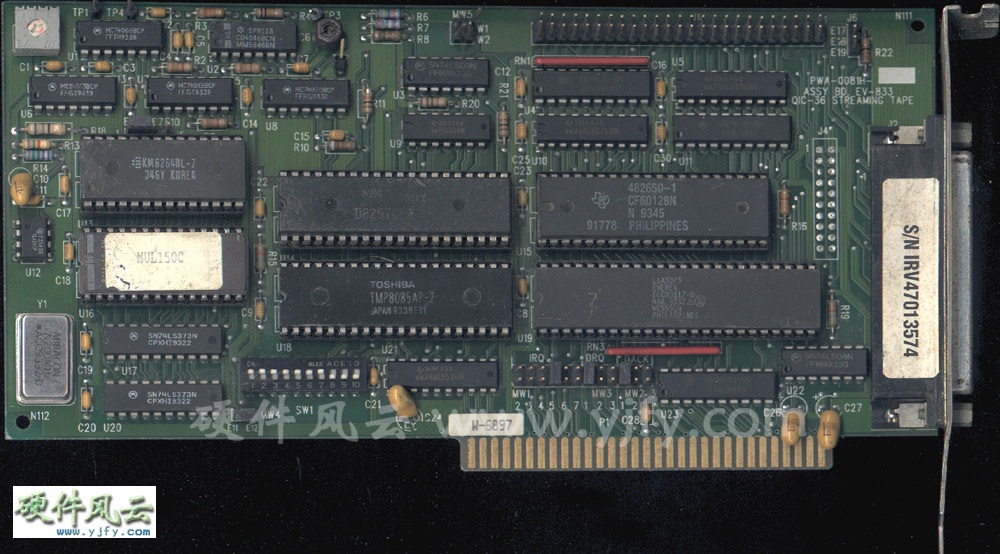
Right now I am attempting to configure my Everex EV-833 tape controller card
with my old 386 system and I am stuck at setting the dip switches and the
jumper blocks.
I usually find configuration settings here...
http://artofhacking.com/th99/index.htm
...but they don't have any info on this card. does anybody here know the
configuration settings or does anyone know where I can find the
configuration settings?
Here's a photograph:
http://www.yjfy.com/images/oldhard/scsi/pwa-0081h.jpg
_________________________________________________________________
Win a webcam! Nominate your friend?s Windows Live Space in the Windows Live
Spaces Sweetest Space Contest and you both could win!
http://www.microsoft.com/canada/home/contests/sweetestspace/default.aspx
Robert Borsuk wrote:
>Does anyone know what a Com-tran Ten is? I have a set of prints
>(over 30 pages) I pulled from my filing cabinet (while looking for
>Mac info for Teo and Jeff) which say they are a reprint by permission
>of Digiac Corporation.
>I tried doing some goggling but to no avail.
>
>Any ideas (or links)?
>
>Rob
I used a Com-tran Ten computer trainer while attending the US Navy's Advanced First Term Avionics (AFTA) school in Millington, Tennessee in 1980. Our classroom time on it was pretty limited - a week or two, at most. I vaguely recall that it was used to teach a smattering of machine language and digital circuit fault analysis & troubleshooting. That's about all I remember, and unfortunately I lost most of the tech pubs I had kept from those days in a move several years ago.
If anyone else on the list attended tech school in Millington during that era, perhaps you can answer a question I've wondered about for a while. The Navy was experimenting with computer graded programmed instruction in the early 80s, and the machine that processed the Scantron forms would print out a line or two of remedial info or "attaboys" on each test report. Unfortunately, we never did get to see "Jim-Jim", the machine which processed our grades. Does anyone know what kind of hardware Jim-Jim was?
-Rick Kaumeier
Dear All,
Thanks for your helpful reples.
On 15 May 2007 at 11:45, Chuck Guzis wrote:
>It's entirely possible to fit 10x512 sectors per track using a 765-
>type controller, though it's much easier if the IAM is left off and the
>space gained used to expand the inter-sector gaps (you can do this with a
>uPD 2765-type controller or any of the WD 17xx/27xx controllers.
>>I think the Tuscan FDC uses a WD1771 controller...
>Nope, the 1771 is restricted to FM only. Maybe a 179x or
1770/1772/1773 though.
You're right, it has a FD1791 controller.
>It's entirely possible that the drive used to create the diskettes was
>somewhat out of alignment. You may have to "unalign" a drive to
>successfully read these. This is more common than you might think.
Yes, it could be. I tried a different PC last night, same problem as before.
Using IMD (Image Disk) utility, and the analyse option, it would show a
scrolling display with entries like:
0 7 20 0 for track 0, the 20 meaning that 20 sectors were found
up to:
39 5 20 0 for track 39.
Using D to read data, I could read track 0 OK, but with higher tracks
(especially 10 or higher) then IMD gave errors like:
Read error <1> No Addr Mark 2
Read error <2> No Addr Mark 3
etc up to sector 10.
I came across this article:
http://www.atari-forum.com/viewtopic.php?t=9644&postdays=0&postorder=asc&st…
(Google for ["read sector" "splice points"])
which makes the valid point that floppies are often formated on one machine,
and written to on another. As I can read track 0, and all the sector marks
are found for the other tracks, but I can't read the data part of the
sectors for tracks 1 to 39, I am guessing that the drive used to write the
data was different to that used to format the floppy and write the system
track. The above page talks about 'splice points' where the new data is
written over existing data.
(Another interesting glossary was found here:
http://www.softpres.org/knowledge_base)
>You didn't mention if you were using a 48tpi ("360K") drive to read these
>or trying to get by on a 96tpi ("720K" or "1.2MB) drive. The former will
>usually produce better results.
I am using a 48tpi drive, an IBM badged Qumetrak 142 with belt drive ("That
is the third worst drive I've dealt with" - Fred Cisin, Oct 2005), also
tried a Techmate NPH-502. I have some Tandon TM-100s on various machines,
I'll try one of these plus a 96tpi drive for luck.
>If the first sector on the track is consistently missing (not always the
>lowest-numbered; some systems skew the tracks for better performance), you
>might be able to recover it by slowing the drive a bit to allow the first
>sector IDAM to move outside of the 765 "blind spot" at the beginning of a
>track (although the 765 formats a track with an IAM at the start, it never
>reads it).
Seems to be every sector past a certan track. BTW the disk is formated with
sector skewing, starting from track 0 they are read as:
1 2 3 4 5 6 7 8 9 10
9 10 1 2 3 4 5 6 7 8
7 8 9 10 1 2 3 4 5 6
5 6 7 8 9 10 1 2 3 4
3 4 5 6 7 8 9 10 1 2
1 2 3 4 5 6 7 8 9 10
Luckily I have recently heard from two more Tuscan owners with CP/M boot
disks, so hopefully they will have more joy.
Regards,
John
_________________________________________________________________
The next generation of Hotmail is here! http://www.newhotmail.co.uk
Hi
Having had a look at the slides I now have it straight. It was the
Alas I saw when at college and the ICL system when I worked just round
the corner at RRD. If you had anything to do with Harwell RRD would have
been familiar to you. I built experimental rigs and interfaced them to
PDP-8's. The science guys would run them whilst the particular reactor
(Dido or Pluto) was operating and I would do the maintenance whilst they
where on shutdown.
Happy Days...
I had a office/workshop at one end of a hut with windows on three
sides.
Taxi to and from work each day and one week in three to a sandwich
course.
Rod
-----Original Message-----
From: cctech-bounces at classiccmp.org
[mailto:cctech-bounces at classiccmp.org] On Behalf Of Roger Holmes
Sent: 16 May 2007 23:28
To: cctalk at classiccmp.org
Subject: Re: Harwell (was RE: A local computer history group for my
area. ..)
>
> Date: Wed, 16 May 2007 04:13:44 +0100
> From: "Rod Smallwood" <RodSmallwood at mail.ediconsulting.co.uk>
> Subject: RE: Harwell (was RE: A local computer history group for my
> area . ..)
>
> Yes slight aberration of the brain. The building was called "The Atlas
> Computer Laboratory" but the system was ICL.
Maybe it had gone by then, but there are photos on the web of the
building when it housed a Ferranti Atlas.
Specifically: http://www.chilton-computing.org.uk/gallery/harwell/
slide8.htm
or the view the whole collection of photos at http://www.chilton-
computing.org.uk/gallery/home.htm
> One of my first jobs as a junior engineer (circa 1972) was to
> refurbish
> 4K core memory stores for an Elliot system.
What was involved in refurbishment?
> They were about three feet long with a Mullard Core stack in a box in
> the middle and plug in cards on either side.
> They used early transistors of the OC71 era (Yup -ve supply). I soon
> learned all about read, write and sense amplifiers and how the cores
> actually worked.
My 1301 has five core stores, each of 400(decimal) words x 50 bits
(48 data + 2 parity). Three of the stores work perfectly after they
have warmed up, but two of the stores are totally dead. We've tried
everything, starting with the obvious - looking for a fault in the
selection logic, but after replacing the same boards about five times
with no effect (especially when the 'scope also says they're working
properly), we had to started looking for a fault in each of the
stores. But everything there looks OK too, at least measuring
voltages they look OK, I don't possess a current probe and I'm not
sure if I had one I'd be able to use it.
>
> As a final test I would put the store back in the system (Elliot
> 4100?)
> load a very complex FORTRAN program from paper tape ( it worked out
> handicaps for large racing yachts based on their dimensions) then a
> data
> tape. The answer came out on one of two IBM golfball printers (no
> keyboards).
>
> That's what I call classic computing as opposed to a classic computer!
>
> Rod Smallwood
> From: Jim Leonard <trixter at oldskool.org>
>
> > Don't confuse interface speed vs. actual media speed.
>
> True, but I didn't have a basis for comparison. I'm hearing that 4MB/s
> is indeed slightly above par, so I guess I should be happy .
I have several 35/70GB DLT drives on various systems and they all do between
240MB/minute to 400MB/minute depending on the speed of the disk systems (and
to some extent CPU's) they are backing up so yours certainly seems in the
ball park. You can't go by interface (10MB/s) or bus (132MB/S) speed, it's
purely down to the highest rate the drive can stream at and making sure you
can feed it data fast enough to keep it in 'streaming' mode.
Jim
>What was involved in refurbishment?
Well its 35 years ago but I'll have a go.
The store was made up of planes.
Each was (I think) 64x64 cores.
Wires ran Horizontally and Vertically through each core plus a sense
wire that snaked through
all the cores diagonally from one corner of the plane to the other.
The cores could be magnetized in one direction or the other.
It was driven by current pulses of differing magnitude depending on
reading or writing.
Reads came out on the sense wire as serial pulses of differing polarity
to indicate 0 or 1 and you had to write the answer back each time.
We had a test bench with power supplies and test boxes to write then
read the store.
The setting up consisted of setting the shape of the pulse amplifers
output to a drawing we had.
If it ran the read/write pattern ok for an hour it was a good one.
If you had good electronics (ie a working board set and pulses present
at the core box input)and no output you checked the date of manufacture
of the core box.
If it was still in warranty you went to he stores with it and said
"Another one to go back to Mullard" and got a new one.
If it was out of warranty you threw it out of the last window on the
left (That's where the skip was) as you left the building to go and get
a new one from the stores.
-----Original Message-----
From: cctech-bounces at classiccmp.org
[mailto:cctech-bounces at classiccmp.org] On Behalf Of Roger Holmes
Sent: 16 May 2007 23:28
To: cctalk at classiccmp.org
Subject: Re: Harwell (was RE: A local computer history group for my
area. ..)
>
> Date: Wed, 16 May 2007 04:13:44 +0100
> From: "Rod Smallwood" <RodSmallwood at mail.ediconsulting.co.uk>
> Subject: RE: Harwell (was RE: A local computer history group for my
> area . ..)
>
> Yes slight aberration of the brain. The building was called "The Atlas
> Computer Laboratory" but the system was ICL.
Maybe it had gone by then, but there are photos on the web of the
building when it housed a Ferranti Atlas.
Specifically: http://www.chilton-computing.org.uk/gallery/harwell/
slide8.htm
or the view the whole collection of photos at
http://www.chilton-computing.org.uk/gallery/home.htm
> One of my first jobs as a junior engineer (circa 1972) was to
> refurbish
> 4K core memory stores for an Elliot system.
What was involved in refurbishment?
> They were about three feet long with a Mullard Core stack in a box in
> the middle and plug in cards on either side.
> They used early transistors of the OC71 era (Yup -ve supply). I soon
> learned all about read, write and sense amplifiers and how the cores
> actually worked.
My 1301 has five core stores, each of 400(decimal) words x 50 bits
(48 data + 2 parity). Three of the stores work perfectly after they
have warmed up, but two of the stores are totally dead. We've tried
everything, starting with the obvious - looking for a fault in the
selection logic, but after replacing the same boards about five times
with no effect (especially when the 'scope also says they're working
properly), we had to started looking for a fault in each of the
stores. But everything there looks OK too, at least measuring
voltages they look OK, I don't possess a current probe and I'm not
sure if I had one I'd be able to use it.
>
> As a final test I would put the store back in the system (Elliot
> 4100?)
> load a very complex FORTRAN program from paper tape ( it worked out
> handicaps for large racing yachts based on their dimensions) then a
> data
> tape. The answer came out on one of two IBM golfball printers (no
> keyboards).
>
> That's what I call classic computing as opposed to a classic computer!
>
> Rod Smallwood
"Rod Smallwood" <RodSmallwood at mail.ediconsulting.co.uk> skrev:
> Well I think I understand the list.
> But for clarity's sake here's the problem again.
>
> 1. I have a number of PDP-11/94's
> 2. The first three slots are Quad Qbus
> 3. The missing KDJ11-EB would have been in slot one
> 4. Slot two has a M9714 ALT PWR FOR KDJ11-E in it.
> 5 Slot three is empty.
> 6. Slot four is a Unibus slot and has a M8191 KTJ11-B Unibus controller
> in it
> 7 Slot five has a M7547 TUK50-BB Tape controller in it.
> 8. Slot's Six,seven and eight are empty
> 9. Slot nine has a M9302 (UNIBUS TERMINATOR) at one end and a M9713
> (MIN. LOAD MODULE) at the other.
>
> "Your mission Mr Phelps (Should you accept it) is to replace the missing
> KDJ11-EB with the lowest cost plug in alternative that will run"
>
> The winner gets (for the cost of the shipping) a 11/94 system unit box
> as described above.
Sorry, but your options are very few.
The first three slots of that backplane are not Q-bus, but a special
adaptation of it for the PMI memory and nothing else. You cannot use
Q-bus memory on it, and no other Q-bus options either (atleast according
to the manuals, I haven't tried in real life. I could check out if any
signals differ, if it were real important).
Second, the Unibus adapter required some special signals from the
CPU-board as well.
Your options are basically the 11/8x and 11/9x CPU boards. No others
will originate the signals for the Unibus adapter required. Memory wise
only PMI memory boards will do.
For an 11/94, all memory are on the CPU board, so for those, the two PMI
slots should always be empty.
To make the power supply happy, you normally have some bus loads on them.
If you go for the 11/84 instead, you also need to find PMI memory boards.
That's the CPU/memory part of your system. You then need to configure
the Unibus correctly, which means you need unibus grant cards in
theright place of all empty slots. You probably also want some disk
controller in that system.
Johnny
--
Johnny Billquist || "I'm on a bus
|| on a psychedelic trip
email: bqt at softjar.se || Reading murder books
pdp is alive! || tryin' to stay hip" - B. Idol
I am writing an educational book about the invention of the videotape
machine and
subsequent evolution of nonlinear edit systems on desktop computers.
In order to background the reader properly, I am including material
on the development of
not only the GUI by companies like Xerox but also microprocessors and
PC's by companies
and people like MOS, Motorola, DG, Intel, Faggin, De Castro, Chuck
Peddle and Bill
Mensche. I have tried without luck to contact Mr Peddle and wish to
do so.
I believe Mr Peddle will be attending, Vintage Computer Festival East
4.0 this June
Maybe you are too?
http://www.vintage.org/2007/east/
If you are going I am looking to convey my interest in making contact
with him,
to make sure the facts in my book are fair and accurate.
I would love to attend but I am in Sydney, Australia.
I am more than happy to give fair credit in the published work to
ClassicCMP.
Thanks
John
velocite (at) gmail dot com
Hi everyone, I have just started up a user group in my area to get
together once a month and enjoy old computers and the history, etc. I
plan to give a short presentation each meeting, bring a few systems,
have some retro gaming available and basic refreshments. I'm calling
it what I once called a "club" I started years ago - The Historical
Computer Society. It will take many meetings and some time, but I
hope it can grow and become a true non-profit group on it's own
standing with elected officers, etc. - a user group. I have arranged
for the space in the public library near my house, every third
Saturday, from 2pm - 3:30pm, starting with next Saturday, May 19th.
Here's the library, in Fruit Cove, FL, just south of Jacksonville:
http://www.sjcpls.org/Branches/BartramTrail.aspx
If you're not too far and interested, please let me know.
Best, David
David Greelish
classiccomputing.com
The Classic Computing Podcast
Home of Computer History Nostalgia
Stan Veit's History of the Personal Computer
Audio Book Podcast
Does anyone know what a Com-tran Ten is? I have a set of prints
(over 30 pages) I pulled from my filing cabinet (while looking for
Mac info for Teo and Jeff) which say they are a reprint by permission
of Digiac Corporation.
I tried doing some goggling but to no avail.
Any ideas (or links)?
Rob
Rob Borsuk
email: rborsuk at colourfull.com
Colourfull Creations
Web: http://www.colourfull.com
>
> Date: Wed, 16 May 2007 04:13:44 +0100
> From: "Rod Smallwood" <RodSmallwood at mail.ediconsulting.co.uk>
> Subject: RE: Harwell (was RE: A local computer history group for my
> area . ..)
>
> Yes slight aberration of the brain. The building was called "The Atlas
> Computer Laboratory" but the system was ICL.
Maybe it had gone by then, but there are photos on the web of the
building when it housed a Ferranti Atlas.
Specifically: http://www.chilton-computing.org.uk/gallery/harwell/
slide8.htm
or the view the whole collection of photos at http://www.chilton-
computing.org.uk/gallery/home.htm
> One of my first jobs as a junior engineer (circa 1972) was to
> refurbish
> 4K core memory stores for an Elliot system.
What was involved in refurbishment?
> They were about three feet long with a Mullard Core stack in a box in
> the middle and plug in cards on either side.
> They used early transistors of the OC71 era (Yup -ve supply). I soon
> learned all about read, write and sense amplifiers and how the cores
> actually worked.
My 1301 has five core stores, each of 400(decimal) words x 50 bits
(48 data + 2 parity). Three of the stores work perfectly after they
have warmed up, but two of the stores are totally dead. We've tried
everything, starting with the obvious - looking for a fault in the
selection logic, but after replacing the same boards about five times
with no effect (especially when the 'scope also says they're working
properly), we had to started looking for a fault in each of the
stores. But everything there looks OK too, at least measuring
voltages they look OK, I don't possess a current probe and I'm not
sure if I had one I'd be able to use it.
>
> As a final test I would put the store back in the system (Elliot
> 4100?)
> load a very complex FORTRAN program from paper tape ( it worked out
> handicaps for large racing yachts based on their dimensions) then a
> data
> tape. The answer came out on one of two IBM golfball printers (no
> keyboards).
>
> That's what I call classic computing as opposed to a classic computer!
>
> Rod Smallwood
> Date: Wed, 16 May 2007 09:43:27 +0100
> From: "Rod Smallwood" <RodSmallwood at mail.ediconsulting.co.uk>
> Subject: RE: Computer stuff 1970's ish at Lucas Birmingham Gt King St
>
> Very Interesting!!!
>
> 1. The console terminal is a Creed Model 75 Teleprinter ie
> Baudot Telex code not ASCII
> This may be a Bletchley Park legacy.
> The later electronic BP systems were designed to break
> teleprinter codes and hence the
> high speed tape readers and terminals were for telex code.
> You can just see the M75 reader/punch above the operators
> hand.
>
> 2. To the left of the operator are two high speed paper tape
> readers.
Are these the 1000 character per second model or the 300 character
per second model? I presume they are the slower 300 cps units as the
1000 cps Elliott version on my ICT 1301 needs a powered tape un-
roller to feed it. It can still stop between characters even at that
speed, but I understand from my old boss when I worked at Elliott's
Rochester works that the older Elliott readers did not have the stop
on character facility, so that our software always put four null
characters after every carriage return line feed pair, and the
reading software would always read a line of input at full speed
before doing any heavy processing which might take longer than a
character time.
>
> 3. You can see the holes in the top of the desk where the tape
> went after the reader
>
> 4. The tape rewinder is on the corner of the other desk.
>
> 5. The two boxes on the right are the storage cases for the high
> speed readers or could be tape punches.
They are the acoustic cases for Teletype BRPE paper tape punches. 100
characters per second. You had to raise the cover to load new rolls
of tape into the unit, then press the feed button on top of the unit
as you pulled on the tape until it started feeding itself. Then you
closed the cover and when it was ready the computer started punching
and the tape fed out of the chrome lined hole on the left hand side.
It looks like it fed into the two holes in the desk to the left of
these units. My ICT 1301 has had one of these grafted onto it in the
1970s using a Vero board full of TTL logic which is housed within the
paper tape reader cabinet. Interest interface between the plus 5 volt
logic levels of TTL and the minus 6.3 volt logic levels of the
discrete germanium transistor logic of the 1301. A slight cheat - the
TTL ground is actually at -5 volts and the TTL's VCC is connected to
the 1301's 0 volt earth level. This also means a TTL '1' is a 1301
'0' and vice-versa. The 1301 to TTL signals work fine with no special
circuitry, but the TTL to 1301 need a transistor (GET872) to work
correctly.
>
> 6. The row of horizontal drawers on the right of the desk are
> for rewound paper tapes.
>
> 7. The row of cabinets under the window is the electronics.
>
> 8. You needed a whole cabinet to hold 16K of core + PSU
>
> 9. The desk to the left appears to have some punched cards on
> it. But they look a bit big.
>
> 10. The drawers in the desk to the left look like card storage.
>
> 11. The desk to the left could be a punched card station but I
> have
> never seen one so am unsure.
Hi all,
my first VAX ever - died, unfortunately. During the last months, I experienced that the CPU just got stuck at some time, but I could not reproduce this error.
Sometimes, it froze during or directly after the initialisation procedure, or later on after half an hour or an hour of work with VMS.
A friend of mine thought of instable voltages caused by the power supply, so I swapped it with another one in order to check, if the supply was to blame.
But it wasn't the case. I took out all the boards and left the CPU and some memory only, but it didn't get any better. After getting stuck, the CPU could only be reset
switching the supply off and on again.
And now, since last week, the CPU doesn't come up at all anymore. After switching on the power supply, the seven segment display shows an "F",
nothing is printed on the terminal, and the halt-button has no function anymore (which was always the case when it got stuck). So I guess that my VAX died...
Needless to say that these boards can't be repaired. As far as I know, no schematics were ever published and these big chips on the board are horrible to unsolder and solder, even
if spare ones could be obtained (supposed that one knows, where the "problem is").
Did anybody on this list make similar experiences regarding VAXen dying that way (at least, I'm pretty sure that she's dead) ?
Is there anything else I could check in order to save my VAX ?
Thanks for any help.
Regards,
Pierre
__________________________________________________________________________
Erweitern Sie FreeMail zu einem noch leistungsst?rkeren E-Mail-Postfach!
Mehr Infos unter http://produkte.web.de/club/?mc=021131
Hello Tim,
> What you write is "not inconsistent" with failing to get DCOK from the
> power supplies. DCOK is a signal indicating that the power supplies
> are all up and operating. The CPU refuses to even begin its self test
> until DCOK is asserted.
Thanks alot for pointing out several things I forgot to mention. My VAX is housed in a BA430 enclosure.
So there is only one power supply which provides the power to the system. Normally, when the green
"DC OK" LED turns on, the DC voltages should be available and lie within the necessary voltage range for the CPU
to work correctly. Now I don't know how reliable the control circuit is, regarding the detection of voltages lying outside of
the specified range. Could it be possible that the DCOK LED lits while a voltage is not within the required tolerance ?
>
> BA213's (a popular cabinet for your CPU) have two supplies and the light
> has to be on on both of them. Otherwise you see exactly the symptom
> you have (CPU stuck at "F").
>
> It's not impossible for a CPU board to fail and get stuck at "F", but
> in my experience, 99 times out of 100 it's because there's no DCOK on the
> backplane. And 9 times out of 10 it's because the power supply is
> failing. They often go flaky and are hard to start, or go flaky and
> fail after getting warm, etc.
>
Ok, in my case, having a BA430 chassis, both tested power supplies would have the same failure then. I tested both, and only
one fits in the chassis at a time.
On both supplies, the DCOK-LED turns on after powering up the VAX. But just to be sure, I should measure the
voltages of the supply at the backplane.
> It's also true that the power supplies need a certain minimum load...
> you may have had some boards in your backplane that had nothing except
> for resistors on them to provide the minimum load. Putting those
> back in won't hurt. Of course, spare KDA50 sets are just fine for
> sucking up DC power too!
>
A total of seven boards were plugged in, so I guess that the minimum load should be given.
Thanks alot for your precious hints, Tim !
Regards,
Pierre
_______________________________________________________________
SMS schreiben mit WEB.DE FreeMail - einfach, schnell und
kostenguenstig. Jetzt gleich testen! http://f.web.de/?mc=021192
>
>Subject: Re: 3.5" Altair CP/M
> From: David Griffith <dgriffi at cs.csubak.edu>
> Date: Tue, 15 May 2007 15:33:55 -0700 (PDT)
> To: "General Discussion: On-Topic and Off-Topic Posts" <cctalk at classiccmp.org>
>
>On Tue, 15 May 2007, Grant Stockly wrote:
>
>> I have a tarbell floppy controller card that has been rewired to access
>> 3.5" disks using a standard PC 3.5" disk drive.
>[snip]
>> What could be missing? If the bitrate is fixed, then is CP/M not writing
>> standard sectors? Rawread says "Address not found" and diskinfo says the
>> drive is not ready.
>
>I take it you don't have access to a Unix machine? The dd command might
>be able to fish out something more from that disk. Specifically, the
>utility cpmtools is useful for writing to a variety of disk formats and is
>easy to customize for new formats.
>
>From all I've read the controller is a a SD unit and may be running at either
the 8" SD rate or possibly the 5.25" SD rate makig the disk at most 360k.
That 360k format is NOT PC compatable. The OS used on the PC is not a factor
as whatever you do required direct controll of the FDC even then some PCs will
NOT do the slower SD data rate.
Allison
>
>Subject: Re: 3.5" Altair CP/M
> From: Grant Stockly <grant at stockly.com>
> Date: Tue, 15 May 2007 17:09:37 -0800
> To: "General Discussion: On-Topic and Off-Topic Posts" <cctalk at classiccmp.org>
>
>At 04:45 PM 5/15/2007, you wrote:
>>On 5/15/07, Grant Stockly <grant at stockly.com> wrote:
>>>I have a tarbell floppy controller card that has been rewired to access
>>>3.5" disks using a standard PC 3.5" disk drive. I have 3 disks that the
>>>Altair can boot off of and read, but my windows computer can't do anything
>>>with them. I've tried rawread.exe and diskinfo.exe and they both choke on
>>>the disk. I assumed that if a disk could be written with the standard 3.5"
>>>disk drive on the tarbell card then it should also be read on the same
>>>drive connected to a modern IBM compatible.
>>
>>Are you using a 1771 based SD Tarbell card, or a 1791/1793 based DD
>>Tarbell card? That might make a difference.
>
>Its an MDL-1011D with an FD1771-B01.
>
>What's the deal with this chip? Is it formatting the the disk as 360k?
the 1771 is single density only and yes.
Also if the format program used didn't fully format the disk with all
the marks (often done with 1771s) then it will be harder to read with a PC.
Allison
Thanks Pete
Heres my list of KJD11 variations:
Module Type Speed RAM ROM LTC SLU
------ ---- ----- --- --- --- ---
M8192 KDJ11-AA 15 0 0 No 0
KDJ11-AB 18 0 0 No
0
M8190 KDJ11-BB 15 0 Y Yes 2
KDJ11-BF 18 0 Y Yes
2
M7554 KDJ11-D 15 1.5 Y Yes 2
M8981 KDJ11-EA 15 2 Y Yes
1
KDJ11-EB 18 4 Y Yes
8
KDJ11-SD
Anybody want to amend and add the module for the memory?
Rod
-----Original Message-----
From: cctech-bounces at classiccmp.org
[mailto:cctech-bounces at classiccmp.org] On Behalf Of Pete Turnbull
Sent: 14 May 2007 21:21
To: On-Topic and Off-Topic Posts
Subject: Re: The Last of The Line
On 14/05/2007 09:01, Rod Smallwood wrote:
> All of your points are well made. One is very important the KDJ11-EB
> has its memory on the CPU board. Are you saying some models of the
> KDJ11 do not have their memory on the CPU board? Is it a case of
> unpopulated sockets and add memory or is it no sockets and no memory?
KDJ11-E (M8981) is a quad-height board used in 11/93 and 11/94, running
at 18MHz, with up to 4MB of RAM on board. It also has a floating point
processor, boot ROMs, line time clock, and 8(?) serial ports.
KDJ11-D (M7554) is a quad-height board used in 11/53, usually running at
15MHz, with either 512KB or 1.5MB of RAM, boot ROMs, LTC, and 2 SLUs.
It's one of the slowest KDJ11s; the 11/53 was meant as a low-cost
system. The same board, but with different ROMs and different handles
(KDJ11-S), was used in some tabletop systems.
KDJ11-B (M8190) is a quad-height board with no RAM (and no sockets for
it), but with boot ROMs, LTC, and 2 SLUs. It was available as 15MHz for
the 11/73, and 18MHz for the 11/83 and 11/84. 18MHz versions normally
included the FPJ11 floating point processor chip; 15MHz usually merely
had the socket; some early 15MHz versions won't accept an FPJ11 chip.
These boards will work with PMI memory as well as with ordinary QBus
memory.
KDJ11-A (M8192) is a dual-height board clocked at 15MHz, with no RAM,
boot ROMs, LTC, SLUs, or other embellishments. In other words, it's
just a CPU. Used in a few 11/73S systems, as an OEM board, and for
11/23 upgrades. Early revisions won't accept an FPJ11 chip.
See Micronotes 25, 30, and 39.
--
Pete Peter Turnbull
Network Manager
University of York