> From: Jules Richardson
> On 5/15/19 9:29 PM, Steve Malikoff via cctalk wrote:
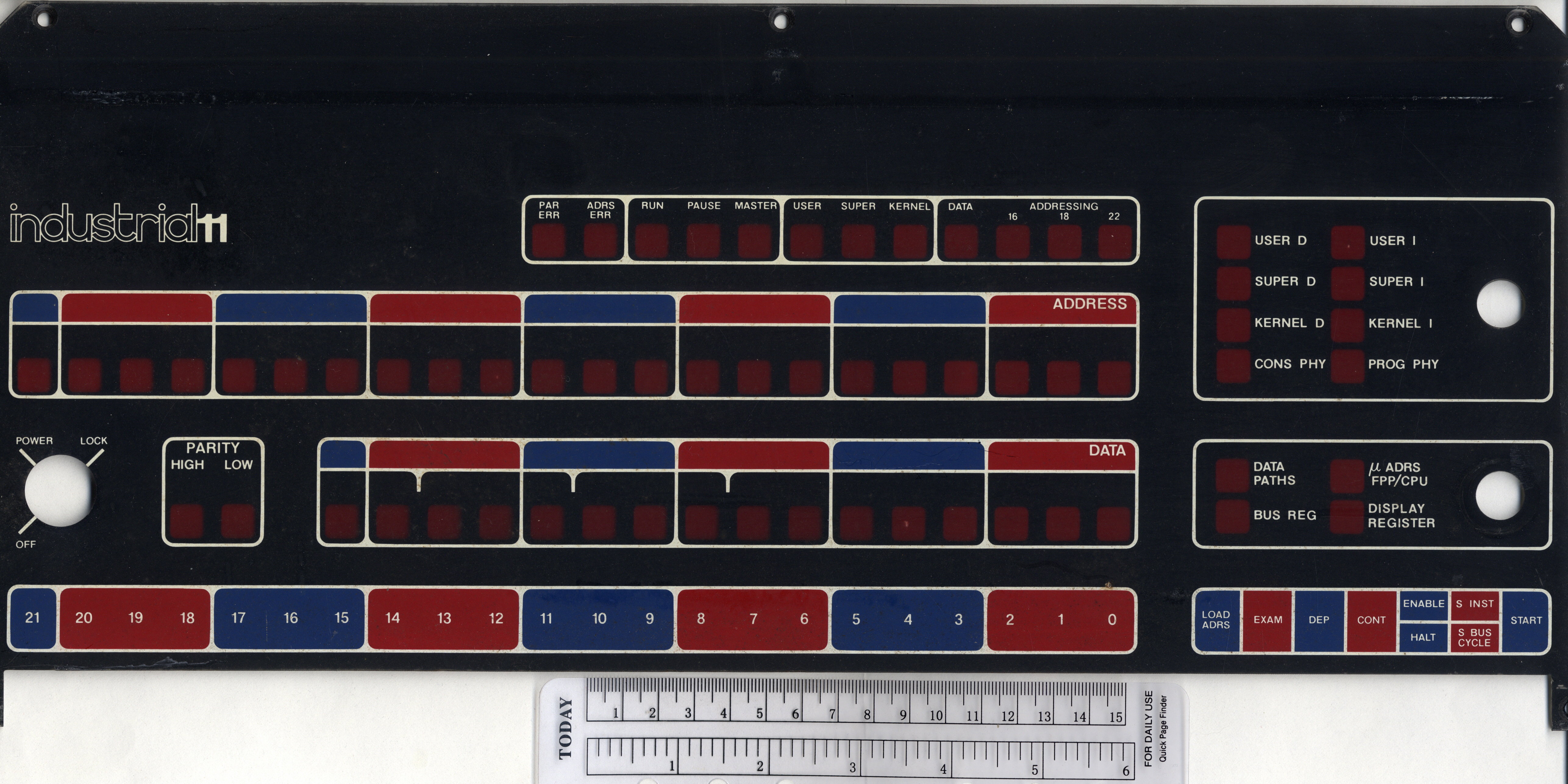
>> Here's the Industrial 11 version of the 11/05
There's an Industrial 11 version of the -11/70, too:
http://ana-3.lcs.mit.edu/~jnc/tech/pdp11/consoles/1170IndustCenter.jpg
So the only one missing (of the early -11's) is the /45, but I wouldn't be
surprised if that existed too. I've no idea about the /20 (I don't think the
/20R counts), or the later machines without physical switch registers (/04,
/34, etc).
> and /5 or /10, or in fact what the difference is between the two
> anyway, I'm not sure
The paint on the front console inlay (I'm not joking :-).
Other than the /15-/20 (which do have slight hardware differences), none of
the OEM/End-User pairs have hardware differences in the circuitry that I know
of (although the /35 was _usually_ supplied in a BA11-D 10-1/2" box, and the
/40 in the BA11-F 21" - and there are rare counter-examples to this rule).
Noel
A kindly donor sent me an external numeric keypad from Data General. It
has the right keycaps and color for a DG One laptop. Model number
2568. Connection is via a 3-terminal plug; basically a miniature
stereo headphone plug.
I'll give this up to a One collector who can identify this for certain.
Otherwise, I'll probably repurpose it. FWIW, it appears to be
unsued--not even the rubber feet have dirt or wear.
--Chuck
I recently obtained a Mac 1K in a Mac 512K box. It does not power on, and it
smells a bit toasty. Does it require a keyboard to power on? I have a
M0110A.
Cindy Croxton
Electronics Plus
1613 Water Street
Kerrville, TX 78028
830-370-3239 cell
sales at elecplus.com
---
This email has been checked for viruses by Avast antivirus software.
https://www.avast.com/antivirus
Due to severe weather, the trip did not happen last week, and will not
happen this week. Tornadoes and floods are not fun, and much of the drive is
on very low roads. I will see if next week looks clear enough.
Cindy Croxton
Electronics Plus
1613 Water Street
Kerrville, TX 78028
830-370-3239 cell
sales at elecplus.com
---
This email has been checked for viruses by Avast antivirus software.
https://www.avast.com/antivirus
Hi,
On 5/3/19 3:22 PM, Pete Turnbull via cctalk wrote:
> Anyone know much about early MIPS workstations? I'm trying to get a
> MIPS RS2030 to boot, without much luck so far. It goes through the
> selftest but stops with the internal LED display at "5" accompanied by
> a continuous beep.
>
> Known problems:
>
> - The Dallas DS1287 battery is flat; I can hack a 3V lithium onto that.
> I assume it should still work to some extent
> even if the contents are lost?
I have the same problem with a cloned MIPS machine, a Sumitomo
Sumistation SP300. The biggest problem with my machine is that the
NVRAM holds the ethernet address. If it goes flat, there seems to be
no way to reprogram the NVRAM. If you find any solution for this,
please tell me.
Aside from the now broken ethernet, the machine works fine. It?s a
25MHz R3000 with 32MB RAM. The box runs SEIUX, something like
Risc/os 4 in SVR3 mode with extra japanese localization, but adapted
to the hardware.
Some people said that some of the old MIPS machines used a M48T02
NVRAM and that you could plug the NVRAM in a SPARCstation to restore
the ethernet address. So far, I have found no mentioning of the DS1287.
A special problem with my machine is that most parts are soldered,
including the NVRAM.
Dennis
While digging for a KY11-LB for a fellow list member, I came across a few
operators panels and programmer panels for 8-As. Sorry, I don't remember
the part numbers. I have extra M8315s, M8316s M8316s, and a bunch of other
8-A boards. Please contact me off list if you have any interest.
Thanks, Paul
On 5/13/19 11:58 AM, Grant Taylor wrote:
> On May 12, 2019, at 10:17 PM, Chuck Guzis via cctalk <cctalk at classiccmp.org> wrote:
>> Don't know a thing about gaming and never wanted to--wrong generation, I guess.
>
> Perhaps ?gaming adapter? is the wrong term for this audience.
>
> Let me describe it as a type of switch that you plug the wired computer into, go to a management webpage there on and give it the wireless network information.<snip>
I don't want to get into a long discussion; I merely wanted to point out
that you're unlikely to find the term "gaming adapter" in Linux tech
docs as they're not written for that audience. And it's very likely that
something with the Debian kernel will be used on an OPZ.
--Chuck
Hi
I was wondering if there were any people who were wanting to sell any HP 1000 computer peripherals. Preferably disk oriented Such as a disk controller or a 79xx drive
(I live in the UK so shipping may be an issue for larger things)
Thanks for the tips. The reason I?m not using Ethernet cable is because the
Vintage Computer Room (where this PC resides) is on the 2nd floor around a
couple of corners, and my DSL modem/router and unfiltered phone line are in
the 1st floor study. Would take a long run and some drilling, or duct taping
it to the banister and hoping the dog and cats don?t eat it ;)
However, after finally giving up on the wireless cards... I realized that I
had a simple Linksys LNE100TX Ethernet card in the PC junk pile. I installed
that (it was recognized by 98SE and the drivers worked first time too), then
brought my laptop upstairs and set it up as a bridge. That works, but is
clumsy and requires another computer.
My next idea was to find a wireless device to connect to the Ethernet card.
I found out about WLAN, bridging, and most importantly, that many models of
router can be reflashed with dd-wrt software, and act as the bridge I
needed! Also in the closet was a Linksys E1200 router, which is one of the
models supported by dd-wrt. So I flashed it and hooked it up.
After a bit of struggle (incomplete directions but I managed to fill in the
missing pieces) I now have wireless network and Internet access on the old
machine :)
Incidentally, PUTR now works perfectly since I?m running 98SE/DOS.
> From: John Foust
> I missed the start of this discussion... exactly why did you want to
> rely on a wireless connection and couldn't string a network cable?
The list archive:
http://www.classiccmp.org/pipermail/cctalk/
is your friend. (That's actually how I read it, so my emailbox won't
get buried in sludge.)
Noel
>You could have installed a gaming adapter, opened the web page,
>connected it to the wireless and been done.
Sure, but you assume I know anything about online gaming (I don't); it would
require purchasing one, *and* I already had the Linksys router and card,
just gathering dust for years!
I like to improvise with what's on hand rather than spending money on a
really ancient PC :)
So, I've been porting Frotz to TOPS-20.
https://github.com/athornton/tops20-frotz
It's been going fine, except that I have something going on with the linker
I don't have enough expertise to understand.
On Mark Crispin's panda distribution, "cc -o frotz *.c" does the trick.
But on TOPS-20 on the LCML's TOAD-2, I get a bunch of undefined global
symbols, which all seem to be from libc.
That suggests to me that KCC at LCML isn't configured to automatically
trigger the linker with the right library path (something like
unix:<root.usr.lib>) for the C standard libraries.
So the first question is: where's the KCC configuration stored, so we can
add the right library path, and the second one is, failing that, how do I
link all my .rel files against the C library to get a working executable
(an answer simplified from "read the linker manual" would be appreciated;
I've started that but it's a little daunting and I suspect it will take me
a while to chew through)?
Adam
JUST? ?DOWN THE? ?ROAD A? FEW? HOURS? FROM? US HERE!
ED#
In a message dated 5/11/2019 2:33:48 AM US Mountain Standard Time, cctalk at classiccmp.org writes:
Great! Good luck with the visit. The other day I wrote to Kristina to express interest.
> On 11 May 2019, at 04:38, Fritz Mueller via cctalk <cctalk at classiccmp.org> wrote:
>
>
>> On 5/10/19 6:42 PM, Adam Thornton via cctech wrote:
>> I have been invited out to the site tomorrow morning to take an inventory of what?s there (I live near the machines).
>> I imagine that I may well have a lot of photos that I bring to the list and say ?what is this??
>
> Standing by to help out!? Go get it, Adam -- (come on, you can _make_ room! :-))
> Message: 1
> Date: Sun, 12 May 2019 17:41:24 -0500
> From: "Charles" <charlesmorris800 at centurytel.net>
> To: "cctalk digest" <cctalk at classiccmp.org>
> Subject: Network cards and Win98SE
> Message-ID: <4F49BB9C660F44B8B67371D3BAB651AA at CharlesDellLap>
> Content-Type: text/plain; format=flowed; charset="iso-8859-1";
> reply-type=original
>
> I have tried for two days to get wireless networking running on my old PC
> under Win 98SE, so I can use PUTR without a separate partition or boot. XP
> is on an 8.4 GB drive. 98SE is on an older 540 MB drive.
>
> There are two network cards (a Netgear WPN311 with Atheros chipset, and
> an
> Encore ENWLI-G2 with Realtek 8185 chip) and neither will work with
> Win98SE.
> I have tried the manufacturer's drivers, Atheros drivers, Realtek
drivers...
> none of it works. The Realtek driver installs but gives a fault in
RUNDLL32.
>
> Netgear's website claims that the WPN311 can run under 98SE and later.
> Some
> sources for that driver package say it starts with XP. Although I would
tend
> to believe the manufacturer...
> The same Netgear card in the same motherboard was working correctly with
> the
> XP drive.
>
> I even did a fresh install of 98SE. Then installed the WPN311 software,
then
> the card. Windows says the card is installed and working properly.
> But the Netgear utility won't run (hangs, Task Manager showing wlancfg5
not
> responding). That's usually because it can't see the card.
>
> Searching the net including various forums from years ago hasn't helped.
> So I'm about to give up. Wasted enough hours on this. Back to XP with a
DOS
> partition for running PUTR.
> Unless someone has a better idea :)
>
> thanks
> Charles
Hi Charles,
About 5 years ago I spent way too much time trying to sort out a PC platform
that would meet my needs for disk imaging (ImageDisk), PUTR, network file
transfers and ISA-based EPROM programmers. I eventually settled on a
Pentium II bare motherboard, AHA-1522A SCSI card (for its floppy controller
which supports single-density disks), CF card as a hard drive, FDADAP
adapter (for 8" drives), a generic ISA network interface card, MSDOS 6.22,
Norton Commander and Michael Brutman's mTCP package.
With this setup I can run PUTR and ImageDisk without any Windows-related
issues. File transfers to other computers are a breeze: mTCP includes an FTP
server and I just run FileZilla on my Windows machines to connect to the
MSDOS machine. Alternatively I can power down the MSDOS machine, and plug
the CF card into a USB adapter and copy files that way instead.
I appreciate these suggestions won't help if you need to have Win98 on the
same machine for other reasons.
Malcolm.
I use? ? 3? com? stuff? I? think? ? the other brands? ?I? toss in a? box in the warehouse.
later? ?3? com? stuff auto? finds? etc? works? fine... lats a long? time!
( paint it? grey and It? will not? rust )
Ed#
In a message dated 5/13/2019 3:39:15 PM US Mountain Standard Time, cctalk at classiccmp.org writes:
On 5/13/19 3:56 PM, Charles via cctalk wrote:
> Thanks for the tips. The reason I?m not using Ethernet cable is because
> the Vintage Computer Room (where this PC resides) is on the 2nd floor
> around a couple of corners, and my DSL modem/router and unfiltered phone
> line are in the 1st floor study. Would take a long run and some
> drilling, or duct taping it to the banister and hoping the dog and cats
> don?t eat it ;)
>
> However, after finally giving up on the wireless cards... I realized
> that I had a simple Linksys LNE100TX Ethernet card in the PC junk pile.
> I installed that (it was recognized by 98SE and the drivers worked first
> time too), then brought my laptop upstairs and set it up as a bridge.
> That works, but is clumsy and requires another computer.
So you turned your laptop into a gaming adapter.
> My next idea was to find a wireless device to connect to the Ethernet
> card. I found out about WLAN, bridging, and most importantly, that many
> models of router can be reflashed with dd-wrt software, and act as the
> bridge I needed! Also in the closet was a Linksys E1200 router, which is
> one of the models supported by dd-wrt. So I flashed it and hooked it up.
You turned the Linksys into a gaming adapter.
> After a bit of struggle (incomplete directions but I managed to fill in
> the missing pieces) I now have wireless network and Internet access on
> the old machine :)
You could have installed a gaming adapter, opened the web page,
connected it to the wireless and been done.
> Incidentally, PUTR now works perfectly since I?m running 98SE/DOS.
Ya.
--
Grant. . . .
unix || die
I've been working on an MSCP controller implemented on top of Joerg Hoppe's
Unibone and that's been going fairly well, modulo a few oddities here and
there (if you have a Unibone and want to beta-test it, it's up at
https://github.com/livingcomputermuseum/UniBone).
It'd be nice to extend it to do TMSCP as well. Is there an equivalent to
the "MSCP Basic Disk Functions Manual" (AA-L619A-TK) for TMSCP? I can
probably glean most of the information I need from various *nix device
driver sources out there, but it'd be nice to have the definitive reference
on hand, and so far it's been eluding me. But maybe I'm just not looking
hard enough...
Thanks!
Josh
I'm building my own 8-bit CPU from TTL chips, and this caused me to think:
how were 32-bit minis built in the late 70s and early 80s? In particular,
how was the ALU built? I know about the 74181 4-bit ALU, and I know (from
reading A Soul of a New Machine) that PALs were also used.
Did companies get custom chips fabricated, or was it all off-the-shelf chips
with a few PALs sprinkled in?
Thanks, Warren
> From: Christian Corti
> 3710 Euro... someone with definitely too much money ... So no, we did
> not get the system, and it probably won't go into a museum.
Well, I did send you email offering to contribute, to help you all buy it.
Did my email not make it to you?
Noel
I have tried for two days to get wireless networking running on my old PC
under Win 98SE, so I can use PUTR without a separate partition or boot. XP
is on an 8.4 GB drive. 98SE is on an older 540 MB drive.
There are two network cards (a Netgear WPN311 with Atheros chipset, and an
Encore ENWLI-G2 with Realtek 8185 chip) and neither will work with Win98SE.
I have tried the manufacturer's drivers, Atheros drivers, Realtek drivers...
none of it works. The Realtek driver installs but gives a fault in RUNDLL32.
Netgear's website claims that the WPN311 can run under 98SE and later. Some
sources for that driver package say it starts with XP. Although I would tend
to believe the manufacturer...
The same Netgear card in the same motherboard was working correctly with the
XP drive.
I even did a fresh install of 98SE. Then installed the WPN311 software, then
the card. Windows says the card is installed and working properly.
But the Netgear utility won't run (hangs, Task Manager showing wlancfg5 not
responding). That's usually because it can't see the card.
Searching the net including various forums from years ago hasn't helped.
So I'm about to give up. Wasted enough hours on this. Back to XP with a DOS
partition for running PUTR.
Unless someone has a better idea :)
thanks
Charles
Just an update... I spent an entire long afternoon wrestling with that old
PC, trying to find some combination of HDD jumpers and BIOS settings that
would allow the XP hard drive to boot with another drive attached (either on
the slave connector or the secondary channel with the CD-ROM removed). No
dice.
So I had the bright idea to use Minitool's Partition Wizard, and shrink my
Windows partition so there'd be room for a newDOS partition.
But it won't even run (probably because I have only 64 MB RAM on that box).
Grrr. It's unbelievably slow anyhow, so more SDRAM on order, which is really
cheap these days.
I'd get a newer PC for the workbench, but need to keep the old motherboard
because there are a couple of devices (including a PB-10 PROM programmer)
which are ISA slots.
So, this has become a Windows/PC (ugh) project instead of just being able to
play with my PDP-11...
As a result of an inventory error on my part, I wound up with an extra copy
of "LSI-11, PDP-11/03 User's Manual" (EK-LSI11-TM-003).
I'd like to pass it along to someone, provided I'm reimbursed _most_ of
my eBait expenditure on it (it was not, alas, cheap). Anyone interested?
Noel