Can somebody send me the decoded switch settings for the 8-bit IBM
"64-256KB MEMORY CD"? There are 8 switches, marked A16-A19, 64KB,
128KB, 190KB, and 256KB.
I need to know how to set the switches for my 16-64KB 5150, so I can
bring it up to 256KB and run PC-DOS 3.30.
Thanks.
ok
bear
Does anyone know of a place that has parts for a Commodore SX 64? (in
particular, keyboard and cable)
--
David Griffith
dgriffi at cs.csubak.edu
A: Because it fouls the order in which people normally read text.
Q: Why is top-posting such a bad thing?
A: Top-posting.
Q: What is the most annoying thing in e-mail?
I'd like to announce the Computer History Wiki at
http://toresbe.dreamhosters.com/wiki !
I realize that there has been some discussion previously about setting
up a computer history wiki, and that Jay has decided against hosting one
himself, favouring a knowledge base arrangement.
I am involved in the Norwegian Computer History Society, and we have a
MediaWiki website which we are very happy with. However, being a
Norwegian organization, the page is... well, it's in Norwegian. I found
myself really enjoying adding technical information, guides, etc, but I
was very frustrated by the fact that the text would only reach a very
limited audience, and only had a very limited potential for revision by
others - at most, our audience consisted of Scandinavia.
Recently I bought a very cheap hosting deal from Dreamhost, which so far
has worked splendidly. I therefore decided to use this to set up an
English computer history wiki and gauge the response. So far, this has
been very encouraging - we are up to 80 articles now, and it's growing
very fast.
The chief difference between this wiki and Wikipedia is that this is not
aiming to be an encyclopedia of formal defintion articles, but an
information base for articles of all kinds - handy hints and tips,
practical guides, tutorials, quick introductions, cheat sheets, advice,
stories, you name it.
My hope is that this page could become a resource for people on all ends
of the classiccmp knowledge scale. The wiki is currently hosted on a
temporary domain, since I did not want to spend my free domain (included
in the hosting deal) if interest turned out to be minimal. Well, it
hasn't, and I'm seriously considering registering a domain very soon.
Currently, the wiki has a strong DEC minicomputer bias, because all
three of the current active editors are DEC fans. With time, I hope this
bias becomes less apparent, and that people will add information about
micros, other minis, mainframes, peripherals, terminals, etc, etc.
Again, the URL of the wiki is: http://toresbe.dreamhosters.com/wiki
Regards,
Tore Sinding Bekkedal
"Rod Smallwood" <RodSmallwood at mail.ediconsulting.co.uk> skrev:
> Now that makes a lot more sense.
>
> So PMI memory choice is: (2 Max)
>
> MSV11-JD M8637-D 1 MB ECC PDP-11/84 or PDP-11/83
> MSV11-JE M8637-E 2 MB ECC PDP-11/84 or PDP-11/83
Correct.
> The CPU choice is:
>
> Module Type Speed RAM ROM LTC SLU
> ------ ---- ----- --- --- --- ---
> M8190 KDJ11-B
> M8190-AD KDJ11-BA 18
> M8190-AB KDJ11-BB 15 0 Y Yes
> 2
> M8190-AC KDJ11-BD
> M8190-AZ KDJ11-BF 18 0 Y Yes
> 2
You need to check out if all of these really works in an 11/84. I don't
think they all do. Some had hardware bugs that meant they only work in
the 11/83 configuration.
> So.....
>
> 1. Plug in one or two memory cards.
Yes.
> 2. Plug in a CPU card
Yes.
> 3. Insert Bus Grant cards (Which end of the slot?)
The bus grant goes into the middle slots. There are two models. One
really small one, which is only one connector high. They should go into
the fourth slot from the top if my memory serves me right. In this case,
you also need to make sure the NPG lines are are connected. This is done
by a DIP-switch block on the backplane. One switch per slot. It should
be visible if you look down into the cage. The other bus grand card is
two connectors high, and also carry the NPG line, in which case you
don't need to worry about the DIP-switches.
> 4. Insert in Slot nine a M9302 UNIBUS TERMINATOR and a M9713 MIN. LOAD
> MODULE
Yes.
> 5. Now we would have:
>
> Slot 1 M8190-Ax KDJ11-Bx 11/83 - 11/84 CPU Card
> Slot 2 M8637-X MSV11-Jx PMI Memory
> Slot 3 M8637-X MSV11-Jx PMI Memory
> Slot 4 M8191 KTJ11-B Unibus controller
> Slot 5 M7547 TUK50-BB Tape controller (Bus grant as
> well?)
> Slot 7 G7273 NPG and BUS Grant
> / Double Grant
> Slot 8 G7273 NPG and BUS Grant
> / Double Grant
> Slot 9 M9302 UNIBUS TERMINATOR
> Slot 9 M9713 MIN. LOAD MODULE
You only need one memory card, so it's not really neccesary to get two.
Also, no grant in the slot where you have the TUK50. But I'm missing a
grant in slot 6. :-)
> 6. Connect up a terminal (I have several 420's) to the SLU connector.
Yes.
> 7. Connect a TK50 drive (Which I have) to its controller.
Yes.
> 8. Check for correct boot proms on the CPU card.
No need, normally. The 11/8x and 11/9x cards have nice large boot proms
with all kind of boot routines on them, including booting from TMSCP.
> 9. Switch on. Wait for smoke to clear. Look for output on the terminal.
Yes.
> 10. Insert a bootable tape. (Which I don't have yet)
That would help if you don't feel like starting to write your own code.
But for test purposes, not needed at all.
> All those in favor of this config say Aye!
> All those against email me quick, before I do anything dangerous!!
If you're just interested in checking that the machine is working, skip
the TUK50. Just make sure the unibus is "whole", and fire her up. The
boot monitor of the 11/8x and 11/9x are real talkative, with lots of
things that can be done without anything else, including running tests,
and checking out the hardware.
Johnny
--
Johnny Billquist || "I'm on a bus
|| on a psychedelic trip
email: bqt at softjar.se || Reading murder books
pdp is alive! || tryin' to stay hip" - B. Idol
Roger that!!
>The other bus grand card is two connectors high, and also carry the
NPG line, in which case you don't need to worry about the DIP-switches.
These I have so where do they go?
Thanks for the kind assistance Jonny.
There now follows a general request for:
One M8190-Ax KDJ11-Bx 11/84 version
One/Two M8637-D or -E MSV11-Jx 11/84 version.
Anybody having or knowing the whereabouts of the above modules please
email me at:
rodsmallwood at btconnect.com
-----Original Message-----
From: cctech-bounces at classiccmp.org
[mailto:cctech-bounces at classiccmp.org] On Behalf Of Johnny Billquist
Sent: 17 May 2007 21:51
To: cctalk at classiccmp.org; Rod Smallwood
Subject: Re: he Last of The Line
"Rod Smallwood" <RodSmallwood at mail.ediconsulting.co.uk> skrev:
> Now that makes a lot more sense.
>
> So PMI memory choice is: (2 Max)
>
> MSV11-JD M8637-D 1 MB ECC PDP-11/84 or PDP-11/83
> MSV11-JE M8637-E 2 MB ECC PDP-11/84 or PDP-11/83
Correct.
> The CPU choice is:
>
> Module Type Speed RAM ROM LTC
SLU
> ------ ---- ----- --- --- ---
---
> M8190 KDJ11-B
> M8190-AD KDJ11-BA 18
> M8190-AB KDJ11-BB 15 0 Y Yes
> 2
> M8190-AC KDJ11-BD
> M8190-AZ KDJ11-BF 18 0 Y Yes
> 2
You need to check out if all of these really works in an 11/84. I don't
think they all do. Some had hardware bugs that meant they only work in
the 11/83 configuration.
> So.....
>
> 1. Plug in one or two memory cards.
Yes.
> 2. Plug in a CPU card
Yes.
> 3. Insert Bus Grant cards (Which end of the slot?)
The bus grant goes into the middle slots. There are two models. One
really small one, which is only one connector high. They should go into
the fourth slot from the top if my memory serves me right. In this case,
you also need to make sure the NPG lines are are connected. This is done
by a DIP-switch block on the backplane. One switch per slot. It should
be visible if you look down into the cage. The other bus grand card is
two connectors high, and also carry the NPG line, in which case you
don't need to worry about the DIP-switches.
> 4. Insert in Slot nine a M9302 UNIBUS TERMINATOR and a M9713 MIN. LOAD
> MODULE
Yes.
> 5. Now we would have:
>
> Slot 1 M8190-Ax KDJ11-Bx 11/83 - 11/84 CPU Card
> Slot 2 M8637-X MSV11-Jx PMI Memory
> Slot 3 M8637-X MSV11-Jx PMI Memory
> Slot 4 M8191 KTJ11-B Unibus controller
> Slot 5 M7547 TUK50-BB Tape controller (Bus grant as
> well?)
> Slot 7 G7273 NPG and BUS Grant
> / Double Grant
> Slot 8 G7273 NPG and BUS Grant
> / Double Grant
> Slot 9 M9302 UNIBUS TERMINATOR
> Slot 9 M9713 MIN. LOAD MODULE
You only need one memory card, so it's not really neccesary to get two.
Also, no grant in the slot where you have the TUK50. But I'm missing a
grant in slot 6. :-)
> 6. Connect up a terminal (I have several 420's) to the SLU connector.
Yes.
> 7. Connect a TK50 drive (Which I have) to its controller.
Yes.
> 8. Check for correct boot proms on the CPU card.
No need, normally. The 11/8x and 11/9x cards have nice large boot proms
with all kind of boot routines on them, including booting from TMSCP.
> 9. Switch on. Wait for smoke to clear. Look for output on the
terminal.
Yes.
> 10. Insert a bootable tape. (Which I don't have yet)
That would help if you don't feel like starting to write your own code.
But for test purposes, not needed at all.
> All those in favor of this config say Aye!
> All those against email me quick, before I do anything dangerous!!
If you're just interested in checking that the machine is working, skip
the TUK50. Just make sure the unibus is "whole", and fire her up. The
boot monitor of the 11/8x and 11/9x are real talkative, with lots of
things that can be done without anything else, including running tests,
and checking out the hardware.
Johnny
--
Johnny Billquist || "I'm on a bus
|| on a psychedelic trip
email: bqt at softjar.se || Reading murder books
pdp is alive! || tryin' to stay hip" - B. Idol
Microvax 2000 Hardware Information, slipcover
ThinkC for Macintosh, Symantec User's Guide
CP/M Assembly Language Programming, Barbier, Prentice
Hall
The Programmer's CP/M Handbook
last 2 are hardcovers
all the preceding a bit musty
same terms as last bunch of crap
also have an Apple IIe that had been sitting out in
the rain. Looks ok, powered up a few months ago,
distorted image, but it powered up.
prolly more items to follow...
____________________________________________________________________________________Choose the right car based on your needs. Check out Yahoo! Autos new Car Finder tool.
http://autos.yahoo.com/carfinder/
I got my selling spot numbers today when I arrived in Dayton and they are
2913 and 2914. I don't have any classic computer stuff for sale, but if you
get a chance, stop by and say Hi!
Marvin, KE6HTS
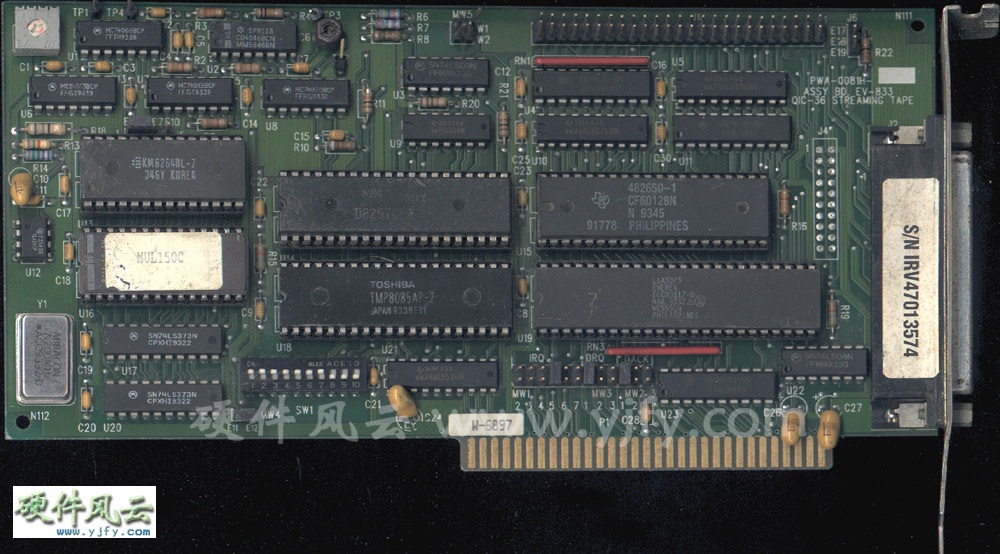
Right now I am attempting to configure my Everex EV-833 tape controller card
with my old 386 system and I am stuck at setting the dip switches and the
jumper blocks.
I usually find configuration settings here...
http://artofhacking.com/th99/index.htm
...but they don't have any info on this card. does anybody here know the
configuration settings or does anyone know where I can find the
configuration settings?
Here's a photograph:
http://www.yjfy.com/images/oldhard/scsi/pwa-0081h.jpg
_________________________________________________________________
Win a webcam! Nominate your friend?s Windows Live Space in the Windows Live
Spaces Sweetest Space Contest and you both could win!
http://www.microsoft.com/canada/home/contests/sweetestspace/default.aspx
Robert Borsuk wrote:
>Does anyone know what a Com-tran Ten is? I have a set of prints
>(over 30 pages) I pulled from my filing cabinet (while looking for
>Mac info for Teo and Jeff) which say they are a reprint by permission
>of Digiac Corporation.
>I tried doing some goggling but to no avail.
>
>Any ideas (or links)?
>
>Rob
I used a Com-tran Ten computer trainer while attending the US Navy's Advanced First Term Avionics (AFTA) school in Millington, Tennessee in 1980. Our classroom time on it was pretty limited - a week or two, at most. I vaguely recall that it was used to teach a smattering of machine language and digital circuit fault analysis & troubleshooting. That's about all I remember, and unfortunately I lost most of the tech pubs I had kept from those days in a move several years ago.
If anyone else on the list attended tech school in Millington during that era, perhaps you can answer a question I've wondered about for a while. The Navy was experimenting with computer graded programmed instruction in the early 80s, and the machine that processed the Scantron forms would print out a line or two of remedial info or "attaboys" on each test report. Unfortunately, we never did get to see "Jim-Jim", the machine which processed our grades. Does anyone know what kind of hardware Jim-Jim was?
-Rick Kaumeier
Dear All,
Thanks for your helpful reples.
On 15 May 2007 at 11:45, Chuck Guzis wrote:
>It's entirely possible to fit 10x512 sectors per track using a 765-
>type controller, though it's much easier if the IAM is left off and the
>space gained used to expand the inter-sector gaps (you can do this with a
>uPD 2765-type controller or any of the WD 17xx/27xx controllers.
>>I think the Tuscan FDC uses a WD1771 controller...
>Nope, the 1771 is restricted to FM only. Maybe a 179x or
1770/1772/1773 though.
You're right, it has a FD1791 controller.
>It's entirely possible that the drive used to create the diskettes was
>somewhat out of alignment. You may have to "unalign" a drive to
>successfully read these. This is more common than you might think.
Yes, it could be. I tried a different PC last night, same problem as before.
Using IMD (Image Disk) utility, and the analyse option, it would show a
scrolling display with entries like:
0 7 20 0 for track 0, the 20 meaning that 20 sectors were found
up to:
39 5 20 0 for track 39.
Using D to read data, I could read track 0 OK, but with higher tracks
(especially 10 or higher) then IMD gave errors like:
Read error <1> No Addr Mark 2
Read error <2> No Addr Mark 3
etc up to sector 10.
I came across this article:
http://www.atari-forum.com/viewtopic.php?t=9644&postdays=0&postorder=asc&st…
(Google for ["read sector" "splice points"])
which makes the valid point that floppies are often formated on one machine,
and written to on another. As I can read track 0, and all the sector marks
are found for the other tracks, but I can't read the data part of the
sectors for tracks 1 to 39, I am guessing that the drive used to write the
data was different to that used to format the floppy and write the system
track. The above page talks about 'splice points' where the new data is
written over existing data.
(Another interesting glossary was found here:
http://www.softpres.org/knowledge_base)
>You didn't mention if you were using a 48tpi ("360K") drive to read these
>or trying to get by on a 96tpi ("720K" or "1.2MB) drive. The former will
>usually produce better results.
I am using a 48tpi drive, an IBM badged Qumetrak 142 with belt drive ("That
is the third worst drive I've dealt with" - Fred Cisin, Oct 2005), also
tried a Techmate NPH-502. I have some Tandon TM-100s on various machines,
I'll try one of these plus a 96tpi drive for luck.
>If the first sector on the track is consistently missing (not always the
>lowest-numbered; some systems skew the tracks for better performance), you
>might be able to recover it by slowing the drive a bit to allow the first
>sector IDAM to move outside of the 765 "blind spot" at the beginning of a
>track (although the 765 formats a track with an IAM at the start, it never
>reads it).
Seems to be every sector past a certan track. BTW the disk is formated with
sector skewing, starting from track 0 they are read as:
1 2 3 4 5 6 7 8 9 10
9 10 1 2 3 4 5 6 7 8
7 8 9 10 1 2 3 4 5 6
5 6 7 8 9 10 1 2 3 4
3 4 5 6 7 8 9 10 1 2
1 2 3 4 5 6 7 8 9 10
Luckily I have recently heard from two more Tuscan owners with CP/M boot
disks, so hopefully they will have more joy.
Regards,
John
_________________________________________________________________
The next generation of Hotmail is here! http://www.newhotmail.co.uk
Hi
Having had a look at the slides I now have it straight. It was the
Alas I saw when at college and the ICL system when I worked just round
the corner at RRD. If you had anything to do with Harwell RRD would have
been familiar to you. I built experimental rigs and interfaced them to
PDP-8's. The science guys would run them whilst the particular reactor
(Dido or Pluto) was operating and I would do the maintenance whilst they
where on shutdown.
Happy Days...
I had a office/workshop at one end of a hut with windows on three
sides.
Taxi to and from work each day and one week in three to a sandwich
course.
Rod
-----Original Message-----
From: cctech-bounces at classiccmp.org
[mailto:cctech-bounces at classiccmp.org] On Behalf Of Roger Holmes
Sent: 16 May 2007 23:28
To: cctalk at classiccmp.org
Subject: Re: Harwell (was RE: A local computer history group for my
area. ..)
>
> Date: Wed, 16 May 2007 04:13:44 +0100
> From: "Rod Smallwood" <RodSmallwood at mail.ediconsulting.co.uk>
> Subject: RE: Harwell (was RE: A local computer history group for my
> area . ..)
>
> Yes slight aberration of the brain. The building was called "The Atlas
> Computer Laboratory" but the system was ICL.
Maybe it had gone by then, but there are photos on the web of the
building when it housed a Ferranti Atlas.
Specifically: http://www.chilton-computing.org.uk/gallery/harwell/
slide8.htm
or the view the whole collection of photos at http://www.chilton-
computing.org.uk/gallery/home.htm
> One of my first jobs as a junior engineer (circa 1972) was to
> refurbish
> 4K core memory stores for an Elliot system.
What was involved in refurbishment?
> They were about three feet long with a Mullard Core stack in a box in
> the middle and plug in cards on either side.
> They used early transistors of the OC71 era (Yup -ve supply). I soon
> learned all about read, write and sense amplifiers and how the cores
> actually worked.
My 1301 has five core stores, each of 400(decimal) words x 50 bits
(48 data + 2 parity). Three of the stores work perfectly after they
have warmed up, but two of the stores are totally dead. We've tried
everything, starting with the obvious - looking for a fault in the
selection logic, but after replacing the same boards about five times
with no effect (especially when the 'scope also says they're working
properly), we had to started looking for a fault in each of the
stores. But everything there looks OK too, at least measuring
voltages they look OK, I don't possess a current probe and I'm not
sure if I had one I'd be able to use it.
>
> As a final test I would put the store back in the system (Elliot
> 4100?)
> load a very complex FORTRAN program from paper tape ( it worked out
> handicaps for large racing yachts based on their dimensions) then a
> data
> tape. The answer came out on one of two IBM golfball printers (no
> keyboards).
>
> That's what I call classic computing as opposed to a classic computer!
>
> Rod Smallwood
> From: Jim Leonard <trixter at oldskool.org>
>
> > Don't confuse interface speed vs. actual media speed.
>
> True, but I didn't have a basis for comparison. I'm hearing that 4MB/s
> is indeed slightly above par, so I guess I should be happy .
I have several 35/70GB DLT drives on various systems and they all do between
240MB/minute to 400MB/minute depending on the speed of the disk systems (and
to some extent CPU's) they are backing up so yours certainly seems in the
ball park. You can't go by interface (10MB/s) or bus (132MB/S) speed, it's
purely down to the highest rate the drive can stream at and making sure you
can feed it data fast enough to keep it in 'streaming' mode.
Jim
>What was involved in refurbishment?
Well its 35 years ago but I'll have a go.
The store was made up of planes.
Each was (I think) 64x64 cores.
Wires ran Horizontally and Vertically through each core plus a sense
wire that snaked through
all the cores diagonally from one corner of the plane to the other.
The cores could be magnetized in one direction or the other.
It was driven by current pulses of differing magnitude depending on
reading or writing.
Reads came out on the sense wire as serial pulses of differing polarity
to indicate 0 or 1 and you had to write the answer back each time.
We had a test bench with power supplies and test boxes to write then
read the store.
The setting up consisted of setting the shape of the pulse amplifers
output to a drawing we had.
If it ran the read/write pattern ok for an hour it was a good one.
If you had good electronics (ie a working board set and pulses present
at the core box input)and no output you checked the date of manufacture
of the core box.
If it was still in warranty you went to he stores with it and said
"Another one to go back to Mullard" and got a new one.
If it was out of warranty you threw it out of the last window on the
left (That's where the skip was) as you left the building to go and get
a new one from the stores.
-----Original Message-----
From: cctech-bounces at classiccmp.org
[mailto:cctech-bounces at classiccmp.org] On Behalf Of Roger Holmes
Sent: 16 May 2007 23:28
To: cctalk at classiccmp.org
Subject: Re: Harwell (was RE: A local computer history group for my
area. ..)
>
> Date: Wed, 16 May 2007 04:13:44 +0100
> From: "Rod Smallwood" <RodSmallwood at mail.ediconsulting.co.uk>
> Subject: RE: Harwell (was RE: A local computer history group for my
> area . ..)
>
> Yes slight aberration of the brain. The building was called "The Atlas
> Computer Laboratory" but the system was ICL.
Maybe it had gone by then, but there are photos on the web of the
building when it housed a Ferranti Atlas.
Specifically: http://www.chilton-computing.org.uk/gallery/harwell/
slide8.htm
or the view the whole collection of photos at
http://www.chilton-computing.org.uk/gallery/home.htm
> One of my first jobs as a junior engineer (circa 1972) was to
> refurbish
> 4K core memory stores for an Elliot system.
What was involved in refurbishment?
> They were about three feet long with a Mullard Core stack in a box in
> the middle and plug in cards on either side.
> They used early transistors of the OC71 era (Yup -ve supply). I soon
> learned all about read, write and sense amplifiers and how the cores
> actually worked.
My 1301 has five core stores, each of 400(decimal) words x 50 bits
(48 data + 2 parity). Three of the stores work perfectly after they
have warmed up, but two of the stores are totally dead. We've tried
everything, starting with the obvious - looking for a fault in the
selection logic, but after replacing the same boards about five times
with no effect (especially when the 'scope also says they're working
properly), we had to started looking for a fault in each of the
stores. But everything there looks OK too, at least measuring
voltages they look OK, I don't possess a current probe and I'm not
sure if I had one I'd be able to use it.
>
> As a final test I would put the store back in the system (Elliot
> 4100?)
> load a very complex FORTRAN program from paper tape ( it worked out
> handicaps for large racing yachts based on their dimensions) then a
> data
> tape. The answer came out on one of two IBM golfball printers (no
> keyboards).
>
> That's what I call classic computing as opposed to a classic computer!
>
> Rod Smallwood
"Rod Smallwood" <RodSmallwood at mail.ediconsulting.co.uk> skrev:
> Well I think I understand the list.
> But for clarity's sake here's the problem again.
>
> 1. I have a number of PDP-11/94's
> 2. The first three slots are Quad Qbus
> 3. The missing KDJ11-EB would have been in slot one
> 4. Slot two has a M9714 ALT PWR FOR KDJ11-E in it.
> 5 Slot three is empty.
> 6. Slot four is a Unibus slot and has a M8191 KTJ11-B Unibus controller
> in it
> 7 Slot five has a M7547 TUK50-BB Tape controller in it.
> 8. Slot's Six,seven and eight are empty
> 9. Slot nine has a M9302 (UNIBUS TERMINATOR) at one end and a M9713
> (MIN. LOAD MODULE) at the other.
>
> "Your mission Mr Phelps (Should you accept it) is to replace the missing
> KDJ11-EB with the lowest cost plug in alternative that will run"
>
> The winner gets (for the cost of the shipping) a 11/94 system unit box
> as described above.
Sorry, but your options are very few.
The first three slots of that backplane are not Q-bus, but a special
adaptation of it for the PMI memory and nothing else. You cannot use
Q-bus memory on it, and no other Q-bus options either (atleast according
to the manuals, I haven't tried in real life. I could check out if any
signals differ, if it were real important).
Second, the Unibus adapter required some special signals from the
CPU-board as well.
Your options are basically the 11/8x and 11/9x CPU boards. No others
will originate the signals for the Unibus adapter required. Memory wise
only PMI memory boards will do.
For an 11/94, all memory are on the CPU board, so for those, the two PMI
slots should always be empty.
To make the power supply happy, you normally have some bus loads on them.
If you go for the 11/84 instead, you also need to find PMI memory boards.
That's the CPU/memory part of your system. You then need to configure
the Unibus correctly, which means you need unibus grant cards in
theright place of all empty slots. You probably also want some disk
controller in that system.
Johnny
--
Johnny Billquist || "I'm on a bus
|| on a psychedelic trip
email: bqt at softjar.se || Reading murder books
pdp is alive! || tryin' to stay hip" - B. Idol
I am writing an educational book about the invention of the videotape
machine and
subsequent evolution of nonlinear edit systems on desktop computers.
In order to background the reader properly, I am including material
on the development of
not only the GUI by companies like Xerox but also microprocessors and
PC's by companies
and people like MOS, Motorola, DG, Intel, Faggin, De Castro, Chuck
Peddle and Bill
Mensche. I have tried without luck to contact Mr Peddle and wish to
do so.
I believe Mr Peddle will be attending, Vintage Computer Festival East
4.0 this June
Maybe you are too?
http://www.vintage.org/2007/east/
If you are going I am looking to convey my interest in making contact
with him,
to make sure the facts in my book are fair and accurate.
I would love to attend but I am in Sydney, Australia.
I am more than happy to give fair credit in the published work to
ClassicCMP.
Thanks
John
velocite (at) gmail dot com
Hi everyone, I have just started up a user group in my area to get
together once a month and enjoy old computers and the history, etc. I
plan to give a short presentation each meeting, bring a few systems,
have some retro gaming available and basic refreshments. I'm calling
it what I once called a "club" I started years ago - The Historical
Computer Society. It will take many meetings and some time, but I
hope it can grow and become a true non-profit group on it's own
standing with elected officers, etc. - a user group. I have arranged
for the space in the public library near my house, every third
Saturday, from 2pm - 3:30pm, starting with next Saturday, May 19th.
Here's the library, in Fruit Cove, FL, just south of Jacksonville:
http://www.sjcpls.org/Branches/BartramTrail.aspx
If you're not too far and interested, please let me know.
Best, David
David Greelish
classiccomputing.com
The Classic Computing Podcast
Home of Computer History Nostalgia
Stan Veit's History of the Personal Computer
Audio Book Podcast
Does anyone know what a Com-tran Ten is? I have a set of prints
(over 30 pages) I pulled from my filing cabinet (while looking for
Mac info for Teo and Jeff) which say they are a reprint by permission
of Digiac Corporation.
I tried doing some goggling but to no avail.
Any ideas (or links)?
Rob
Rob Borsuk
email: rborsuk at colourfull.com
Colourfull Creations
Web: http://www.colourfull.com
>
> Date: Wed, 16 May 2007 04:13:44 +0100
> From: "Rod Smallwood" <RodSmallwood at mail.ediconsulting.co.uk>
> Subject: RE: Harwell (was RE: A local computer history group for my
> area . ..)
>
> Yes slight aberration of the brain. The building was called "The Atlas
> Computer Laboratory" but the system was ICL.
Maybe it had gone by then, but there are photos on the web of the
building when it housed a Ferranti Atlas.
Specifically: http://www.chilton-computing.org.uk/gallery/harwell/
slide8.htm
or the view the whole collection of photos at http://www.chilton-
computing.org.uk/gallery/home.htm
> One of my first jobs as a junior engineer (circa 1972) was to
> refurbish
> 4K core memory stores for an Elliot system.
What was involved in refurbishment?
> They were about three feet long with a Mullard Core stack in a box in
> the middle and plug in cards on either side.
> They used early transistors of the OC71 era (Yup -ve supply). I soon
> learned all about read, write and sense amplifiers and how the cores
> actually worked.
My 1301 has five core stores, each of 400(decimal) words x 50 bits
(48 data + 2 parity). Three of the stores work perfectly after they
have warmed up, but two of the stores are totally dead. We've tried
everything, starting with the obvious - looking for a fault in the
selection logic, but after replacing the same boards about five times
with no effect (especially when the 'scope also says they're working
properly), we had to started looking for a fault in each of the
stores. But everything there looks OK too, at least measuring
voltages they look OK, I don't possess a current probe and I'm not
sure if I had one I'd be able to use it.
>
> As a final test I would put the store back in the system (Elliot
> 4100?)
> load a very complex FORTRAN program from paper tape ( it worked out
> handicaps for large racing yachts based on their dimensions) then a
> data
> tape. The answer came out on one of two IBM golfball printers (no
> keyboards).
>
> That's what I call classic computing as opposed to a classic computer!
>
> Rod Smallwood
> Date: Wed, 16 May 2007 09:43:27 +0100
> From: "Rod Smallwood" <RodSmallwood at mail.ediconsulting.co.uk>
> Subject: RE: Computer stuff 1970's ish at Lucas Birmingham Gt King St
>
> Very Interesting!!!
>
> 1. The console terminal is a Creed Model 75 Teleprinter ie
> Baudot Telex code not ASCII
> This may be a Bletchley Park legacy.
> The later electronic BP systems were designed to break
> teleprinter codes and hence the
> high speed tape readers and terminals were for telex code.
> You can just see the M75 reader/punch above the operators
> hand.
>
> 2. To the left of the operator are two high speed paper tape
> readers.
Are these the 1000 character per second model or the 300 character
per second model? I presume they are the slower 300 cps units as the
1000 cps Elliott version on my ICT 1301 needs a powered tape un-
roller to feed it. It can still stop between characters even at that
speed, but I understand from my old boss when I worked at Elliott's
Rochester works that the older Elliott readers did not have the stop
on character facility, so that our software always put four null
characters after every carriage return line feed pair, and the
reading software would always read a line of input at full speed
before doing any heavy processing which might take longer than a
character time.
>
> 3. You can see the holes in the top of the desk where the tape
> went after the reader
>
> 4. The tape rewinder is on the corner of the other desk.
>
> 5. The two boxes on the right are the storage cases for the high
> speed readers or could be tape punches.
They are the acoustic cases for Teletype BRPE paper tape punches. 100
characters per second. You had to raise the cover to load new rolls
of tape into the unit, then press the feed button on top of the unit
as you pulled on the tape until it started feeding itself. Then you
closed the cover and when it was ready the computer started punching
and the tape fed out of the chrome lined hole on the left hand side.
It looks like it fed into the two holes in the desk to the left of
these units. My ICT 1301 has had one of these grafted onto it in the
1970s using a Vero board full of TTL logic which is housed within the
paper tape reader cabinet. Interest interface between the plus 5 volt
logic levels of TTL and the minus 6.3 volt logic levels of the
discrete germanium transistor logic of the 1301. A slight cheat - the
TTL ground is actually at -5 volts and the TTL's VCC is connected to
the 1301's 0 volt earth level. This also means a TTL '1' is a 1301
'0' and vice-versa. The 1301 to TTL signals work fine with no special
circuitry, but the TTL to 1301 need a transistor (GET872) to work
correctly.
>
> 6. The row of horizontal drawers on the right of the desk are
> for rewound paper tapes.
>
> 7. The row of cabinets under the window is the electronics.
>
> 8. You needed a whole cabinet to hold 16K of core + PSU
>
> 9. The desk to the left appears to have some punched cards on
> it. But they look a bit big.
>
> 10. The drawers in the desk to the left look like card storage.
>
> 11. The desk to the left could be a punched card station but I
> have
> never seen one so am unsure.
Hi all,
my first VAX ever - died, unfortunately. During the last months, I experienced that the CPU just got stuck at some time, but I could not reproduce this error.
Sometimes, it froze during or directly after the initialisation procedure, or later on after half an hour or an hour of work with VMS.
A friend of mine thought of instable voltages caused by the power supply, so I swapped it with another one in order to check, if the supply was to blame.
But it wasn't the case. I took out all the boards and left the CPU and some memory only, but it didn't get any better. After getting stuck, the CPU could only be reset
switching the supply off and on again.
And now, since last week, the CPU doesn't come up at all anymore. After switching on the power supply, the seven segment display shows an "F",
nothing is printed on the terminal, and the halt-button has no function anymore (which was always the case when it got stuck). So I guess that my VAX died...
Needless to say that these boards can't be repaired. As far as I know, no schematics were ever published and these big chips on the board are horrible to unsolder and solder, even
if spare ones could be obtained (supposed that one knows, where the "problem is").
Did anybody on this list make similar experiences regarding VAXen dying that way (at least, I'm pretty sure that she's dead) ?
Is there anything else I could check in order to save my VAX ?
Thanks for any help.
Regards,
Pierre
__________________________________________________________________________
Erweitern Sie FreeMail zu einem noch leistungsst?rkeren E-Mail-Postfach!
Mehr Infos unter http://produkte.web.de/club/?mc=021131
Hello Tim,
> What you write is "not inconsistent" with failing to get DCOK from the
> power supplies. DCOK is a signal indicating that the power supplies
> are all up and operating. The CPU refuses to even begin its self test
> until DCOK is asserted.
Thanks alot for pointing out several things I forgot to mention. My VAX is housed in a BA430 enclosure.
So there is only one power supply which provides the power to the system. Normally, when the green
"DC OK" LED turns on, the DC voltages should be available and lie within the necessary voltage range for the CPU
to work correctly. Now I don't know how reliable the control circuit is, regarding the detection of voltages lying outside of
the specified range. Could it be possible that the DCOK LED lits while a voltage is not within the required tolerance ?
>
> BA213's (a popular cabinet for your CPU) have two supplies and the light
> has to be on on both of them. Otherwise you see exactly the symptom
> you have (CPU stuck at "F").
>
> It's not impossible for a CPU board to fail and get stuck at "F", but
> in my experience, 99 times out of 100 it's because there's no DCOK on the
> backplane. And 9 times out of 10 it's because the power supply is
> failing. They often go flaky and are hard to start, or go flaky and
> fail after getting warm, etc.
>
Ok, in my case, having a BA430 chassis, both tested power supplies would have the same failure then. I tested both, and only
one fits in the chassis at a time.
On both supplies, the DCOK-LED turns on after powering up the VAX. But just to be sure, I should measure the
voltages of the supply at the backplane.
> It's also true that the power supplies need a certain minimum load...
> you may have had some boards in your backplane that had nothing except
> for resistors on them to provide the minimum load. Putting those
> back in won't hurt. Of course, spare KDA50 sets are just fine for
> sucking up DC power too!
>
A total of seven boards were plugged in, so I guess that the minimum load should be given.
Thanks alot for your precious hints, Tim !
Regards,
Pierre
_______________________________________________________________
SMS schreiben mit WEB.DE FreeMail - einfach, schnell und
kostenguenstig. Jetzt gleich testen! http://f.web.de/?mc=021192
>
>Subject: Re: 3.5" Altair CP/M
> From: David Griffith <dgriffi at cs.csubak.edu>
> Date: Tue, 15 May 2007 15:33:55 -0700 (PDT)
> To: "General Discussion: On-Topic and Off-Topic Posts" <cctalk at classiccmp.org>
>
>On Tue, 15 May 2007, Grant Stockly wrote:
>
>> I have a tarbell floppy controller card that has been rewired to access
>> 3.5" disks using a standard PC 3.5" disk drive.
>[snip]
>> What could be missing? If the bitrate is fixed, then is CP/M not writing
>> standard sectors? Rawread says "Address not found" and diskinfo says the
>> drive is not ready.
>
>I take it you don't have access to a Unix machine? The dd command might
>be able to fish out something more from that disk. Specifically, the
>utility cpmtools is useful for writing to a variety of disk formats and is
>easy to customize for new formats.
>
>From all I've read the controller is a a SD unit and may be running at either
the 8" SD rate or possibly the 5.25" SD rate makig the disk at most 360k.
That 360k format is NOT PC compatable. The OS used on the PC is not a factor
as whatever you do required direct controll of the FDC even then some PCs will
NOT do the slower SD data rate.
Allison
>
>Subject: Re: 3.5" Altair CP/M
> From: Grant Stockly <grant at stockly.com>
> Date: Tue, 15 May 2007 17:09:37 -0800
> To: "General Discussion: On-Topic and Off-Topic Posts" <cctalk at classiccmp.org>
>
>At 04:45 PM 5/15/2007, you wrote:
>>On 5/15/07, Grant Stockly <grant at stockly.com> wrote:
>>>I have a tarbell floppy controller card that has been rewired to access
>>>3.5" disks using a standard PC 3.5" disk drive. I have 3 disks that the
>>>Altair can boot off of and read, but my windows computer can't do anything
>>>with them. I've tried rawread.exe and diskinfo.exe and they both choke on
>>>the disk. I assumed that if a disk could be written with the standard 3.5"
>>>disk drive on the tarbell card then it should also be read on the same
>>>drive connected to a modern IBM compatible.
>>
>>Are you using a 1771 based SD Tarbell card, or a 1791/1793 based DD
>>Tarbell card? That might make a difference.
>
>Its an MDL-1011D with an FD1771-B01.
>
>What's the deal with this chip? Is it formatting the the disk as 360k?
the 1771 is single density only and yes.
Also if the format program used didn't fully format the disk with all
the marks (often done with 1771s) then it will be harder to read with a PC.
Allison
Thanks Pete
Heres my list of KJD11 variations:
Module Type Speed RAM ROM LTC SLU
------ ---- ----- --- --- --- ---
M8192 KDJ11-AA 15 0 0 No 0
KDJ11-AB 18 0 0 No
0
M8190 KDJ11-BB 15 0 Y Yes 2
KDJ11-BF 18 0 Y Yes
2
M7554 KDJ11-D 15 1.5 Y Yes 2
M8981 KDJ11-EA 15 2 Y Yes
1
KDJ11-EB 18 4 Y Yes
8
KDJ11-SD
Anybody want to amend and add the module for the memory?
Rod
-----Original Message-----
From: cctech-bounces at classiccmp.org
[mailto:cctech-bounces at classiccmp.org] On Behalf Of Pete Turnbull
Sent: 14 May 2007 21:21
To: On-Topic and Off-Topic Posts
Subject: Re: The Last of The Line
On 14/05/2007 09:01, Rod Smallwood wrote:
> All of your points are well made. One is very important the KDJ11-EB
> has its memory on the CPU board. Are you saying some models of the
> KDJ11 do not have their memory on the CPU board? Is it a case of
> unpopulated sockets and add memory or is it no sockets and no memory?
KDJ11-E (M8981) is a quad-height board used in 11/93 and 11/94, running
at 18MHz, with up to 4MB of RAM on board. It also has a floating point
processor, boot ROMs, line time clock, and 8(?) serial ports.
KDJ11-D (M7554) is a quad-height board used in 11/53, usually running at
15MHz, with either 512KB or 1.5MB of RAM, boot ROMs, LTC, and 2 SLUs.
It's one of the slowest KDJ11s; the 11/53 was meant as a low-cost
system. The same board, but with different ROMs and different handles
(KDJ11-S), was used in some tabletop systems.
KDJ11-B (M8190) is a quad-height board with no RAM (and no sockets for
it), but with boot ROMs, LTC, and 2 SLUs. It was available as 15MHz for
the 11/73, and 18MHz for the 11/83 and 11/84. 18MHz versions normally
included the FPJ11 floating point processor chip; 15MHz usually merely
had the socket; some early 15MHz versions won't accept an FPJ11 chip.
These boards will work with PMI memory as well as with ordinary QBus
memory.
KDJ11-A (M8192) is a dual-height board clocked at 15MHz, with no RAM,
boot ROMs, LTC, SLUs, or other embellishments. In other words, it's
just a CPU. Used in a few 11/73S systems, as an OEM board, and for
11/23 upgrades. Early revisions won't accept an FPJ11 chip.
See Micronotes 25, 30, and 39.
--
Pete Peter Turnbull
Network Manager
University of York
Very Interesting!!!
1. The console terminal is a Creed Model 75 Teleprinter ie
Baudot Telex code not ASCII
This may be a Bletchley Park legacy.
The later electronic BP systems were designed to break
teleprinter codes and hence the
high speed tape readers and terminals were for telex code.
You can just see the M75 reader/punch above the operators hand.
2. To the left of the operator are two high speed paper tape
readers.
3. You can see the holes in the top of the desk where the tape
went after the reader
4. The tape rewinder is on the corner of the other desk.
5. The two boxes on the right are the storage cases for the high
speed readers or could be tape punches.
6. The row of horizontal drawers on the right of the desk are
for rewound paper tapes.
7. The row of cabinets under the window is the electronics.
8. You needed a whole cabinet to hold 16K of core + PSU
9. The desk to the left appears to have some punched cards on
it. But they look a bit big.
10. The drawers in the desk to the left look like card storage.
11. The desk to the left could be a punched card station but I have
never seen one so am unsure.
Rod Smallwood
-----Original Message-----
From: cctech-bounces at classiccmp.org
[mailto:cctech-bounces at classiccmp.org] On Behalf Of Dave Caroline
Sent: 15 May 2007 21:02
To: cctalk at classiccmp.org
Subject: Computer stuff 1970's ish at Lucas Birmingham Gt King St ?
Here's a few obscure pics from the 1970's I believe take the picture
link
Pertec tape drive and a box with System 90 on it? and what else
http://www.archivist.info/collection/searchv8.php?srcdata=title&srcprog=
searchv8.php&searchv4page=1&errlev=0&searchstr=lucas+computer+lab
Any information gratefully received
as a treat here is an Elliott 803 at Lucas
http://www.archivist.info/collection/searchv8.php?srcdata=title&srcprog=
searchv8.php&searchv4page=1&errlev=0&searchstr=lucas+elliott
Dave Caroline
Well I think I understand the list.
But for clarity's sake here's the problem again.
1. I have a number of PDP-11/94's
2. The first three slots are Quad Qbus
3. The missing KDJ11-EB would have been in slot one
4. Slot two has a M9714 ALT PWR FOR KDJ11-E in it.
5 Slot three is empty.
6. Slot four is a Unibus slot and has a M8191 KTJ11-B Unibus controller
in it
7 Slot five has a M7547 TUK50-BB Tape controller in it.
8. Slot's Six,seven and eight are empty
9. Slot nine has a M9302 (UNIBUS TERMINATOR) at one end and a M9713
(MIN. LOAD MODULE) at the other.
"Your mission Mr Phelps (Should you accept it) is to replace the missing
KDJ11-EB with the lowest cost plug in alternative that will run"
The winner gets (for the cost of the shipping) a 11/94 system unit box
as described above.
Rod Smallwood
PS Speed is not an issue here.
-----Original Message-----
From: cctech-bounces at classiccmp.org
[mailto:cctech-bounces at classiccmp.org] On Behalf Of Glen Slick
Sent: 15 May 2007 19:24
To: General Discussion: On-Topic and Off-Topic Posts
Subject: Re: The Last of The Line
On 5/15/07, Pete Turnbull <pete at dunnington.plus.com> wrote:
>
> > Anybody want to amend and add the module for the memory?
>
> http://www.dunnington.u-net.com/public/PDP-11/QBus_memory
>
> It also doesn't have columns to specify whether the boards work in
> Qbus/Qbus backplanes or Q/CD backplanes without releasing magic smoke,
> whether they have provision to use battery power, whether they have
> options to disable the parity CSR, or support block-mode transfers.
> I'd expect users to get the nitty-gritty from the relevant user guides
> or handbooks.
>
> As always, additions and corrections are welcome.
>
http://www.bitsavers.org/pdf/dec/qbus/EK-MSV1J-UG_001_May85.pdf
MSV11-JB M8637-B 1 MB ECC PDP-11/84 ONLY
MSV11-JC M8637-C 2 MB ECC PDP-11/84 ONLY
MSV11-JD M8637-D 1 MB ECC PDP-11/84 or PDP-11/83
MSV11-JE M8637-E 2 MB ECC PDP-11/84 or PDP-11/83
NOTE: Modules designated MSV11-JB and MSV11-JC may be used in the
PDP-11/84 (UNIBUS) system only. Modules designated MSV11-JD and
MSV11-JE may be used in both the PDP-11/84 and PDP-11/83 (Q-bus)
systems.
NOTE: MSV11-JB and MSV11-JC cannot perform Q-bus protocol.
NOTE: Insertion of the MSV11-J in a Q-Q backplane my damage other
components or the memory itself. The PMI bussing of the MSV11-J's CD
connectors is not compatible with the +12V bussing on the Q-Q backplane.
(LURK OFF)
Item 290114723691, Safetran Dual Tone Multi-Frequency Test Set A41080.
I thought about buying another of these just for its potential, but am
passing on bidding on this one and letting the list be aware of what I
found this in this little 14x10x6 inch fiberglass case.
I bought one of these, 290112949036, from the same seller. It arrived
UPS 3-day today, was very well packed, and looks to have never been
used. I'm quite pleased with its quality and potential. Oh, and it
works great.
The manual that came with mine is everything a manual should be,
Operation, Circuit Description (4 1/2 pages alone), Block Diagram
(detailed), Troubleshooting, Wiring Diagram, Schematics, Component
Layout Diagrams and Parts Lists. If someone on this list wins the
auction, ending May-16-07 13:29:44 PDT, I'll photocopy the manual for
them if it's not available anywhere else (I haven't looked). The manual
is dated April 82, although my test set was made in August 85.
Portable uProcessor controlled tone DTMF decoder/encoder 2 & 4 wire.
Audible monitor
Intercom mode, includes adjustable amp, speaker & electret mike.
12 digit LED readout (2 x HP HDSP3733)
Reset Button
All I.C.s in sockets
Contents:
Separate Keyboard/Display and Processor/Power Supply boards connected by
a ribbon cable, and an Intercom board with Volume control and transmit
level controls.
Processor board: MC6809 @ 1Mhz, 2x 2716, 2Kx8 CMOS RAM (MSM5128), MC6821
PIA, MT8865 DTMF Band Splitter, 2-of-8 Tone Encoder MC14410P, Keyboard
Encoder MM74C923, Hex Bounce Controller MC14490VL, Watchdog, all the
necessary glue, and power supply rectification & regulation
Display/Keypad board: LED displays, Hex Keypad, 4 other momentary
buttons, 3 other LEDs, 2x Hex Display Driver Controller MM74C917,
Keyboard Encoder MM74C92312, and 12 digit LED readout (2 x HP HDSP3733).
Great hacking potential, now to figure out what to hack it into. Guess
a nice 6809 Monitor in EPROM would be a good start...
I have no relation to the seller in this auction other than as a very
satisfied buyer.
Regards,
Bill Dawson
(/LURK OFF)
--
This message has been scanned for viruses and
dangerous content by MailScanner, and is
believed to be clean.
Yes slight aberration of the brain. The building was called "The Atlas
Computer Laboratory" but the system was ICL.
One of my first jobs as a junior engineer (circa 1972) was to refurbish
4K core memory stores for an Elliot system.
They were about three feet long with a Mullard Core stack in a box in
the middle and plug in cards on either side.
They used early transistors of the OC71 era (Yup -ve supply). I soon
learned all about read, write and sense amplifiers and how the cores
actually worked.
As a final test I would put the store back in the system (Elliot 4100?)
load a very complex FORTRAN program from paper tape ( it worked out
handicaps for large racing yachts based on their dimensions) then a data
tape. The answer came out on one of two IBM golfball printers (no
keyboards).
That's what I call classic computing as opposed to a classic computer!
Rod Smallwood
-----Original Message-----
From: cctech-bounces at classiccmp.org
[mailto:cctech-bounces at classiccmp.org] On Behalf Of Roger Holmes
Sent: 15 May 2007 19:44
To: cctalk at classiccmp.org
Subject: Re: Harwell (was RE: A local computer history group for my area
. ..)
> From: "Rod Smallwood" <RodSmallwood at mail.ediconsulting.co.uk>
>
> Well now let me see now I left School for College in 1964. My major
> subjects were Industrial Electronics and Computing.
>
> We were taken to Harwell Research centre to see 'The' Computer. It was
> an ICL 1900 series system. It took up three floors of a substantial
> building. Input on the top floor (80col Cards and papertape).
> Processing
> and storage on the middle floor and output on the ground floor. Had to
> be that way or the vibration from the line printers would have shaken
> the building to pieces.
>
> I remember it was called Atlas and even had an operating system called
> George III. So that's just over 40 years ago. In computer terms
> certainly vintage if not veteran.
Hi Rod,
I think you have mixed up two different systems. The Ferranti Atlas
(later ICT/ICL Atlas) was in a custom built building, I understand the
CPU occupied two floors, and yes there was one at Harwell I've been
told.
I would expect that Harwell also had at least one ICT/ICL 1900, and that
would indeed run the George 3 multi access system.
I did my computer science degree at Queen Mary College (University of
London) and we had a ICL 1905E, upgraded to a 1904S which ran George
2 batch processing and the Maximop multi access system. Later I used a
1906 (S?) at the Royal Aircraft Establishment and it used either George
3 or George 4, and I was relieved to find that all the Maximop commands
worked on it.
When I was in the sixth form we visited the computer centre at the
NatWest tower - huge floors - IIRC, one floor had nothing but IBM CPUs
(probably 370s - this was 1969) and other static electronics, one floor
had all the storage - magnetic tapes, discs, and juke box like machines
which picked up strips of magnetic tape. Another floor had the hard
peripherals - card readers, line printers and a massive document reader
with a curved 'retina' on top about 20 feet across where all the optical
sensors were. Another floor had all the cheque reading machines, the
operators were moaning about people stapling their cheques and the
staples getting caught in the works. At that time a random 2% of the
cheques were also processed manually for quality assurance purposes, and
presumably to prevent fraud. That day was the first I heard of the
fraction of a penny (or cent) scam, where all interest payments were
rounded down and all the fractions of a penny credited to the
programmer's account.
The same day I visited the University of London's central computer
centre (as opposed to the individual college's private ones). They had a
CDC 7600 and one operator was using a terminal to send messages to chat
up a girl operating one of the remote stations which fed the 7600 with
punched card data and printed the results. A very early form of Internet
chat room you might say.
Roger
Owner of a ICT 1301 built 1962
Message: 8
Date: Sat, 12 May 2007 11:49:02 +0100
From: Paul Williams <paul at frixxon.co.uk>
Subject: Re: Manuals being scanned
To: General Discussion: On-Topic and Off-Topic Posts
<cctalk at classiccmp.org>
Message-ID: <46459B9E.4040706 at frixxon.co.uk>
Content-Type: text/plain; charset=ISO-8859-1; format=flowed
> Al Kossow wrote:
>>
>> They are some of the ugliest, bloated pdf's I've ever seen.
>> What are you doing to them to make them look so BAD.
> This is Adobe Capture at work. I had a look at the CP/M manual to see if
> the OCRed text was overlaid on an original full page image beneath, but
> unfortunately, the 256-page document consists of 13441 image fragments
> that couldn't be OCRed. There are no images where text has been OCRed.
> --
> Paul
Paul -
in all kindness (I've been there, done that)
Stop scanning a bit and consider:
1) your current technique is not good!
a) your current files are indeed much too large
by maybe a factor of 6 or 7
b) your current files contain OCR errors - with no warning
to users, who tend to think .pdf means a valid image.
Two easily found errors are on "your"
http://www.cse.uta.edu/TheMuseum at CSE/Manuals%20Scanned/CDC/Control%20Data-Cyber%2070%20Computer%20Systems%20Models%2072,73,74,6000%20Computer%20Systems.PDF
on page 3-7 or page 19 in the file
in HTML, several variable which should be
l<sub>i</SUB>
have been mis OCRed and are shown as
I,
Adobe blunders such as the above caused me to abandon
Adobe for several years, until I met an Adobe employee
who straightened me out.
I now use Adobe Acrobat Professional as scanning input control,
(not optimum, but it works OK)
- trim off the images of paper holes with "Crop Pages"
- check the "Recognize Text using OCR"
which places Adobe's interpretation "behind" the image
(for direct searching)
- and have figured how to make "Reduce File Size" work
Another thing to consider is that GOOGLE OCRs .pdf
files that it spiders, highlighting search hits :-))
To some extent, your Adobe OCR is bypassed by GOOGLE.
So - I'm back "PDF"ing,
http://www.ed-thelen.org/comp-hist/on-line-docs.htmlhttp://www.ed-thelen.org/#h-documents
etc.
For serious work, I suggest you look at Al Kossow's suggestions at
http://www.bitsavers.org/
"Keep Smiling" ;-))
Ed Thelen
I'm guessing that old (circa early-70s) electrolytics which have a green cap
at one end and a red cap at the other are polarised and that the green end is
-ve. Can anyone confirm to save me tracing out schematics?
They're in the power supply of an IME-86s calculator and are decidedly past
their best :-) (At least four of the ten in the PSU are showing signs of major
leakage)
The rest of the machine *looks* healthy enough; once I've replaced the
electrolytics is there any good reason not to slowly run the system up on a
variac (rather than giving it full AC from the start)?
Hi,
I have a Transam Tuscan system and recently received a set of boot disks for
it. I am trying to back these up to a PC, but when reading the disks with
Anadisk or Imagedisk I get 'no data' errors on tracks 3 and higher. The
errors get worse from tracks 3 to 15 then nothing can be read. I have taken
the 5.25" drive out of the Tuscan and put it in the PC, and the contoller
passes the TESTFDC tests for single density and double density.
The odd thing about these floppies is that Anadisk reports them as 512 byte
/ sector and 10 sectors per track. The norm for '360K' floppies is 9 sectors
/ track. The outer sector (track 0) can be read fine with Anadisk, and I can
read the CP/M welcome message.
I was hoping someone could advise on what tricks or techniques I could use?
Would it help for example to slow the drive down below 300rpm?
I assume that with 9 sectors / track there is more time for the FDC to
recgnise the start of each track. I think the Tuscan FDC uses a WD1771
controller, is that better than the NEC765 type-controller and able to pack
more data in? I read on http://www.s100-manuals.com/Disk-drives.htm that
Kaypro also uses 10 sectors of 512 bytes.
Another thought is to try different PCs, perhaps formating, writing and
reading 10 x 512 byte sectors is another test that could be added to Dave's
TESTFDC program to help find a suitable machine :-)
Lastly (before anyone asks) yes the floppies are soft sectored.
Regards,
John
_________________________________________________________________
The next generation of Hotmail is here! http://www.newhotmail.co.uk/
I have been trying to boot my Pro380 from an RX50 and can't seem to get
it to work. I have to be missing something.
I have been using RX50 floppies that work fine in an -11/73. When I put
those disks in the Pro I get an error code that translates to "Bad
format or blank disk." and a picture of a floppy with a question mark.
I created RT11 boot disks for the FB monitor and used the COPY/BOOT:DZ
thing to get the right bootstrap. All on a real -11/73.
I was able to initialize a volume on the diskette using P/OS from the
Pro's hard disk. The resulting disk boots in the -11/73 with the message
***THIS VOLUME DOES NOT CONTAIN A HARDWARE BOOTABLE SYSTEM ***. In the
Pro it gives me that same error code 340. The fact that this message was
created by the Pro makes me think there is nothing wrong with the
hardware or the floppy format.
I have swapped floppy controllers and RX50 drives with no change.
I have downloaded a couple disk images that I thought should be bootable
(P/OS maintenance utilities) with the same results. I have a little less
confidence in this because I had to convert .td0 images to binary images
to copy to the floppy.
I did find a note about installing 2.9bsd on the Pro that indicates that
the floppy must have a special header for the bootstrap different from
the NOP and BR that the normal PDP-11's usually require. Shouldn't this
be taken care of by the RT11 bootstrap installation process? Is there
something that needs to be in the first track that is missing from my disks?
This Pro380 was a VAX console. Is there possibly something different
about the firmware?
Can anyone help me with creating a boot floppy for a Color Macintosh?
I have a machine whose hard disk died and I'm trying to replace it
but I don't have a boot floppy containing DiskTools to format the new
(Apple) hard drive. I *do* have an install CD for System 7.5 but it
doesn't seem to want to boot on the Color Classic even if I hold "C"
down when I start up the Mac. I'd be happy to pay for shipping and
something extra for the effort involved in making the DiskTools boot
disk.
By the way, I've already tried downloading the DiskTools 7.5 and 8.5
images that are available on the net. Unfortunately, they won't boot
on the Color Classic. I get a message saying that a system resource
is missing. I'm assuming that they don't have the right enabler for
the Color Classic.
Thanks!
David
reply offlist hosers
Logitech Scanman Handheld scanner user manual
a bunch of caddies, prolly 20+
generic Mac ADB trackball
Wordstar Reference Manual for 2000 plus release 3, I
may have others in this series, no disks/images I
don't think though
MCS-8080/8085 Family User's Manual
Adobe Streamline, boxed, 5 1/4" disks, I won't vouch
for their integrity
DBase III Plus Command Performance Series (M$ Press?)
The New Wordstar Customizing Guide
Analyzing Broadband Networks, 3rd Ed.
Soundblaster Midi Kit, boxed, disk and cable
AS/400 User's Manual, wire bound
The Modem Reference, 2nd Ed. Brady pubs.
3 non-functional Commodore Plus 4's (I think, the
brown squarish ones). chips missing. Basically
doorstops or parts. I might want to keep one, don't
know...
*these are moldy, but readable*
PC Tools Deluxe Hard Drive Back Up
PC Tools Data Recovery and Dos Utilities
PC Tools Data Recovery and Utilities
If any interest, postage must be payed in advance by
snail mail. I don't have paypal and don't want to
bother with it right now. If there's no interest after
~1 week, I throw it all in the trash.
Muahahahahahahaha
____________________________________________________________________________________Got a little couch potato?
Check out fun summer activities for kids.
http://search.yahoo.com/search?fr=oni_on_mail&p=summer+activities+for+kids&…
This is an interesting read and some pics of the very first video games.
http://www.1up.com/do/feature?cId=3159462
Found the link on slashdot.
Paxton
--
Paxton Hoag
Astoria, OR
USA
a very nice man is offering to send me (2) 5170s
replete w/5175 monitors and the associated PGA
graphics boards. These were used in the "common area"
at MIT. As such, do these represent any particular
value? I have an AT already, but these are seemingly
more interesting having dwelt w/i the hallowed halls
of an illustrious technical university.
Any thoughts...
____________________________________________________________________________________
Never miss an email again!
Yahoo! Toolbar alerts you the instant new Mail arrives.
http://tools.search.yahoo.com/toolbar/features/mail/
The Rainbow does operate at standard TV rates, i beleive. The monochrome
signal is actually a straight composite signal, meaning, if you build an
adapter, you can connect any old composite monitor to it. I used a
Commodore 1084 (I think that's the model...) for a while.
One of the oddest features was that you could switch to European rates at
any time through the bios. Just press F3 while the system was on to get
to the Set-Up screen. One of the flags was 'Frequency' and it presented
two options: 50Hz and 60Hz. Just flip the flag depending on your
continent, and you're all done.
The high-res graphics mode was 800x240, which does seem a bit wide. Maybe
the engineers predicted the coming of widescreen monitors... ;)
Low-res graphics mode was a more normal ratio at 384x240.
The Rainbow in the auction looks nice, but there is no color monitor in
the pictures. Is the seller sure that he has a color monitor?
jba at sdf.lonestar.org
SDF Public Access UNIX System - http://sdf.lonestar.org
http://cgi.ebay.com/Vintage-1982-Televideo-TS-802-
CP-M-Z80-PC-Computer_W0QQitemZ250077921603QQihZ015
QQcategoryZ4193QQrdZ1QQssPageNameZWD1VQQcmdZViewItem
____________________________________________________________________________________Ready for the edge of your seat?
Check out tonight's top picks on Yahoo! TV.
http://tv.yahoo.com/
> Date: Tue, 15 May 2007 13:07:03 -0500
> From: Jim Leonard <trixter at oldskool.org>
> Subject: Re: General SCSI+DLT speed questions
> To: General Discussion: On-Topic and Off-Topic Posts
> <cctalk at classiccmp.org>
> Message-ID: <4649F6C7.4010402 at oldskool.org>
> Content-Type: text/plain; charset=ISO-8859-1; format=flowed
> On the system I had it hooked up to (a 933MHz Linux box with hardware
> RAID) keeping the drives fed was no problem.
>
> Anyway, I'm happy to see that, although seeming to need a cleaning tape
> every 4 loads or so, they function as expected :-)
> --
> Jim Leonard (trixter at oldskool.org) http://www.oldskool.org/
The cleaning light can also indicate media problems, not just head cleaning
time. I have a few tapes which frequently trigger the head-cleaning light
even though recently cleaned.
Jim
I have a tarbell floppy controller card that has been rewired to access
3.5" disks using a standard PC 3.5" disk drive. I have 3 disks that the
Altair can boot off of and read, but my windows computer can't do anything
with them. I've tried rawread.exe and diskinfo.exe and they both choke on
the disk. I assumed that if a disk could be written with the standard 3.5"
disk drive on the tarbell card then it should also be read on the same
drive connected to a modern IBM compatible.
The disks are 720K style, they don't have the high density hole.
I was hoping that these disks would be an easy way to move data to and from
the Altair.
The version of CP/M is 1.4.
What could be missing? If the bitrate is fixed, then is CP/M not writing
standard sectors? Rawread says "Address not found" and diskinfo says the
drive is not ready.
Grant
Good morning, excuse me for the trouble, have I seen a discussion on a forum
and have I seen that her posside it "Nicolet 1280", do I have the necessity
to restore mine "Nicolet 1280", don't I have the floppy disk that allows the
operation anymore, is it possible to send me by mail the packet of the
softwares?
I Thank you in advance.
Dr. Michele Marongiu
(Hopefully this is on-topic since the technologies and hardware are over
a decade old)
Background: I rescued two DLT 7000 drives this weekend (one Quantum, one
SUN) and hooked them up to an Adaptec 29160 HBA. The Adaptec has an
external 50-pin (Ultra 2?) connector, so I used a 50-to-68 pin (Ultra
wide SCSI?) cable to connect the HBA to the first DLT drive, and a
68-pin to connect both DLT drives together. It took a bit of
configuring in the Adaptec BIOS (had all targets set to U160 16-bit) but
after some sane reductions they both were recognized and speed was set
to 10MB/s.
My concern is that it takes nearly two hours to fill a DLT IV (35GB)
tape, regardless of which drive I use or HBA settings I configure. The
Quantum drive averages 4168 kB/s; the SUN drive is slower and averages
3355 kB/s. Are these times normal? With such large capacities per
tape, I would have assumed they could be filled faster... They are
reporting a 10MB/s speed, why am I getting only 4MB/s?
Another question: Is it normal for DLT drives to go faster if
compression is disabled? I thought the point of hardware compression
was that it came without cost. I'm running a test now, but was curious
to know if other drives were known for being "slower" with compression on.
--
Jim Leonard (trixter at oldskool.org) http://www.oldskool.org/
Help our electronic games project: http://www.mobygames.com/
Or check out some trippy MindCandy at http://www.mindcandydvd.com/
A child borne of the home computer wars: http://trixter.wordpress.com/
The recent discussion on tape backup devices has been timely, to say
the least. I just picked up an Exabyte 8505XL 8mm tape drive,
hoping to scan a ziplock bag-full of 8mm tapes that were included in
a pickup of several Qbus PDP-11s and uVAXen last year.
Included with the drive is a bare board that rumor has it came from
a Micro Technology 'Liberator' tape backup subsystem. The
interesting part about this board is that it is also rumored to be a
DSSI-to-SCSI adapter. If true then I just maybe, sorta, kinda,
might have a way to connect SCSI hard disks and/or a CD-ROM drive to
my DECsystem 5400, which would be very, very nice.
Unfortunately, I have no docs or technical information on this board,
or the Liberator. Nothing turns up on bitsavers.org, Manx, the MTI
website, or a general search of Google. I have tried to query MTI's
support group via email, but no reply for a week, and I'm guessing
that whoever received that email just took me for a crank collector
of old comptuers! ;)
While this board isn't really a 'classic' item by any means, nor even
the DECsystem 5400, I'd still appreciate any information that anyone
might have on this.
It is marked "Model: THORN / T/A: 640036-007 REV M / S/A: 640036-001
REV K" and is built around a 68C000 @ 16Mhz, a couple NCR 53C700 SCSI
drivers, 3 (I think) AMD 29c983 bus exchangers (whatever they are)
and a bunch of logic, and two 68-pin SCA-like connectors on the SCSI side.
You can see an image of the board on my mystery boards page at:
http://www.rogerwilco.org/mystery_boards/#MTI_THORN
If I can sort out the power connection, I might start experimenting a
bit through what appears to be an on-board RS-232 port.
The big question is: can I really use this to connect at least one
SCSI hard disk or CDROM to my system?
Thanks!
Jared
I'm leaning toward the idea of offloading my Plus/4 as it's sat in the attic
for years and I've never got around to *doing* anything with it. :-(
It works, but some of the keys are a bit sluggish - are there any gotchas
involved in dismantling the keyboard in order to give contacts a clean? (I
just want to check I'm not going to be faced with tiny springs going every
which way if I unscrew the backplate :-)
Also, am I right in thinking that the tape unit was an optional extra? I don't
have one [1], but looking at the boxed plus/4 on ebay at the moment, it
doesn't seem to include one either in the standard package.
[1] I *did* have a broken one once, but it's either seriously buried or I
tossed it out long ago.
Hi. I'm looking for a dead IBM 5155 Portable Personal Computer. The
only conditions are that the power supply, monitor and floppy drive need
to work. None of the motherboard-based devices (including the CPU) need
to work.
A canvas carrying case would be a nice plus. Anyone have a line on one?
Peace... Sridhar
> From: "Rod Smallwood" <RodSmallwood at mail.ediconsulting.co.uk>
>
> Well now let me see now I left School for College in 1964. My major
> subjects were Industrial Electronics and Computing.
>
> We were taken to Harwell Research centre to see 'The' Computer. It was
> an ICL 1900 series system. It took up three floors of a substantial
> building. Input on the top floor (80col Cards and papertape).
> Processing
> and storage on the middle floor and output on the ground floor. Had to
> be that way or the vibration from the line printers would have shaken
> the building to pieces.
>
> I remember it was called Atlas and even had an operating system called
> George III. So that's just over 40 years ago. In computer terms
> certainly vintage if not veteran.
Hi Rod,
I think you have mixed up two different systems. The Ferranti Atlas
(later ICT/ICL Atlas) was in a custom built building, I understand
the CPU occupied two floors, and yes there was one at Harwell I've
been told.
I would expect that Harwell also had at least one ICT/ICL 1900, and
that would indeed run the George 3 multi access system.
I did my computer science degree at Queen Mary College (University of
London) and we had a ICL 1905E, upgraded to a 1904S which ran George
2 batch processing and the Maximop multi access system. Later I used
a 1906 (S?) at the Royal Aircraft Establishment and it used either
George 3 or George 4, and I was relieved to find that all the Maximop
commands worked on it.
When I was in the sixth form we visited the computer centre at the
NatWest tower - huge floors - IIRC, one floor had nothing but IBM
CPUs (probably 370s - this was 1969) and other static electronics,
one floor had all the storage - magnetic tapes, discs, and juke box
like machines which picked up strips of magnetic tape. Another floor
had the hard peripherals - card readers, line printers and a massive
document reader with a curved 'retina' on top about 20 feet across
where all the optical sensors were. Another floor had all the cheque
reading machines, the operators were moaning about people stapling
their cheques and the staples getting caught in the works. At that
time a random 2% of the cheques were also processed manually for
quality assurance purposes, and presumably to prevent fraud. That day
was the first I heard of the fraction of a penny (or cent) scam,
where all interest payments were rounded down and all the fractions
of a penny credited to the programmer's account.
The same day I visited the University of London's central computer
centre (as opposed to the individual college's private ones). They
had a CDC 7600 and one operator was using a terminal to send messages
to chat up a girl operating one of the remote stations which fed the
7600 with punched card data and printed the results. A very early
form of Internet chat room you might say.
Roger
Owner of a ICT 1301 built 1962
Howdy, guys.
I'm working on restoring a Sun 2/120. My particular machine appears
to have been a diskless workstation (no storage controllers). I think
I have enough spares to give it a local disk and QIC-11 drive, but
there is no obvious way to mount a drive of any type in the upper
part of the chassis. There's a cutout on the front panel, so I know
you were at least supposed to be able to put a tape drive up there.
Can somebody draw me a picture of how things are supposed to look
with drives in the cabinet?
I guess if worse came to worst I could attach one of the 511
shoeboxes, but I'd need a panel kit for my multibus SCSI controller.
Also:
I guess this is a long shot, but I would also like to find a Sun-2
keyboard and mouse for this machine. I'll pay some money for it, if
somebody has one they would be willing to part with.
Thanks!
ok
bear
At 08:38 AM 5/15/2007, Ethan Dicks wrote:
>Babylon 5 used hopped-up Amiga 2000s w/68040s and Toasters and
>Lightwave for their first season, but I think they switched the
>rendering platform to Lightwave on Pentium-class machines for the
>remainder of the show. Don't know if they continued to use Toasters
>for laying down the rendered images to tape or not.
As I recall, they all used non-video / all-digital methods of
laying down the rendered frames. I remember writing an Abekas
utility at one point for Newtek for someone at the Post Group,
I think it read and wrote Abekas-format data to an Exabyte 8500.
Back then there were video recorders that could cleanly lay down
single frames of video to tape. They may also have simply 'tar'd
rendered frames to Exabytes and delivered them to a post-production
service, who rendered them to high-quality video output.
- John
>
>Subject: Giant LED Displays - Re: Motion video on an IBM PC/XT - Methodology
> From: Grant Stockly <grant at stockly.com>
> Date: Mon, 14 May 2007 21:53:37 -0800
> To: "General Discussion: On-Topic and Off-Topic Posts" <cctalk at classiccmp.org>
>
>At 07:40 PM 5/13/2007, you wrote:
>>About 3 years ago I announced to the list a little something I'd done with
>>an IBM PC/XT with CGA that was unconventional for the platform
>>(full-motion video using stock hardware). I recently gave a talk at a
>>hacker convention on the complete methodology of how I did it, and the
>>video of that talk is now available here:
>>
>>http://www.archive.org/details/8088CorruptionExplained
>
>This whole discussion has reminded me of an unfinished project of mine, a
>192x99, 19,008 pixel LED display. I have not manufactured the driver
>circuits, but they have been designed.
>
>The display is organized/refreshed as 11x1728. 8x11 characters look very
>good to me, so I designed it to handle 24 wide by 9 high characters.
>
>Here are pictures of it:
>Front: http://www.stockly.com/images2/060129-LED_Display_Front_2718.jpg
>Back: http://www.stockly.com/images2/060129-LED_Display_Back_2716.jpg
>Weight of all the
>legs: http://www.stockly.com/images2/060129-Weight_of_39584_Legs_2696.jpg
>
>As you can see from the pictures it is as big as a couch. : )
>
>I built it in the spirit of blinkin lights for my Altair. 19008 LEDs is
>2376 bytes, 71280 bytes a second at 30 frames. The altair should be able
>to handle this...??? Any ideas?
Thats faster than SD 8" FDC data rate! Thats pushing an 8080 hard.
>I would really love if it could handle a shade or two of grey. : ) I'm
>considering now building a driver out of an FPGA. It would be able to
>handle a fast refresh rate and frame rate in order to get grey scales. I
>was thinking 4 shades would be enough. The FPGA might even be able to act
>as the dual port SRAM for the bitmap display? Any ideas how I should
>proceed? : )
You want the CPU doing as little as possible. If at all possible the
display is refreshed by DMA from local or other memory and the CPU is
there to update/alter the display.
>You can find my thread on this on USENET called "Wall of RAM". I have
>copied it here:
>http://www.stockly.com/forums/showthread.php?t=21
>
>Grant
;) if I were to do something on that grand a scale I'd consider a LED
billboard of VDM-1 (160x512) (roughly 30"x100"). Of course it would
have to use green leds.
Allison
MB8116 is a Fujitsu part, not Fairchild. Per the 1982 databook it crosses
to AM9016, F4116, HM4716A, 2117, M5K4116, MK4116, MCM4116, MM5290,
TMS4116, TMM416.
-- Adam
> From: Allison <ajp166 at bellatlantic.net>
> The links do not works from here. I get an operation timed out
> error.
> Allison
It's my home site on a RoadRunner cable connection, and the cable
modem locks up if there is excess traffic. Doesn't happen often,
but judging by my web logs I was being overloaded by coincidental
spidering from 4 different search engines at once.
It's back online now. Had to wait until I got home to reset the
cable device.
Some time this summer, history.dcs.ed.ac.uk should be relocated to a
properly hosted machine in Edinburgh.
Oh yes - that reminds me - if there are any Edinburgh people here,
we're organising a reunion in late June. Mail me for info.
Graham
>
> Can anyone help me with creating a boot floppy for a Color Macintosh?
> I have a machine whose hard disk died and I'm trying to replace it
> but I don't have a boot floppy containing DiskTools to format the new
> (Apple) hard drive. I *do* have an install CD for System 7.5 but it
> doesn't seem to want to boot on the Color Classic even if I hold "C"
> down when I start up the Mac. I'd be happy to pay for shipping and
> something extra for the effort involved in making the DiskTools boot
> disk.
I think at one time you had to hold down both the C and D keys to
boot from CD on the old Macs.
I don't have a floppy drive any more so cannot help there, even
though I have just about all the Apple developer CDs ever issued,
including floppy images of the various systems.
About 3 years ago I announced to the list a little something I'd done
with an IBM PC/XT with CGA that was unconventional for the platform
(full-motion video using stock hardware). I recently gave a talk at a
hacker convention on the complete methodology of how I did it, and the
video of that talk is now available here:
http://www.archive.org/details/8088CorruptionExplained
Just thought some people here would be curious to see how it was
accomplished. While there are several versions of the video to choose
from, if you have the bandwidth you should grab the MPEG-2 version (big)
because it's DVD quality and best preserves some of the detail necessary
to properly appreciate the piece. (In fact, it looks best burnt to a
DVD and watched on a television proper.)
--
Jim Leonard (trixter at oldskool.org) http://www.oldskool.org/
Help our electronic games project: http://www.mobygames.com/
Or check out some trippy MindCandy at http://www.mindcandydvd.com/
A child borne of the home computer wars: http://trixter.wordpress.com/
Hi
When preserving something you go for the best example you can find.
Even so in this case there was no choice involved. I want to keep as
original as I can a a PDP-11 from the era when I was working with them.
Speed is not an issue and a slower (but working)DEC KDJ11 board would
satisfy my criteria for originality.
All of your points are well made. One is very important the KDJ11-EB has
its memory on the CPU board. Are you saying some models of the KDJ11 do
not have their memory on the CPU board? Is it a case of unpopulated
sockets and add memory or is it no sockets and no memory?
Reading from the factory label the 11/94 was confgured thus
Slot 1 M8981 (Now sadly empty)
Slot 2 M7914
Slot 3 Empty
Slot 4 M8191 KTJ11-B
Slot 5 M7547 TUK50-BB
Slot 6 Empty
Slot 7 Empty
Slot 8 Empty
Slot 9 M9302 & M9713
So excluding the expensive options can anybody say exactly which board I
need. Full module and DEC code to me please. For example only say
M8980-AA KDJ11-BB
I must get a list of the KDJ11 boards. Iv'e seen one somewhere.
Rod
-----Original Message-----
From: cctech-bounces at classiccmp.org
[mailto:cctech-bounces at classiccmp.org] On Behalf Of Jerome H. Fine
Sent: 14 May 2007 03:16
To: On-Topic and Off-Topic Posts
Subject: Re: The Last of The Line
>Patrick Finnegan wrote:
>>On Sunday 13 May 2007 06:28, Rod Smallwood wrote:
>
>
>>Hi All
>>Now for my dilemma. Before checking the cost of a KDJ11-EB you are
>>advised to make sure pacemaker batteries are fully charged and any
>>blood pressue medication has been taken. Take it from me the prices
>>are so high they need to join the astronaut corps!
>>
>..which is probably why your systems were missing the CPU boards when
>yo got them...
>
>>I would like to get at least one of these historic systems running
>>again. Suggestions please!!
>>
>It'd be a lot less expensive to turn it into an 11/84, the CPU for that
>(some models of KDJ11-B) should be much less expensive, then just add
>memory. :)
>
Jerome Fine replies:
Your suggestion might not be possible. I once had the box and boards
for an 11/94. I really can't remember, but there might not have been
any slots for the memory.
In any case, I am extremely curious. What goal(s) will you achieve? Do
you want to run software faster? Is your only goal to have the fastest
PDP-11 that DEC ever produced? Note that a number of other companies
produced much faster PDP-11 CPU boards. Note that I very much
appreciate that from a hardware point of view your goal is extremely
gratifying - probably even more than my software goals. I am just
curious what your goals are.
One of my goals when I run using PDP-11 software is to run as fast as
possible. At present I run at about
15 times a PDP-11/93. Very shortly, I hope to be upgrading my hardware
and be able to run at 100 times a PDP-11/93 along with the availability
of having an extra GigaByte of spare memory for data that may also allow
a co-processor to perform CPU intensive calculations.
About 20 years ago, I was using a PDP-11/23+ on a system with 4 MB of
memory which included a co-processor that used the same memory as the
PDP-11/23+.
Any finally, although my experience is with an 11/93 on the Qbus, I
found that there is very little difference between an 11/93 and an 11/83
as far as CPU speed is concerned. That would also be likely to apply to
the difference between an 11/94 and an 11/84. Basically, I suggest that
the only difference in speed is due to the clock rate of 20 MHz on the
11/93 board and the
18 MHz clock rate (or crystal if you prefer) on the
11/83 board. Otherwise, the PMI memory on the 11/83 is probably about
as fast as the on board memory on the 11/93.
As for the actual CPU, almost all M8190 quad CPU boards or KDJ11-Bx
(maybe all) allow the use of PMI memory which is the primary reason the
11/83 is faster than the 11/73. The other reason is the 18 MHz clock
rate on the 11/83 as opposed to the 15 MHz clock rate on the 11/73. So
if anyone has a M8190 CPU with non-PMI memory and can find some PMI
memory, then as long as there are ABCD slots available for all of the
memory and CPU boards, the system will run much faster with PMI memory.
Sincerely yours,
Jerome Fine
--
If you attempted to send a reply and the original e-mail address has
been discontinued due a high volume of junk e-mail, then the
semi-permanent e-mail address can be obtained by replacing the four
characters preceding the 'at' with the four digits of the current year.
If you don't have a clue what I'm talking about, I
guess you wouldn't have it then, huh?
____________________________________________________________________________________Take the Internet to Go: Yahoo!Go puts the Internet in your pocket: mail, news, photos & more.
http://mobile.yahoo.com/go?refer=1GNXIC
Message: 12
Date: Mon, 14 May 2007 09:32:35 -0500
From: Jules Richardson <julesrichardsonuk at yahoo.co.uk>
Subject: Old electrolytic capacitors (IME-86s calculator)
To: General Discussion: On-Topic and Off-Topic Posts
<cctalk at classiccmp.org>
Message-ID: <46487303.8040805 at yahoo.co.uk>
Content-Type: text/plain; charset=ISO-8859-15; format=flowed
...
> They're in the power supply of an IME-86s calculator and
> are decidedly past their best :-) (At least four of the ten
> in the PSU are showing signs of major leakage)
I'm the power supply guy in a large restoration effort.
http://www.ed-thelen.org/1401Project/1401RestorationPage.htmlhttp://www.ed-thelen.org/1401Project/TricksForCapacitors.html
Fortunately, there were only linear supplies,
(suitable switching devices not yet available for switching
power supplies - another interesting game :-))
The machines (and currents) were large and most electrolytics
were the screw connector types.
After considerable experience, and using an ESR
(Effective Series Resistance) unit to verify
performance of the re-formed electrolytics, I went to
replacing only those capacitors with "major" leakage,
and testing ripple for "excessive" and that everything was
"cool enough" when power supply running rated voltage and current.
> The rest of the machine *looks* healthy enough; once
> I've replaced the electrolytics is there any good reason
> not to slowly run the system up on a variac
> (rather than giving it full AC from the start)?
A vital thing to watch out for in this business is motors.
Most types of motors depend on sufficient source voltage to get
started and generating "back EMF (voltage)" to limit current.
I was using the variac technique on an old key punch
when we began to hear a loud hummmm
- the capacitor start motor was not moving and getting warm :-(((
Interestingly, we have not had to "re-form" any capacitors
on capacitor start motors!! ?? I have no clue why.
One would reasonably expect some effort there.
Enjoy :-))
I didn't know the 'bus took cartridges. How many
different kinds were there? Besides the Peanut, the
only other PC I'm aware of that used them was the
Mindset. Currently I'm missing a huge mega box of docs
and stuph for the 'set, and I'm about ready to burst
out in tears.
____________________________________________________________________________________
We won't tell. Get more on shows you hate to love
(and love to hate): Yahoo! TV's Guilty Pleasures list.
http://tv.yahoo.com/collections/265
Ah Ha ... Thanks and the memory card would be a ????
Rod
-----Original Message-----
From: cctech-bounces at classiccmp.org
[mailto:cctech-bounces at classiccmp.org] On Behalf Of Roger Ivie
Sent: 14 May 2007 21:02
To: General Discussion: On-Topic Posts Only
Subject: RE: The Last of The Line
On Mon, 14 May 2007, Rod Smallwood wrote:
> When preserving something you go for the best example you can find.
> Even so in this case there was no choice involved. I want to keep as
> original as I can a a PDP-11 from the era when I was working with
them.
> Speed is not an issue and a slower (but working)DEC KDJ11 board would
> satisfy my criteria for originality.
I've never met an 11/94, so I'm no expert. My understanding of the
situation was the 11/94 was built when it became possible to put all of
the memory on the CPU board.
The 11/84 used a CPU board without memory. The memory was in the slots
between the CPU board and the UNIBUS adapter, communicating with the CPU
board using a private memory interconnect protocol. I don't recall
whether there was an additional ribbon cable across the top, like the
MicroVAX II.
I'm pretty certain (but, have been wrong before) that the KDJ11-BB would
be the 11/83 or 11/84 CPU; they used the same CPU board, differing in
the backplane and whether the UNIBUS adapter was present.
--
roger ivie
rivie at ridgenet.net
I'm mainly a BBC Micro person, but thanks to the local freecycle list,
i'm now up to two Apple Macintosh II base units - latest is a IIsi.
Unfortunately those are all I've got .. no monitors, no keyboards, no
mice. nothing.. These are ADB mouse/kb, so not something I have
already..
I've never used a Mac before .. so... has anybody, preferably in the
UK, got any spare peripherals going cheep/free so I can at least test
them, see what all the fuss was about :-)
Cheers,
Rob
>From: "Ethan Dicks" <ethan.dicks at gmail.com>
>Yeah... the definition of "old" tends to be quite subjective, as in
>"prior to what was current when _I_ got started with foo."
>
>I tend to think of "old" as 100% TTL designs, i.e. -
>pre-microprocessor, but that's because I got my start with the 6502
>and 1802, then later came upon M-series DEC logic-based machines (like
>the PDP-8/L).
Well, what I'm trying to do is essentially create a mini VCF that meets each month, so at least for now, the rules are pretty loose. I'll see how many show up this Saturday, then in a month and so on. There is a much smaller potential pool of members on a local level, but I have hopes! Go north-east Florida, we can do it.
I'll just mostly stick to the ten year rule for now. I just hope to have a lot of fun and see and "play" with some cool machines I haven't seen that much, or at all. Perhaps a swap meet twice a year would be great too.
Best, David
David Greelish
classiccomputing.com
The Classic Computing Podcast
Home of Computer History Nostalgia
Stan Veit's History of the Personal Computer
Audio Book Podcast
Well now let me see now I left School for College in 1964. My major
subjects were Industrial Electronics and Computing.
We were taken to Harwell Research centre to see 'The' Computer. It was
an ICL 1900 series system. It took up three floors of a substantial
building. Input on the top floor (80col Cards and papertape). Processing
and storage on the middle floor and output on the ground floor. Had to
be that way or the vibration from the line printers would have shaken
the building to pieces.
I remember it was called Atlas and even had an operating system called
George III. So that's just over 40 years ago. In computer terms
certainly vintage if not veteran.
Rod Smallwood
-----Original Message-----
From: cctech-bounces at classiccmp.org
[mailto:cctech-bounces at classiccmp.org] On Behalf Of Ethan Dicks
Sent: 14 May 2007 16:39
To: General Discussion: On-Topic and Off-Topic Posts
Subject: Re: A local computer history group for my area . . .
On 5/14/07, Gordon JC Pearce <gordon at gjcp.net> wrote:
> Funny, I don't think my PDP-11 is *that* old. It seems to date from
> around 1986. I can't call a computer that was built while I was doing
> my 'O' grades "old", I just can't...
Yeah... the definition of "old" tends to be quite subjective, as in
"prior to what was current when _I_ got started with foo."
I tend to think of "old" as 100% TTL designs, i.e. - pre-microprocessor,
but that's because I got my start with the 6502 and 1802, then later
came upon M-series DEC logic-based machines (like the PDP-8/L).
-ethan
>> >Google is particularly bad about fetching documents over and over
>> >again.
>>
>> mmm... any evidence they are using OCR to index pdf's?
>>
>> of all the places I'd *like* them to OCR, it's bitsavers.
>>
>> in fact, mmmmm, I'd like to connect the two dots. bitsavers
>> + google (and, and/all mit, standford, cmu, ... software archives)
>>
>> something to start mentioning at various fund raising
>> cocktail parties :-)
>
> To be clear - the problem is that Google consumes bandwidth by
> repeatedly downloading static documents, verses downloading dynamic
> content whose index status might be new or dirty?
Guys, if you want bitkeeper OCR'd, have you tried just *asking*
Google if they'd do it? They are scanning and OCR'ing huge
amounts of paper all the time, working with various libraries.
As far as I know, they're doing this for free, because they want all
the world's data...
It wouldn't hurt to ask... anyone have any contacts at Google?
Also, the Internet Archive will accept a DVD by mail of your archives
if spidering is too expensive. I gave them a DVD of the Edinburgh
Computer History Project last year. (Not sure if the contents are
visible online anywhere, but at least they're in the archives and
reasonably safe against me trashing my hard drive again...)
G
Hi Phillip,
My company TRIAD sells HP legacy and other IT hardware. I came across your
name going through some old User Group threads. Do you still require legacy
HP or other IT hardware quotes? TRIAD offers expert techs in HP, Cisco, IBM
and Liebert and we'd like to be a vendor for you if appropriate.
Cheers,
Mike
Mike Pisciotta
Hardware Sales
TRIAD Computer Connection
Office: 425-402-1700
Cell: 831-566-9270
Fax: 425-402-1777
mikep at triadcomputer.com
I went ahead and reverse engineered the TTL on the
NETRONICS ELECTRIC MOUTH, so I have a good idea of
the addresses, etc. that it uses. The main component
on the board is the above mentioned VS100, a 40-pin
chip that seems to be (along with 4 ROMs) the heart
of the board. Anybody have any info on this guy?
Thanks,
Bill
No virus found in this outgoing message.
Checked by AVG Free Edition.
Version: 7.5.467 / Virus Database: 269.7.0/803 - Release Date: 5/13/2007
12:17 PM
When contemplating spending some fairly serious coin on that IBM
system earlier this week, a friend asked "which systems/machines out
there would you pay 'real' money for?" Since I'm not a Big Iron
collector, and I'm used to spending no more than $10-20 on any given
piece, that's a fair question for me. Maybe a Symbolics Lisp machine.
Maybe an original Sun machine, or even a 2-series. A Xerox Alto.
Historical stuff like that. Then I remembered when my high school
class took a trip down to the U of I at Champaign-Urbana for
"Engineering Open House" and I was sat in front of this monstrous
wooden terminal with beguiling orange vector graphics. Only many
years later did I learn what it was, and where it fit in the timeline
of computing (thanks in part to Ted Nelson's "Computer Lib/Dream
Machines" books.)
So...who has one? What's become of the remaining infrastructure? I
recently used a Windows Plato client to connect to some descendant of
the system, but I asssume even the back end was running on modern
hardware then, and not old Data General equipment.
-j
--
Retrocomputing and collecting in the Chicago area:
http://chiclassiccomp.org
I'll never know unless I ask - does anyone have a TU56 for sale or
trade?
Ideally in the $10/lb range, or trade for an Altair 8800. I'm in the
Chicago area, will be driving to VCF East and Midwest in the next few
months, happy to drive a couple hundred extra miles to retrieve said
tape drive. Shipping is a bit frightening, but will certainly be
considered.
The drive will be interfaced to my 8/E, most likely with a TD8E
interface, but a good or restorable unit in any configuration will do!
TIA,
Jack
No virus found in this outgoing message.
Checked by AVG Free Edition.
Version: 7.5.467 / Virus Database: 269.7.0/801 - Release Date: 5/12/2007
6:40 PM
Hi All
For reasons that I will not go into here I have most of four
PDP-11/94's. The 94 was the last of the PDP11 line. Thats about as
classic as it gets.
Notice I said 'most'. What's missing is the cpu cards in this case a
KDJ11-EB. The DEC orientated amongst us will know that the CPU is a QBus
J11 chip based board on quad module (M8981). Ah but the 11/94 is a
unibus system you say. Thats right. The board talks to the unibus
through a KT11-B that does the conversion.
Now for my dilemma. Before checking the cost of a KDJ11-EB you are
advised to make sure pacemaker batteries are fully charged and any blood
pressue medication has been taken. Take it from me the prices are so
high they need to join the astronaut corps!
I would like to get at least one of these historic systems running
again. Suggestions please!!
Rod Smallwood
All:
I have a few IBM-labeled YE-Data YE-580 (320k/360k) half-height floppy
drives. I can?t seem to locate a manual for these on-line so I wondered if
they use the standard 150 ohm terminator or something else (the Teac uses
330 ohm for example).
Any info appreciated. Thanks.
Rich
--
Rich Cini
Collector of Classic Computers
Build Master and lead engineer, Altair32 Emulator
http://www.altair32.comhttp://highgate.comm.sfu.ca/~rcini/classiccmp
> they never find stuff on
> bitsavers when you search for text.
Very early on, I disabled all search engines from .pdf files
on bitsavers' in the robots.txt file.
Google is particularly bad about fetching documents over and
over again.
My best-condition 83-key keyboard suddenly developed a bum spacebar,
right in the middle of writing some documentation. Before I unscrew the
two screws on back to open it up and take a look, can anyone tell me if
this is a common condition and if it's relatively easy to fix? I've
*never* had a buckling-spring keyboard develop a bad key (maybe I
haven't had enough frustrating debugging sessions yet ;-) so I'm at a
slight loss as to how to start repairing it. Was there a tech ref for
the keyboard at one point, perhaps?
Slightly OT, here's an 83-key that is *gray* (several pictures):
http://www.clickykeyboards.com/index.cfm/fa/items.main/parentcat/11066/subc…
I've never seen a gray variant -- was it official? If so, what system
was it intended for use with? I've seen "skinny" IBM keyboards that
were intended for use with the PS/2 model 25, but I've never seen a gray
83-key before...
--
Jim Leonard (trixter at oldskool.org) http://www.oldskool.org/
Help our electronic games project: http://www.mobygames.com/
Or check out some trippy MindCandy at http://www.mindcandydvd.com/
A child borne of the home computer wars: http://trixter.wordpress.com/
At 12:02 -0500 5/6/07, Pat wrote:
> > Au contraire. "Architecture" these days is whatever you want it to be
> > cooked into an FPGA. .... FPGA designs are
> > *very* popular for custom architectures these days.
>
>Sure, but no one (in their right mind) builds a general purpose CPU out
>of them. Well, unless it's a research or "toy" project, a prototype
>design, or something very unusual and high end[1], but even in that case
>it's still not making a general purpose CPU out of it.
Although I tend to agree with Pat about the "right mind" part of it,
we routinely do this for spacecraft avionics. Both simple processors,
like 8085, and more complex ones like SPARC architecture are
implemented in FPGAs. The speed is generally far below what a "real"
CPU would do, but because we can implement more functions than just
the CPU into a single chip, and because we can often get an FPGA that
has been tested to better radiation exposure levels than the
corresponding (faster, smaller semiconductor feature) "real" CPU, it
still turns out to be the best option in many cases.
I really mourn the lack of availability of rad-hard CPU's anymore.
Harris RTX2010 (a forth-oriented 8/16 bit) and the RAD6000 (a
PowerPC-like unit) were both workhorses in the past. The FPGA's we
use routinely come up with chip-level problems of one form or another
(bad programming algorithms, power-up sequencing issues, etc.) that
cause angst, board reworks, or other serious cost and schedule
problems. That never used to happen with "real" CPUs.
>I challenge you to come up with the name of a single product that someone
>can purchase right now, which uses an FPGA-implemented CPU, which is
>general-purpose, and reasonably widely available.
:-) admittedly, I can't really claim our avionics boxes are "widely
available", though we're always looking for new customers....
--
- Mark, 210-379-4635
-----------------------------------------------------------------------
Large Asteroids headed toward planets
inhabited by beings that don't have
technology adequate to stop them:
Think of it as Evolution in Fast-Forward.
Thanks to another cctalk-er, I've discovered an inexpensive
replacement for the dreaded neoprene belt in Amstrad 3" CF drives.
There's a product called "Plastibands" available at many office
supply stores (or on Amazon.com) that are intended as a replacement
for traditional rubber bands. They're made of polyurethane and have
a considerable amount of "stretch"--and, the best part, don't
disintegrate quickly. I slipped one of the 2" x 1/8" bands on my CF
drive and it works like charm--plenty "grippy".
A box of 100 on Amazon runs less than $5.00. That should keep you
and your best friends in drive belts nearly forever.
There's also a larger 4" x 1/4" size.
The $64,000 question is "Can these be used as a replacement for the
band in DC-600-ish QIC carts? My initial experimentation with the 2"
model in a DC-2000 cart is "not quite"--the QIC application requires
a bit of slip, which these don't appear to have--they're a bit too
"grippy". However, I'm going to tumble a few in some molybdenium
disulfide powder for a few days to see if a "slip" can be imparted to
them. Stay tuned...
However, I suspect that the larger belts might work with old 5.25"
floppy drives that require a drive belt. Remember, as they stretch,
they get narrower.
Cheers,
Chuck
Re: "The spacebar - beyond the switch - has a small "C" supporter that keeps
the bar horizontal and makes any pressure in any point of the bar activate
the switch"
This is called an "equalizer" mechanism, and all keyboards have it on all
large keys (it's usually present on the enter and shift keys as well as the
space bar, and often on a few other keys). These can be a real bitch to get
reconfigured properly, but it's a purely mechanical task, and with some
patience, if this is the problem, it should be fixable.
It's possible, however, that this isn't the problem. Do NOT take the back
of the keyboard apart as a first step, rather, remove the space bar (being
very careful not to break the equalizer mechanism and noting in detail how
it is attached). There is a metal plate inside the "switch" that serves as
the actual contact point, this can become dislodged. Or there might be dirt
in the mechanism. It's very rare that these can't be fixed, and fixed
without any new parts, unless something is really broken. More common it's
just dirt or some mechanical part that has become misaligned.
>> From: "Chuck Guzis" <cclist at sydex.com>
>> Hi everyone, I have just started up a user group in my area to get
>> together once a month and enjoy old computers and the history, etc.
> David, some folks local to your area who are also on this list might
> be more interested if you could nail down what you mean by "old". To
> some, a Commodore 128 is "old"; others wear socks older than that.
Hi Chuck, as a general guideline, I'm a big fan of the ten year rule,
though I'd generally be weary still of anything PC based that is
Pentium III and newer, and/or Win95 or newer. Thanks, David
David Greelish
classiccomputing.com
The Classic Computing Podcast
Home of Computer History Nostalgia
Stan Veit's History of the Personal Computer
Audio Book Podcast
>> From: "Chuck Guzis" <cclist at sydex.com>
>> Hi everyone, I have just started up a user group in my area to get
>> together once a month and enjoy old computers and the history, etc.
> David, some folks local to your area who are also on this list might
> be more interested if you could nail down what you mean by "old". To
> some, a Commodore 128 is "old"; others wear socks older than that.
Hi Chuck, as a general guideline, I'm a big fan of the ten year rule,
though I'd generally be weary still of anything PC based that is
Pentium III and newer, and/or Win95 or newer. Thanks, David
David Greelish
classiccomputing.com
The Classic Computing Podcast
Home of Computer History Nostalgia
Stan Veit's History of the Personal Computer
Audio Book Podcast
In my hands is a floppy drive pulled from a Sun IPC: a Sony MP-F17W-F1.
Looking at Ebay, I see a floppy from a Macintosh: Sony MP-F75W-02G. Would
this IPC's drive be acceptable for a Mac?
--
David Griffith
dgriffi at cs.csubak.edu
A: Because it fouls the order in which people normally read text.
Q: Why is top-posting such a bad thing?
A: Top-posting.
Q: What is the most annoying thing in e-mail?
Hello to All on the list,
I need the schematic for the ET-3400A, which is different from the original ET-3400, which I already have.
I have an ET-3400 that does not have the MCM6830A ROM. I have a ET-3400A that uses the 8316 ROM and one that uses a 2716 EPROM, which are interchangable. I want to create an interface circuit that will allow me to use a 2716 EPROM in the ET-3400.
A schematic for the ET3400A will really be appreciated.
Thanks in advance,
whipaway at yahoo.com
---------------------------------
Park yourself in front of a world of choices in alternative vehicles.
Visit the Yahoo! Auto Green Center.
I've posted a photo of my Microcomputer Systems Corporation SA4000-to-
GPIB disk controller PCB here:
http://www.sydex.com/durango/msc1088.jpg
This is a large board (12"x19")that contains mostly 74LSxx logic.
The two 24-pin cerdip packages at the top left side are AM2506DC 4-
bit ALUs; the 28-pin package below them is a N8209 (Signetics) 64x9
bipolar RAM. The 40 pin package to the left of them is an Intel 8291
GPIB talker/listener. The
Just thought I'd snap a photo before it went back into its box. The
documentation for the board (just command definitions) is dated 1979.
FWIW,
Chuck
Hi,
I have one of these cards that I'd like to demo at VCF East
this year. Does anyone have docs and/or software for it?
Thanks,
Bill
No virus found in this outgoing message.
Checked by AVG Free Edition.
Version: 7.5.467 / Virus Database: 269.6.8/800 - Release Date: 5/11/2007
7:34 PM
> Has anyone else noticed that ftp search services like archie seem to
> have disappeared
The web as subsumed all of this, in an inferior fashion, IMHO.
You will notice that bitsavers looks exactly the same as it did as
an anonymous ftp site on its previous host.
> Should we be working to archive large FTP software repositories?
Absolutely! And try to find old backups that you have.
Make sure to use something that can preserve file dates of the files.
The old recursive ftp programs didn't do this.
> If you have any comments I would like to hear them.
OK, I've downloaded some of them now.
They are some of the ugliest, bloated pdf's I've ever seen.
What are you doing to them to make them look so BAD.
"Control Data-Cyber 70 Computer Systems Models 72,73,74,6000 Computer Systems.PDF"
for example, appears to have a mix of six different fonts on a single line, where
there should be one.
The titles are poor.
"IBM System-360 Operating System.pdf" is a program logic manual for the Fortran IV
graphics programming services. At a minimum, you should have the document part number,
date, and the REAL title.
Y27-7152-0_F4_Graphic_Programming_Services_Program_Logic_Sep67.pdf
provides some useful metadata
Look at http://bitsavers.org/pdf for 10,000+ examples of how this SHOULD be done.
> A few weeks
> ago I bought a few USB serial port adapters, and they work fine on a
> variety of PCs running various versions of Windows. Not, though, on a
> Mac, which doesn't even see them.
Did they 'just work' or was a driver downloaded off the net to make them work?
The curse of Windows is every vendor doing things their own way, and the need
for thousands of incompatible drivers. You can extend this to USB drivers as
well. A USB async adapter can be implemented a bunch of different ways, going
as far back as Anchorchips devices that squirted code onto the adapter, up through
the current reduced cost devices that barely offer any tech docs on how they
work.
Vendors really only care about Windows support, and grudgingly give out info
to driver writers (or they have to reverse engineer the hardware to do it).
They also want to lock you into their device, so they have no interest in common
drivers.
Getting back to the original topic, as long as the protocol for the floppy adapter
is documented so that people can write USB drivers for it for other platforms, it
should not be an issue.
I was staring at a Seagate "fiber channel" drive today and trying to
figure out what the most economical method of attaching a few to a box
would be. Seagate made a line of STxxxxFC drives with a small
D-connector (like a narrow SCA connector) that presumably has power,
unit ID lines, and, of course, the drive's part of the FC loop for
data in/out. I know there are a number of Sun boxes (3500? 5500?)
that have compatible connectors right there in the CPU box - you just
drop the drives into bays in the front of the machine and off you go.
Presuming you have something older, with PCI or Sbus, say, what
options are there for using these drives?
I know there are PCI (PCI-X?) FC-AL-over-copper SCSI controllers.
What has me puzzled is what the options are for the interconnects -
drive bays, external connections (copper vs fiber) for said bays,
copper-to-fiber converters, etc. If one wants to hang a wad of drives
off of a server, it seems that an 8-drive bay or whatever, with a
fiber attachment to an Sbus or PCI fiber card makes sense. If one
has, say, a PCI SCSI controller with an FC-over-copper external
connector, or just wants to hook up one or two drives, are there any
inexpensive interconnect options, like, say, the SCA-to-68-pin adapter
boards that are an inexpensive way to use an SCA drives in an non-SCA
environment?
Of course the answer might just be, "no... the drives are the cheap
part of an FC-based storage scheme", but given how cheap FC drives
seem to be these days (plus the added bonus of fiber-attached drives
being allowed to be a couple of kilometers from your server via
single-mode fiber ;-) it seems like an option worth exploring.
My direct FC-AL experience is a bit old - I used to run SPARCserver
1000 with three pre-FC-AL disk boxes with 3 drawers each of up to
seven 2GB SCA-connector drives. I think one or two members on the
list might have one of these. It was nice in its day (10+ years ago),
but a lot of juice and a lot of heat for your 42GB (you _might_ have
been able to install 4GB drives, but no larger due to firmware
limitations in the box). I did get to fiddle with what I think might
have been an early proper FC-AL box with a stack of 9GB drives, but I
didn't get to play with it long enough to have many details stick in
my mind about it.
For now, though, my best Sun box just has a couple of 18GB
SCA-connector drives. Effective, but boring.
Thanks for any info on FC-over-copper interconnects and adapters.
-ethan
A bit of a different post here, but I thought folks on this list might
get a kick out of the tattoo I had inked this week, branding me for
all eternity as one with retro computing in my blood (and on my skin).
A sort of crude petroglyph from the walls of the cave of computing history.
http://www.bytecellar.com/archives/000105.php
bp
--
Heisenberg may have slept here.
> If you have any comments I would like to hear them.
Do you have any other Memorex system documents?
I have a fair bit on the MRX 70 under http://bitsavers.org/pdf/memorex/7x00
but I didn't have the RPG design document.
All:
I?ve done a bit of searching for this but can?t locate it. Does anyone
have a scannable copy of the schematic for the Mockingboard sound board for
the Apple II?
Thanks.
Rich
--
Rich Cini
Collector of Classic Computers
Build Master and lead engineer, Altair32 Emulator
http://www.altair32.comhttp://highgate.comm.sfu.ca/~rcini/classiccmp
Hi guys,
I think I might be on something of a roll here - I spent the train ride
to/from work (and a good chunk of my lunch break) playing about with state
machine designs for the write side of the floppy disc writer. What I've come
up with is a nifty little finite state machine that interprets instructions
>from the acquisition RAM, then executes them and writes them to disc. The way
I've done it, there are five instructions:
0nnn nnnn: Write Timer. Writes the 7-bit timer value 'n' to the timer, then
outputs a pulse on the WRDATA line when the counter reaches zero
1111 1111: STOP. Sets the STOP flag and halts the state machine until it is
reset.
1011 xxx0: Close Write Gate. Deactivates WRGATE, preventing the head from
writing to the disc.
1011 xxx1: Open Write Gate. Activates WRGATE, allowing the drive head to
write to the disc.
110n nnnn: Wait for 'n' INDEX pulses before continuing execution of SM
instructions.
1100 0000: Wait for a hard-sector track index (sector zero marker) signal
before continuing execution of SM instructions.
As far as I can tell, this is the minimum instruction set required to allow
both soft and hard sectored discs to be duplicated reliably. There is one
'spare' instruction -- 1110 xxxx -- if anyone can come up with a good use for
it, I'm open to suggestions.
The write hardware currently clocks in at 19 macrocells, read hardware is
another 26, the track-index pulse detector (which allows hard-sectored discs
to be read and written) is 18, and the MFM synchronisation detector (including
the neat little state-machine data separator) is another 29. So that's a total
of 92, which leaves 52 for the acquisition control circuitry and registers.
Assuming I don't run out of any other chip resources first, that is.
The disc interface is going to be a standard 34-pin "PC" floppy connector.
It seemed like the best plan - wiring to 3.5 and 5.25" drives can be done with
a standard cable, and 8" drives can probably be connected with a fairly simple
adapter cable.
I do need one thing confirming though - I've read that on hard-sectored
discs, each sector is marked with an index pulse:
---+ +------------+ +----
| | | |
+--+ +--+
And the start of the track (sector 1) looks like this - note the index pulse
half-way between two other index pulses:
---+ +----+ +----+ +----
| | | | | |
+--+ +--+ +--+
1 2 3
My question is, does sector 1 start at 1, 2 or 3? I'm guessing 3, and that's
what the sync detector's set up for at the moment. Basically, it has a timing
window - if a second index pulse arrives within 0.75T (where T = time between
two normal index pulses) of the last one, it is assumed to be a track index
sequence. The threshold value is adjustable in software, so drive speed isn't
an issue.
Thanks.
--
Phil. | (\_/) This is Bunny. Copy and paste Bunny
classiccmp at philpem.me.uk | (='.'=) into your signature to help him gain
http://www.philpem.me.uk/ | (")_(") world domination.
How common were drives which could read these? I suspect the answer is "not
very"! If anyone has one, how reliable was/is the media?
I've got a couple of such Sony cartridges here dating from 1991; one does call
itself a data cartridge (QG-112M) - the other one is a PAL/SECAM 90-minute
Video8 tape (P5-90MP).
Going from the labels, both have backups from some UNIX system on them - but
(helpfully!) no clue as to what that system was or what backup program wrote
them. From the huge box of floppies that I found them in though, I suspect
that they might be from an Olivetti 3B2 - in which case they're possibly just
tar dumps.
I'm not sure what my chances are of finding a drive to read them are though
(and worse still, such a drive might not be SCSI and so require a proprietary
interface card and drivers). The packrat in me wants to try reading them
rather than just tossing them out though :-)
cheers
Jules
>There is a large pile of VAX and other documentation waiting for
>disposal on the 7th floor of Disque Hall at Drexel University in
>Philadelphia.
>Disque hall is located on the former 32nd street between market and
>chestnut streets, its the tall(~10 floors)) brick building.
>Pretty much everything paper, and a working Phaser 370? printer (missing
>its paper tray and missing the centronics->microcentronics adapter but
>otherwise working) is free for the taking.
>This documentation originally went along with the VAX machine which
>someone from the list rescued from there about 2 years ago when it was
>being disposed.
This is all still there. I found the VAX installation manual and license PAK buried in a seperate pile behind some fuzzy wall panels (I have it cached at home now), so there's also some networking manuals and other stuff behind there in grey binders in additional to the 22 orange binders of VAX stuff. This stuff IS going to be disposed of eventually, so I suggest anyone who wants it to get it QUICK. Theres also a bunch of printouts, schematics, software manuals, and source code listings for some old CERN-associated neutrino experiment which was run years ago, if anyone is interested in that.
Jonathan Gevaryahu
We are probably going to be drastically curtailing our museum efforts and perhaps shifting to a new
affiliation if I can pull it off. As a start to lightening the load we are scanning as many of the
manuals as we can. (We have a pretty nice scanner and some office assistants who occasionally have
extra time that they need to look busy in.) I will be placing the scanned manuals on our web site,
but for the time being there will be no link to the directory. You may feel free to download any of
them you like. If you want to download everything that will be OK, but try to do it in the early
morning hours U.S. Central Standard time. The university has a pretty good connection, but we don't
want to swamp it during the day.
If you seen anything that you would like to have in hard copy I will be happy to mail it to you.
Payment of the postage and some token payment for the manual would be appreciated. You can contact
me via email to arrange such a payment.
If you see anything here that you think should not be available because of copyright limitations
please let me know. I assume that since these manuals are all nearly 30 years old that nobody will
care. Of course something may slip through the cracks and some large vendors still exist and might
care for legal reasons, but I don't have time to sort that all out right now.
Here is the link:
http://www.cse.uta.edu/TheMuseum at CSE/Manuals%20Scanned/
If you have any comments I would like to hear them.
Gil
--
A. G. (Gil) Carrick, Director
The Museum at CSE
University of Texas at Arlington
Department of Computer Science & Engineering
Box 19015, 471 S Cooper Street
Arlington, TX 76019
817-272-3620
http://www.cse.uta.edu/TheMuseum at CSE/
> I've never seen an audio cart used in a data drive,
> and we had a lot of customers using them..
Audio DATs don't have the media recognition burst, and will
be rejected by DDS drives.
DDS tapes used as audio DAT tapes overwrite the DDS data, and
are unusable as data tapes after doing that.
Early audio DAT recorders (TEAC DA-30) will accept 90M data tapes,
later TEAC drives will reject them. At one point we had about 6
DA-30's at KFJC, which have all developed transport problems after
using a lot of 90M data tapes in them.
We're slowly migrating 100's of DATs to optical or IDE disc media
because of the problems preserving data recorded to DAT.
A few weeks ago, CHM received a donation of the entire floppy
collection of the First Osborne Group (FOG). It is literally
thousands of 5" floppies, and I am trying to get a feeling for
what of the collection has already been archived. I believe
NODE51 has the CPM portion on line, but FOG morphed into a general
users group including support for the DOS world through the 80's.
It will be a LOT of work to read the collection, so I'm trying
to get a feeling for how to prioritize what's there.